> ## Documentation Index
> Fetch the complete documentation index at: https://docs.m1amdocs.com/llms.txt
> Use this file to discover all available pages before exploring further.
# Campaigns
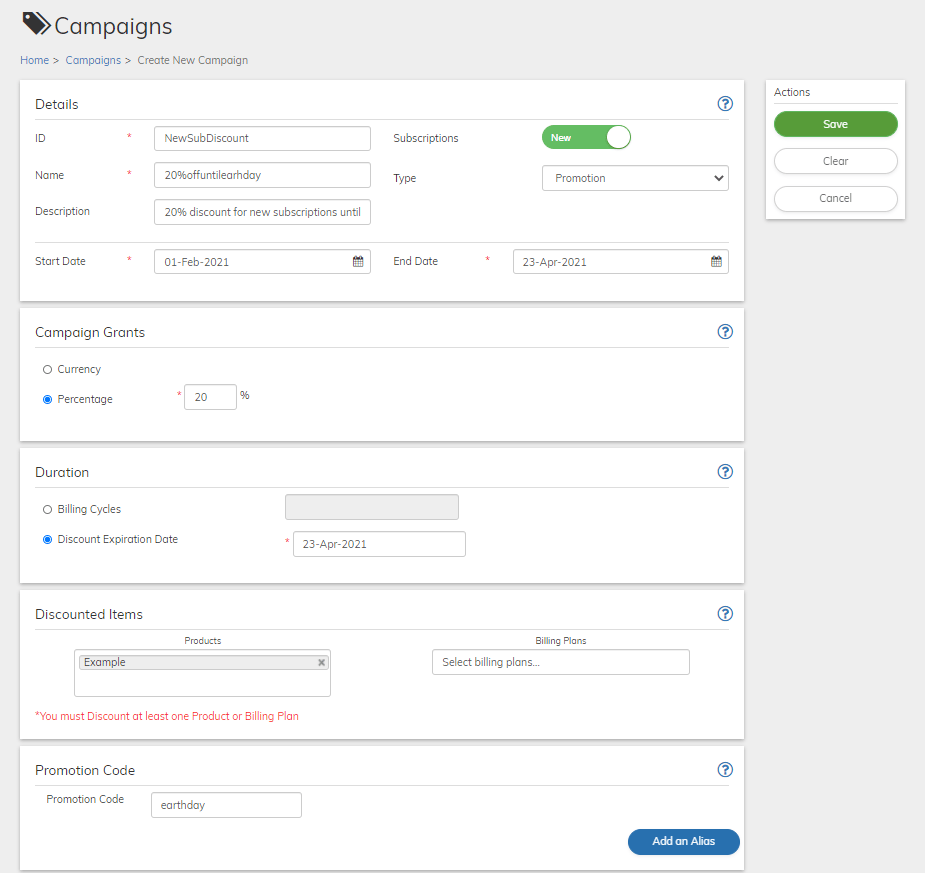
 Commerce Engine Campaigns are discounts, such as special offers or limited-time pricing, you can apply to your existing Products or Billing Plans. Discounts can be currency-based or percentage-based, and applied to one-time purchases or applied to a recurring subscription for a specific period.
## Campaign Duration Options
A **rolling-period** Campaign extends for a defined number of Billing Cycles and can be triggered at any point in time. For example, a cable company might offer a three months discount of a premium channel to new customers, whenever they sign up.
A **fixed-period** Campaign has a specific end date up to which the discount is valid. For example, a cleaning service might offer a discounted monthly rate until May 1st, after which, discount rates will no longer be relevant, regardless of how long each of the subscribers received the promotional rate.
Commerce Engine Campaigns are discounts, such as special offers or limited-time pricing, you can apply to your existing Products or Billing Plans. Discounts can be currency-based or percentage-based, and applied to one-time purchases or applied to a recurring subscription for a specific period.
## Campaign Duration Options
A **rolling-period** Campaign extends for a defined number of Billing Cycles and can be triggered at any point in time. For example, a cable company might offer a three months discount of a premium channel to new customers, whenever they sign up.
A **fixed-period** Campaign has a specific end date up to which the discount is valid. For example, a cleaning service might offer a discounted monthly rate until May 1st, after which, discount rates will no longer be relevant, regardless of how long each of the subscribers received the promotional rate.
 ## Enforcing Eligibility Rules
Campaigns can enforce [Eligibility Service](eligibilityServiceAbout) rules. Eligibility service rules allow you to determine what customers are eligible to receive a discount. If you run into any issues or need help configuring eligibility, contact your MarketONE representative for support.
## Promotion Codes
**Promotion Campaigns** allow you to generate a single promotion code that can be distributed to multiple customers. A promotion code is not unique to individual users and is typically publicly available through mass distribution. You can define any alphanumeric string as your promotion code.
## Validation of Promotion Codes
Commerce Engine automates the campaign discount process by validating the codes and then redeeming the discount using the following logic:
* Commerce Engine validates that the promotion code is **accurate** and can be accepted according to the campaign parameters.
* Commerce Engine validates that the promotion code is **applicable to any of the Products or Billing Plan** of the purchased subscription.
* Commerce Engine validates that the promotion code is still **valid**, meaning that it's still within its offer period, has not been submitted more times than allowed for redemption (coupon codes) and that the code has not been previously used for the same subscription.
Commerce Engine then automatically calculates the discount to the Billing Transaction, as follows:
* Promotion codes submitted for subscriptions that include multiple Products are applied to all eligible Products and Billing Plans.
* Commerce Engine calculates the discount amount relevant for the Billing Period(s). This can be as high as the total charge for the Period.
* Commerce Engine calculates the sales tax of the purchase based on the discounted price, rather than the original price.
* Commerce Engine calculates the applicable Promotion discount when prorating an Account during an upgrade.
Campaign discounts are given "pre-tax." For example, on a bill that is $100, with a 25% off discount, and 10% sales tax, the total billed would be $82.50.
| Product price: | \$100.00 |
| - | - |
| Campaign discount: | -\$25.00 |
| Sub-total: | \$75.00 |
| Sales tax: | \$7.50 |
| Total: | \$82.50 |
## Exporting Campaigns
To keep a list of Campaigns, you can export the Campaigns to a csv file. Click the
## Enforcing Eligibility Rules
Campaigns can enforce [Eligibility Service](eligibilityServiceAbout) rules. Eligibility service rules allow you to determine what customers are eligible to receive a discount. If you run into any issues or need help configuring eligibility, contact your MarketONE representative for support.
## Promotion Codes
**Promotion Campaigns** allow you to generate a single promotion code that can be distributed to multiple customers. A promotion code is not unique to individual users and is typically publicly available through mass distribution. You can define any alphanumeric string as your promotion code.
## Validation of Promotion Codes
Commerce Engine automates the campaign discount process by validating the codes and then redeeming the discount using the following logic:
* Commerce Engine validates that the promotion code is **accurate** and can be accepted according to the campaign parameters.
* Commerce Engine validates that the promotion code is **applicable to any of the Products or Billing Plan** of the purchased subscription.
* Commerce Engine validates that the promotion code is still **valid**, meaning that it's still within its offer period, has not been submitted more times than allowed for redemption (coupon codes) and that the code has not been previously used for the same subscription.
Commerce Engine then automatically calculates the discount to the Billing Transaction, as follows:
* Promotion codes submitted for subscriptions that include multiple Products are applied to all eligible Products and Billing Plans.
* Commerce Engine calculates the discount amount relevant for the Billing Period(s). This can be as high as the total charge for the Period.
* Commerce Engine calculates the sales tax of the purchase based on the discounted price, rather than the original price.
* Commerce Engine calculates the applicable Promotion discount when prorating an Account during an upgrade.
Campaign discounts are given "pre-tax." For example, on a bill that is $100, with a 25% off discount, and 10% sales tax, the total billed would be $82.50.
| Product price: | \$100.00 |
| - | - |
| Campaign discount: | -\$25.00 |
| Sub-total: | \$75.00 |
| Sales tax: | \$7.50 |
| Total: | \$82.50 |
## Exporting Campaigns
To keep a list of Campaigns, you can export the Campaigns to a csv file. Click the  **Download** button and select whether to download the current displayed results only (by default, 10 to a page) or the full result list.
* **[Campaign Lifecycle](campaignFlow)**
* **[Working with Campaigns](campaignWorking)**
**Parent topic:**[Catalog](catalog)
This documentation is built and hosted on [Mintlify](https://mintlify.com), a developer documentation platform.
**Download** button and select whether to download the current displayed results only (by default, 10 to a page) or the full result list.
* **[Campaign Lifecycle](campaignFlow)**
* **[Working with Campaigns](campaignWorking)**
**Parent topic:**[Catalog](catalog)
This documentation is built and hosted on [Mintlify](https://mintlify.com), a developer documentation platform.