> ## Documentation Index
> Fetch the complete documentation index at: https://docs.m1amdocs.com/llms.txt
> Use this file to discover all available pages before exploring further.
# Business Rules
Business rules allow you to upsell and cross-sell products and offers. Use business rules to display zones based on the user's active subscriptions or login status.
**Note:** Business rules do not enforce eligibility.
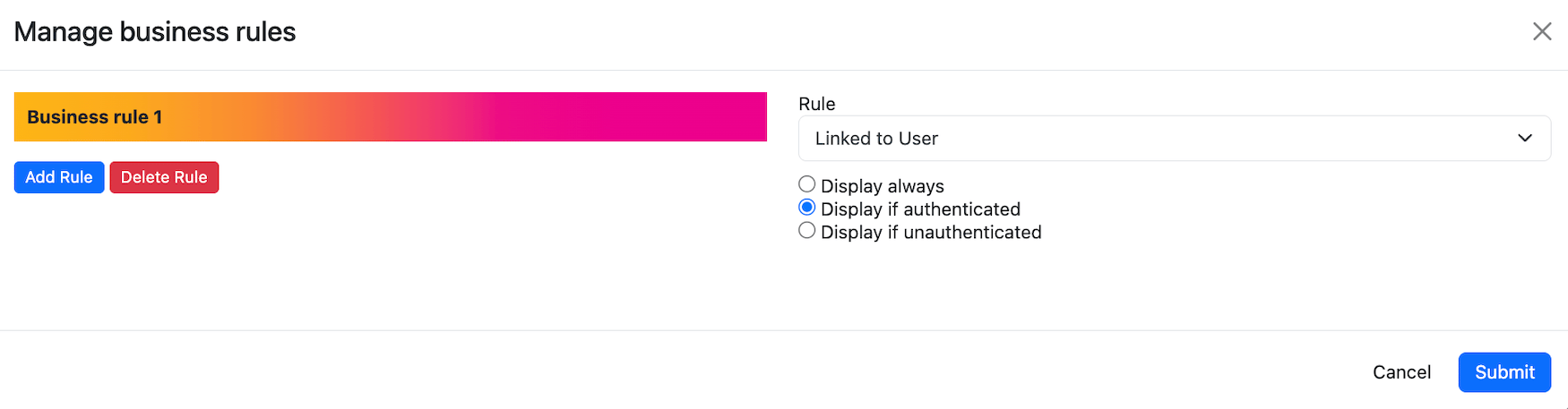 ## Types of Business Rules
You can apply any of the following types of business rules to a zone:
* **Linked to a user**
* **Display always**: Always display the zone.
* **Display if authenticated**: Display the zone if the user is logged in.
* **Display if unauthenticated**: Display the zone if the user is not logged in.
* **Linked to a partner/service**
* **Display if subscribed**: Display the zone if the user is subscribed to the selected service.
* **Display if not subscribed**: Display the zone if the user is not subscribed to the selected service.
The **Linked to a user** and **Linked to a partner/service** business rules can both be applied to the same zone.
**To apply a business rule:**
* After you create [programming](manageProgrammingPage) and add a zone, add a business rule to the zone by selecting the business rules icon
## Types of Business Rules
You can apply any of the following types of business rules to a zone:
* **Linked to a user**
* **Display always**: Always display the zone.
* **Display if authenticated**: Display the zone if the user is logged in.
* **Display if unauthenticated**: Display the zone if the user is not logged in.
* **Linked to a partner/service**
* **Display if subscribed**: Display the zone if the user is subscribed to the selected service.
* **Display if not subscribed**: Display the zone if the user is not subscribed to the selected service.
The **Linked to a user** and **Linked to a partner/service** business rules can both be applied to the same zone.
**To apply a business rule:**
* After you create [programming](manageProgrammingPage) and add a zone, add a business rule to the zone by selecting the business rules icon  ## Use Case Examples
**Use Case Example #1**
A Reseller wants to incentivize upgrades to users with the basic version of a service.
The Reseller does the following:
* Creates programming for the **Discovery** page
* Adds a content wall zone with the upgraded versions of a product
* Applies a business rule linked to users who are actively subscribed to the basic version of the product
**Use Case Example #2**
A Reseller wants to cross-sell other video streaming services to users that have subscribed to a service called Amazing Entertainment.
The Reseller does the following:
* Creates programming for the **Discovery** page
* Adds a content rail zone with video streaming products that are similar to Amazing Entertainment
* Applies a business rule linked to users who are actively subscribed to Amazing Entertainment
**Parent topic:**[Page Programming](programmingAbout)
This documentation is built and hosted on [Mintlify](https://mintlify.com), a developer documentation platform.
## Use Case Examples
**Use Case Example #1**
A Reseller wants to incentivize upgrades to users with the basic version of a service.
The Reseller does the following:
* Creates programming for the **Discovery** page
* Adds a content wall zone with the upgraded versions of a product
* Applies a business rule linked to users who are actively subscribed to the basic version of the product
**Use Case Example #2**
A Reseller wants to cross-sell other video streaming services to users that have subscribed to a service called Amazing Entertainment.
The Reseller does the following:
* Creates programming for the **Discovery** page
* Adds a content rail zone with video streaming products that are similar to Amazing Entertainment
* Applies a business rule linked to users who are actively subscribed to Amazing Entertainment
**Parent topic:**[Page Programming](programmingAbout)
This documentation is built and hosted on [Mintlify](https://mintlify.com), a developer documentation platform.