> ## Documentation Index
> Fetch the complete documentation index at: https://docs.m1amdocs.com/llms.txt
> Use this file to discover all available pages before exploring further.
# Manage Internal Links
1. Navigate to **Contents** > **Internal Link**.
The **Internal Link** page appears.
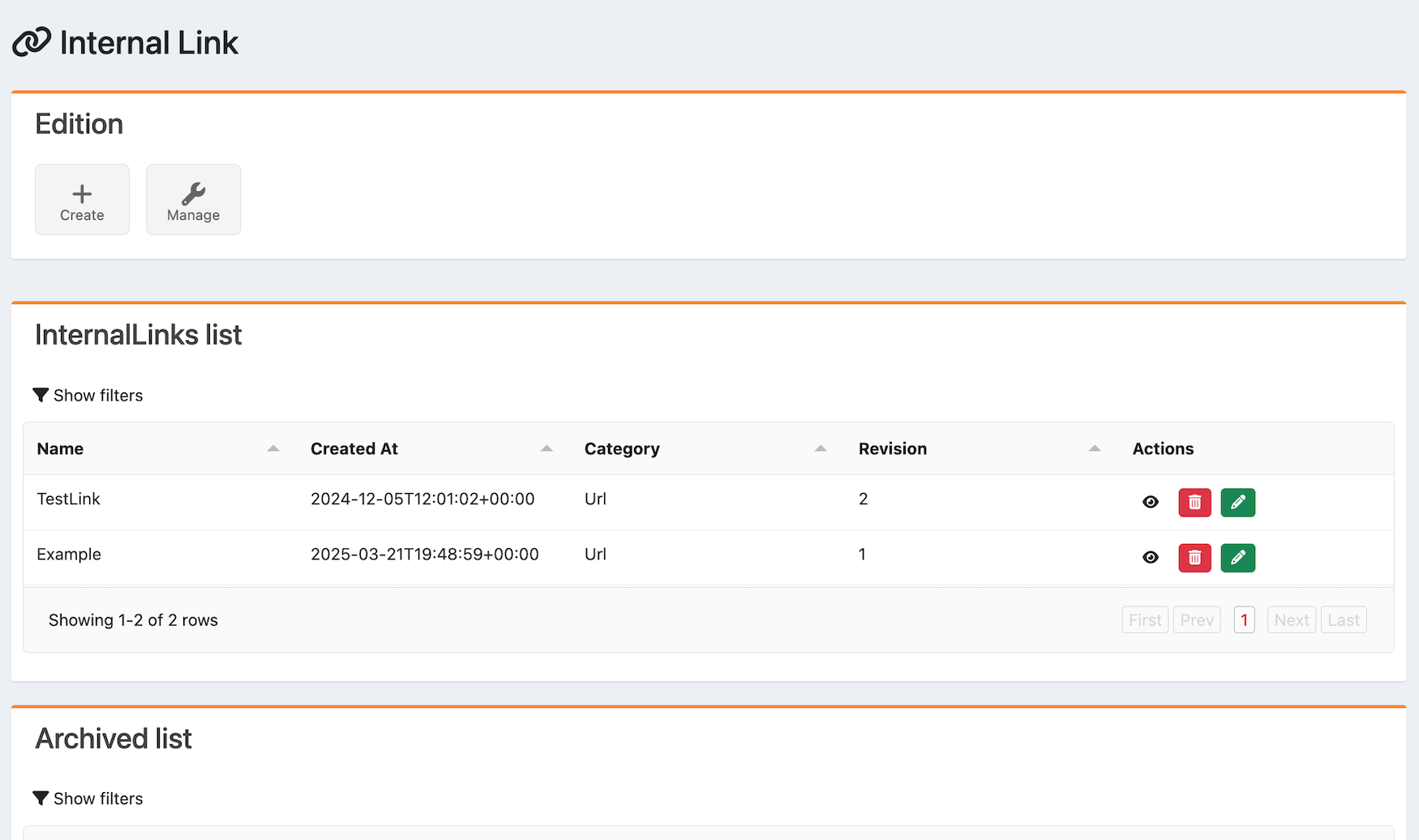 2. Select what you'd like to do:
* To create an internal link, select **Create**.
* To edit an internal link, scroll to the **Internal Links list** and select the edit icon
2. Select what you'd like to do:
* To create an internal link, select **Create**.
* To edit an internal link, scroll to the **Internal Links list** and select the edit icon  for the item.
* To delete an internal link, scroll to the **Internal Links list** and select the delete icon
for the item.
* To delete an internal link, scroll to the **Internal Links list** and select the delete icon  for the item.
* To view an internal link, scroll to the **Internal Links list** or **Archived List** and select the view icon
for the item.
* To view an internal link, scroll to the **Internal Links list** or **Archived List** and select the view icon  for the item.
If you choose to create or edit an internal link, the **Create or Edit Internal Link** page appears.
3. Complete the fields. See the table below for more information.
4. Select **Submit**.
The internal link has been successfully created or edited.
* **[Internal Link Fields](manageInternalLinks#internal-link-fields)**
**Parent topic:**[Internal Links](internalLinkAbout)
## Internal Link Fields
| Box Name | Description Value |
| - | - |
| **Type** | From the dropdown menu, select the type of internal link. The options are:- Page - URL |
| **Name** | Enter the name of the internal link. |
| **Description** | Enter the description of the internal link. |
| **Thumbnail** | To override the service thumbnail in the internal link:1. Select **Edit**. 2. Select an image. 3. Crop the image and select **OK**. The thumbnail's aspect ratio is 16:9. |
| **Barker** | To add a barker to the internal link:1. Select **Edit**. 2. Select an image. 3. Crop the image and select **OK**. The barker is in landscape view (desktop) and the aspect ratio is 16:9. |
| **Portrait** | To add a portrait to the internal link:1. Select **Edit**. 2. Select an image. 3. Crop the image and select **OK**. The portrait's aspect ratio is 16:9. |
| **Parent topic:**[Manage Internal Links](manageInternalLinks) | |
This documentation is built and hosted on [Mintlify](https://mintlify.com), a developer documentation platform.
for the item.
If you choose to create or edit an internal link, the **Create or Edit Internal Link** page appears.
3. Complete the fields. See the table below for more information.
4. Select **Submit**.
The internal link has been successfully created or edited.
* **[Internal Link Fields](manageInternalLinks#internal-link-fields)**
**Parent topic:**[Internal Links](internalLinkAbout)
## Internal Link Fields
| Box Name | Description Value |
| - | - |
| **Type** | From the dropdown menu, select the type of internal link. The options are:- Page - URL |
| **Name** | Enter the name of the internal link. |
| **Description** | Enter the description of the internal link. |
| **Thumbnail** | To override the service thumbnail in the internal link:1. Select **Edit**. 2. Select an image. 3. Crop the image and select **OK**. The thumbnail's aspect ratio is 16:9. |
| **Barker** | To add a barker to the internal link:1. Select **Edit**. 2. Select an image. 3. Crop the image and select **OK**. The barker is in landscape view (desktop) and the aspect ratio is 16:9. |
| **Portrait** | To add a portrait to the internal link:1. Select **Edit**. 2. Select an image. 3. Crop the image and select **OK**. The portrait's aspect ratio is 16:9. |
| **Parent topic:**[Manage Internal Links](manageInternalLinks) | |
This documentation is built and hosted on [Mintlify](https://mintlify.com), a developer documentation platform.