> ## Documentation Index
> Fetch the complete documentation index at: https://docs.m1amdocs.com/llms.txt
> Use this file to discover all available pages before exploring further.
# Manage Product Catalog
Manage images, titles, descriptions, and other information for product groups, products, offers, bundles, and/or gift cards.
1. Navigate to **Contents** > **Product Catalog**.
The **Product Catalog** page appears.
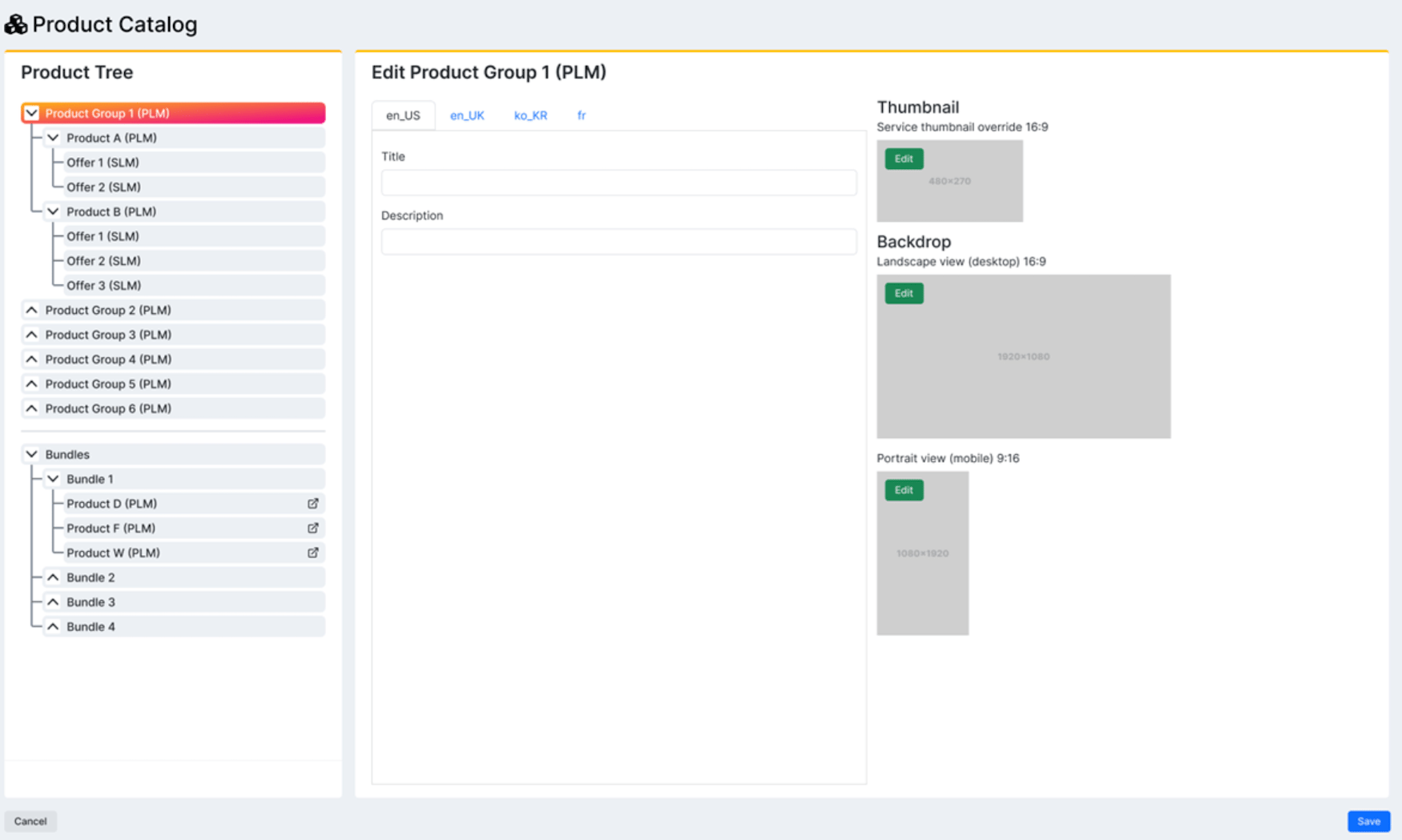 2. Select what you'd like to do:
* To edit a product group or gift card, select the product group or gift card in the list.
* To edit a product within a product group, expand the product group and select the product in the list.
* To edit a hard or soft bundle, expand **Hard/Soft Bundles** and select the product in the list.
The product group, gift card, or product details appear in the pane to the right.
3. Edit the fields as desired. See the table below for more information.
**Note:** To clear the data associated with the product group, gift card, or product, select **Reset Options**.
4. To save your changes, select **Save**.
Your changes to the product group, gift card, or product have been successfully saved.
* **[Product Catalog Fields](manageProductCatalog#product-catalog-fields)**
**Parent topic:**[Product Catalog](productCatalogAbout)
## Product Catalog Fields
### Product Group Fields
2. Select what you'd like to do:
* To edit a product group or gift card, select the product group or gift card in the list.
* To edit a product within a product group, expand the product group and select the product in the list.
* To edit a hard or soft bundle, expand **Hard/Soft Bundles** and select the product in the list.
The product group, gift card, or product details appear in the pane to the right.
3. Edit the fields as desired. See the table below for more information.
**Note:** To clear the data associated with the product group, gift card, or product, select **Reset Options**.
4. To save your changes, select **Save**.
Your changes to the product group, gift card, or product have been successfully saved.
* **[Product Catalog Fields](manageProductCatalog#product-catalog-fields)**
**Parent topic:**[Product Catalog](productCatalogAbout)
## Product Catalog Fields
### Product Group Fields
 1. Title
2. Description
3. Thumbnail
4. Backdrop
5. Portrait
| Field Name | Description Value |
| - | - |
| **Title** | Enter the title of the product group. |
| **Description** | Enter the description of the product group. |
| **Thumbnail** | To change the thumbnail:1. Select the edit icon
1. Title
2. Description
3. Thumbnail
4. Backdrop
5. Portrait
| Field Name | Description Value |
| - | - |
| **Title** | Enter the title of the product group. |
| **Description** | Enter the description of the product group. |
| **Thumbnail** | To change the thumbnail:1. Select the edit icon  . 2. Crop your selection and select **Crop**. The required dimensions of the thumbnail are 480x270 pixels.To delete the thumbnail, select the delete icon
  . |
| **Backdrop** | To change the backdrop:1. Select the edit icon . 2. Crop your selection and select **Crop**. The required dimensions of the backdrop are 1750x985 pixels.To delete the backdrop, select the delete icon . |
| **Portrait** | To change the portrait:1. Select the edit icon . 2. Crop your selection and select **Crop**. The required dimensions of the portrait are 720x1920 pixels.To delete the portrait, select the delete icon . |
### Product Fields
| Field Name | Description Value |
| - | - |
| **Title** | Enter the title of the product. |
| **Description** | Enter the description of the product. |
| **More information URL (Optional)** | Enter the URL for the **More information** link that appears on the product modal. |
| **Service Access URL (Optional)** | Enter the URL for the service access link that appears on the product modal. |
| **Terms & Condition URL (Optional)** | Enter the URL for the terms & condition link that appears on the product modal. |
| **Thumbnail** | To change the thumbnail:1. Select the edit icon . 2. Crop your selection and select **Crop**. The required dimensions of the thumbnail are 480x270 pixels.To delete the thumbnail, select the delete icon . |
| **Backdrop** | To change the backdrop:1. Select the edit icon . 2. Crop your selection and select **Crop**. The required dimensions of the backdrop are 1920x1080 pixels.To delete the backdrop, select the delete icon . |
| **Portrait** | To change the portrait:1. Select the edit icon . 2. Crop your selection and select **Crop**. The required dimensions of the portrait are 1080x1920 pixels.To delete the portrait, select the delete icon . |
| **Parent topic:**[Manage Product Catalog](manageProductCatalog) | |
This documentation is built and hosted on [Mintlify](https://mintlify.com), a developer documentation platform.
. |
| **Backdrop** | To change the backdrop:1. Select the edit icon . 2. Crop your selection and select **Crop**. The required dimensions of the backdrop are 1750x985 pixels.To delete the backdrop, select the delete icon . |
| **Portrait** | To change the portrait:1. Select the edit icon . 2. Crop your selection and select **Crop**. The required dimensions of the portrait are 720x1920 pixels.To delete the portrait, select the delete icon . |
### Product Fields
| Field Name | Description Value |
| - | - |
| **Title** | Enter the title of the product. |
| **Description** | Enter the description of the product. |
| **More information URL (Optional)** | Enter the URL for the **More information** link that appears on the product modal. |
| **Service Access URL (Optional)** | Enter the URL for the service access link that appears on the product modal. |
| **Terms & Condition URL (Optional)** | Enter the URL for the terms & condition link that appears on the product modal. |
| **Thumbnail** | To change the thumbnail:1. Select the edit icon . 2. Crop your selection and select **Crop**. The required dimensions of the thumbnail are 480x270 pixels.To delete the thumbnail, select the delete icon . |
| **Backdrop** | To change the backdrop:1. Select the edit icon . 2. Crop your selection and select **Crop**. The required dimensions of the backdrop are 1920x1080 pixels.To delete the backdrop, select the delete icon . |
| **Portrait** | To change the portrait:1. Select the edit icon . 2. Crop your selection and select **Crop**. The required dimensions of the portrait are 1080x1920 pixels.To delete the portrait, select the delete icon . |
| **Parent topic:**[Manage Product Catalog](manageProductCatalog) | |
This documentation is built and hosted on [Mintlify](https://mintlify.com), a developer documentation platform.