> ## Documentation Index
> Fetch the complete documentation index at: https://docs.m1amdocs.com/llms.txt
> Use this file to discover all available pages before exploring further.
# Page Programming
Showcase a super aggregation of services and content for users to discover with page programming. Add zones to programming to showcase top-selling Merchants, the most popular shows, and content geared to them. Even without logging in, users can explore and engage with offers, increasing the chances of conversion before they commit.
Every storefront page needs to have [programming](manageProgrammingPage) added to it. Programming enables you to have different "versions" of a page by creating various instances of programming. Programming allows you to add zones, configure metadata, customize the page logo, add the SEO, choose the layout, and more.
Tailor programming to different audiences by customizing with [languages](languagesAbout), [business rules](businessRulesAbout), and/or [populations](populationsAbout).
## Zones
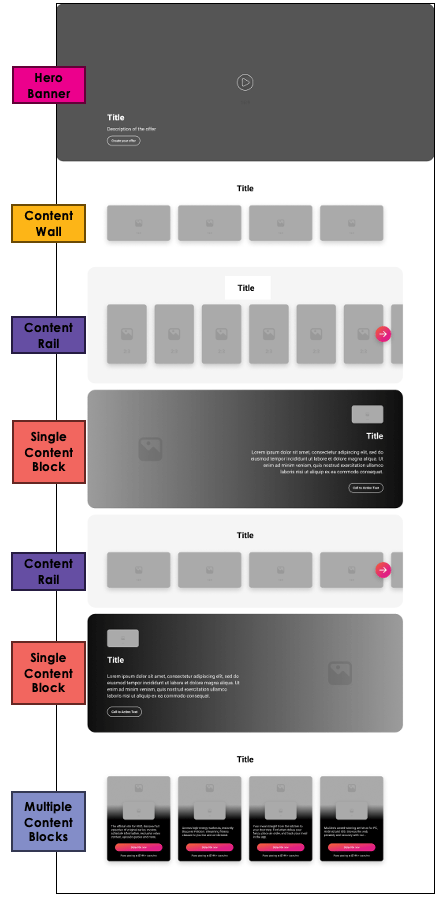
Zones allow you to promote products and content in visually appealing and engaging layouts on pages.
Available zones include:
* Hero banner
* Content wall
* Content rail
* Single content block
* Multiple content block
This image shows an example of zones and how they can be configured on a page:
 ## Use Case Examples
**Use Case Example #1**
A Reseller wants to promote upgrades to users with the basic version of a service.
The Reseller does the following:
* Creates programming for the **Discovery** page
* Adds a content wall zone with the upgraded versions of a product
* Applies a business rule linked to users who are actively subscribed to the basic version of the product
**Use Case Example #2**
A Reseller wants to cross-sell other video streaming services to users that have subscribed to a service called Amazing Entertainment.
The Reseller does the following:
* Creates programming for the **Discovery** page
* Adds a content rail zone with video streaming products that are similar to Amazing Entertainment
* Applies a business rule linked to users who are actively subscribed to Amazing Entertainment
## Programming Dashboard
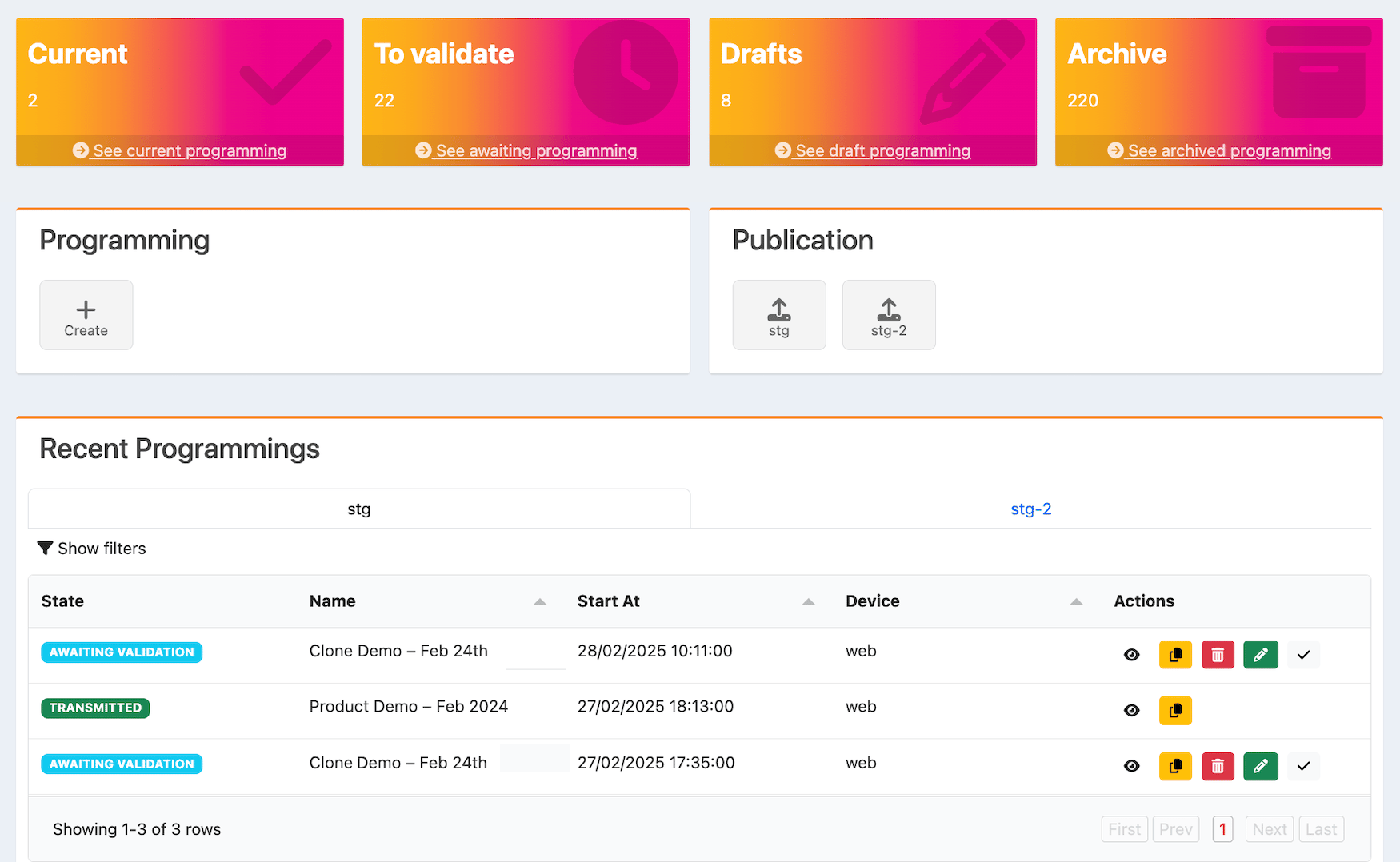
The tiles at the top of the programming page are as follows:
* **Current**: Edit published programming.
* **To validate**: Validate programming that needs to be reviewed and approved.
* **Drafts**: View, edit, or delete drafted programming.
* **Archive**: View or clone archived programming.
## Use Case Examples
**Use Case Example #1**
A Reseller wants to promote upgrades to users with the basic version of a service.
The Reseller does the following:
* Creates programming for the **Discovery** page
* Adds a content wall zone with the upgraded versions of a product
* Applies a business rule linked to users who are actively subscribed to the basic version of the product
**Use Case Example #2**
A Reseller wants to cross-sell other video streaming services to users that have subscribed to a service called Amazing Entertainment.
The Reseller does the following:
* Creates programming for the **Discovery** page
* Adds a content rail zone with video streaming products that are similar to Amazing Entertainment
* Applies a business rule linked to users who are actively subscribed to Amazing Entertainment
## Programming Dashboard
The tiles at the top of the programming page are as follows:
* **Current**: Edit published programming.
* **To validate**: Validate programming that needs to be reviewed and approved.
* **Drafts**: View, edit, or delete drafted programming.
* **Archive**: View or clone archived programming.
 ## Publication and Recent Programmings Sections
The **Publication** section on the programming page displays the [populations](populationsAbout) you've added.
Below, in the **Recent Programmings** section, you can see the list of programmings for each population.
To publish validated programming for a population:
* Select the population in the **Publication** section
For each page, you can:
* [Create and edit programming](manageProgrammingPage)
* [View programming](manageProgrammingPage)
* [Validate programming](manageProgrammingPage)
* [Publish validated programming](manageProgrammingPage)
* [Clone programming](manageProgrammingPage)
* [Delete programming](manageProgrammingPage)
* **[Manage Programming](manageProgrammingPage)**
* **[Programming Workflow](programmingWorkflow)**
* **[Programming States](programmingStates)**
* **[Business Rules](businessRulesAbout)**
This documentation is built and hosted on [Mintlify](https://mintlify.com), a developer documentation platform.
## Publication and Recent Programmings Sections
The **Publication** section on the programming page displays the [populations](populationsAbout) you've added.
Below, in the **Recent Programmings** section, you can see the list of programmings for each population.
To publish validated programming for a population:
* Select the population in the **Publication** section
For each page, you can:
* [Create and edit programming](manageProgrammingPage)
* [View programming](manageProgrammingPage)
* [Validate programming](manageProgrammingPage)
* [Publish validated programming](manageProgrammingPage)
* [Clone programming](manageProgrammingPage)
* [Delete programming](manageProgrammingPage)
* **[Manage Programming](manageProgrammingPage)**
* **[Programming Workflow](programmingWorkflow)**
* **[Programming States](programmingStates)**
* **[Business Rules](businessRulesAbout)**
This documentation is built and hosted on [Mintlify](https://mintlify.com), a developer documentation platform.