> ## Documentation Index
> Fetch the complete documentation index at: https://docs.m1amdocs.com/llms.txt
> Use this file to discover all available pages before exploring further.
# OTT Service Callbacks
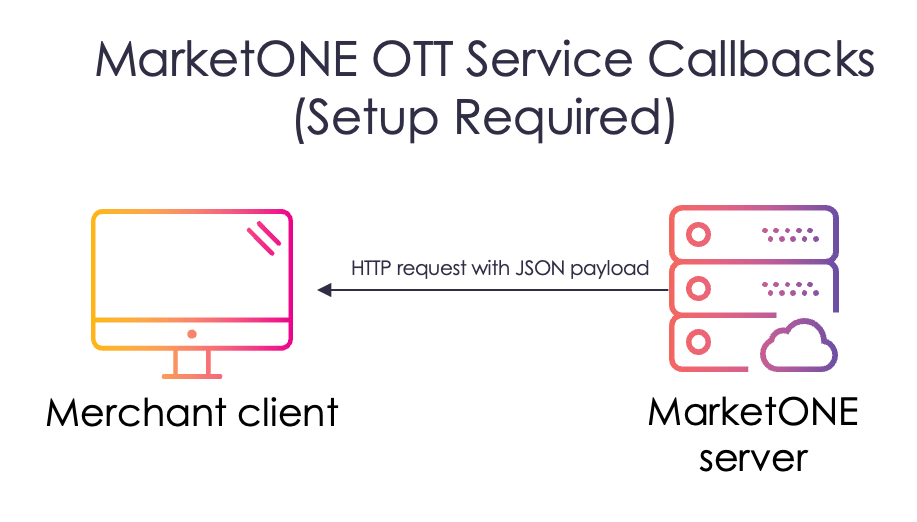
The MarketONE OTT Service Callbacks (also known as webhooks) are automatically generated API requests that inform a Merchant system about MarketONE service provisioning events as they occur. With webhooks, there's no need to pull data via the API.
First, you [set up one or more webhook(s) and specify an endpoint (URL)](https://docs.saas.amdocs.com/bundle/b_userGuideForMerchants/page/topics/webhooksManage_t.html) to receive the events. When the events happen, MarketONE automatically generates and sends a push notification as an HTTPS POST request with a JSON payload. MarketONE webhook actions include the full related object(s) in JSON format.
MarketONE webhook actions are intended to be actionable on their own, not typically requiring a subsequent API call.
 The following table lists and describes the OTT service callbacks that MarketONE supports.
| Event Name | API Action Value | Description |
| - | - | - |
| Add subscription | `AddSubscription` | MarketONE sends this event when the customer purchases a subscription from the Reseller's (Service Provider's) website, or a subscription needs to be re-provisioned. **Note:** It is expected that the Merchant performs any applicable provisioning if the callback is configured via the **Platform Settings** in MarketONE, and returns the mandatory fields described in the [OTT Service Callbacks](https://docs.saas.amdocs.com/bundle/MarketONEOTTServiceCallbacks/page/index.html). |
| Add multiple subscriptions | `AddMultipleSubscriptions` | **Note:** Your system must be configured to use this request. MarketONE sends this event when the customer purchases multiple subscriptions from the Reseller's (Service Provider's) website or when the subscriptions need to be re-provisioned. |
| Update subscription | `UpdateSubscription` | MarketONE sends this event when the customer upgrades or downgrades the service subscription via the Reseller's (Service Provider's) website.**Note:** The Merchant should handle this action to allow for any applicable provisioning. |
| Delete subscription | `DeleteSubscription` | MarketONE sends this event when the customer cancels the subscription or the subscription is no longer valid based on the status of the customer's billing account.**Note:** The Merchant must handle this action to allow for any applicable de-provisioning. |
| Update subscription metadata | `UpdateSubscriptionMetadata` | MarketONE sends this event when any metadata associated with a subscription is changed on the Reseller's (Service Provider's) side, such as a phone number. |
| Pause subscription | `PauseSubscription` | MarketONE sends this event when a customer's subscription is paused from the Reseller's (Service Provider's) side for a variety of reasons, such as non-pay scenarios. |
| Resume subscription | `ResumeSubscription` | MarketONE sends this event when a customer's subscription is resumed from the Reseller's (Service Provider's) side. |
## Get Partner Subscription Status API
As a part of integration, the Merchant organization must respond to this API. MarketONE uses `GET /subscription/{id}/partner/status` to get the `partnerSubscription` status from the Merchant.
**Response**
At minimum, the Merchant should return the `partnerSubscriptionId` and `status` in the response body.
Here's an example of the response body MarketONE expects to receive from the Merchant:
```
{
"partnerSubscriptionId":"",
"partnerCustomerId":"",
"partnerCode":"string",
"productCode":"",
"status":"string",
"metadata":{
"property1":"string",
"property2":"string"
}
```
**Parent topic:**[MarketONE APIs](marketONEApisAbout)
This documentation is built and hosted on [Mintlify](https://mintlify.com), a developer documentation platform.
The following table lists and describes the OTT service callbacks that MarketONE supports.
| Event Name | API Action Value | Description |
| - | - | - |
| Add subscription | `AddSubscription` | MarketONE sends this event when the customer purchases a subscription from the Reseller's (Service Provider's) website, or a subscription needs to be re-provisioned. **Note:** It is expected that the Merchant performs any applicable provisioning if the callback is configured via the **Platform Settings** in MarketONE, and returns the mandatory fields described in the [OTT Service Callbacks](https://docs.saas.amdocs.com/bundle/MarketONEOTTServiceCallbacks/page/index.html). |
| Add multiple subscriptions | `AddMultipleSubscriptions` | **Note:** Your system must be configured to use this request. MarketONE sends this event when the customer purchases multiple subscriptions from the Reseller's (Service Provider's) website or when the subscriptions need to be re-provisioned. |
| Update subscription | `UpdateSubscription` | MarketONE sends this event when the customer upgrades or downgrades the service subscription via the Reseller's (Service Provider's) website.**Note:** The Merchant should handle this action to allow for any applicable provisioning. |
| Delete subscription | `DeleteSubscription` | MarketONE sends this event when the customer cancels the subscription or the subscription is no longer valid based on the status of the customer's billing account.**Note:** The Merchant must handle this action to allow for any applicable de-provisioning. |
| Update subscription metadata | `UpdateSubscriptionMetadata` | MarketONE sends this event when any metadata associated with a subscription is changed on the Reseller's (Service Provider's) side, such as a phone number. |
| Pause subscription | `PauseSubscription` | MarketONE sends this event when a customer's subscription is paused from the Reseller's (Service Provider's) side for a variety of reasons, such as non-pay scenarios. |
| Resume subscription | `ResumeSubscription` | MarketONE sends this event when a customer's subscription is resumed from the Reseller's (Service Provider's) side. |
## Get Partner Subscription Status API
As a part of integration, the Merchant organization must respond to this API. MarketONE uses `GET /subscription/{id}/partner/status` to get the `partnerSubscription` status from the Merchant.
**Response**
At minimum, the Merchant should return the `partnerSubscriptionId` and `status` in the response body.
Here's an example of the response body MarketONE expects to receive from the Merchant:
```
{
"partnerSubscriptionId":"",
"partnerCustomerId":"",
"partnerCode":"string",
"productCode":"",
"status":"string",
"metadata":{
"property1":"string",
"property2":"string"
}
```
**Parent topic:**[MarketONE APIs](marketONEApisAbout)
This documentation is built and hosted on [Mintlify](https://mintlify.com), a developer documentation platform.