> ## Documentation Index
> Fetch the complete documentation index at: https://docs.m1amdocs.com/llms.txt
> Use this file to discover all available pages before exploring further.
# Platform-Managed Use Cases
Merchants need to process and respond to five main Platform-managed subscription flow use cases. These use cases are as follows:
* Add Subscription
* Update Subscription (For Example, Upgrade/Downgrade)
* Delete Subscription
* Pause Subscription
* Resume Subscription
**Note:** Some Merchants only need to implement the Add Subscription and Delete Subscription use cases due to single product offerings which don’t require pause/resume capabilities.
The Merchant's system must support idempotency for successful subscription status management.
Each section below provides API sequence information and diagrams. The APIs used for integration with the platform are the MarketONE APIs.
## Add Subscription
The following sequence diagram describes how to add a new subscription (with the focus on Merchant related activities and recommendations). The assumption here is that the redemption code is embedded in the activation link.
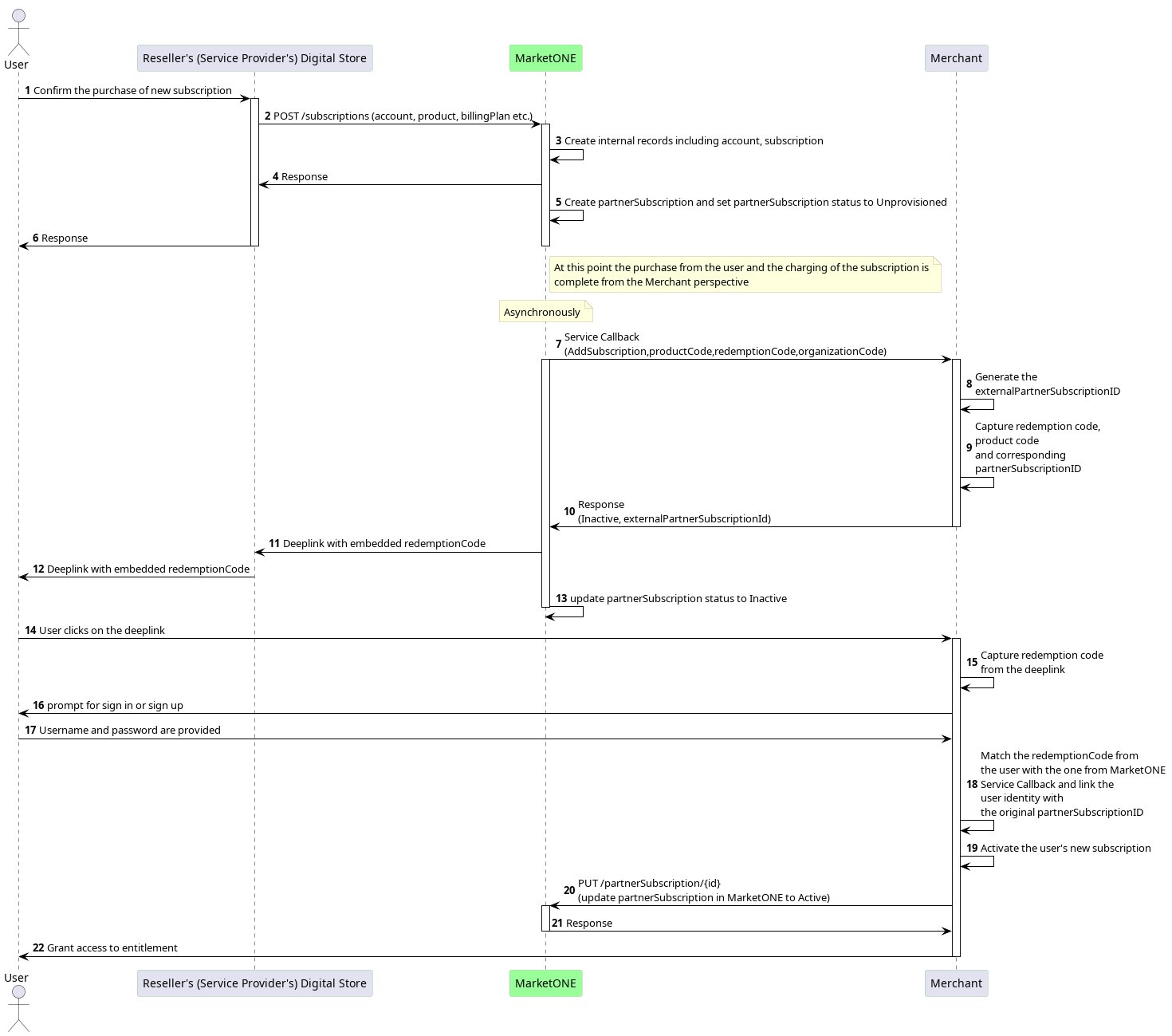 This process works as follows:
1. A new subscription purchase by the user in the Reseller's (Service Provider's) digital store triggers an `AddSubscription` event/callback to the Merchant.
2. The Merchant needs to keep the unique `partnerSubscriptionID` and the redemption code (`registrationString`) that MarketONE has sent, as well as the `productCode` that the user subscribes to and the `organizationCode` identifying the source of the subscription. At this point, these values are the only new subscription information the Merchant receives. There's no user identity.
**Note:** It's possible that the Merchant could receive additional information about the new subscription through metadata fields in the callback request (for example, a postal code). However, the Merchant and Reseller (Service Provider) must negotiate and approve this beforehand.
3. The user gets the activation link with the embedded redemption code through the Reseller (Service Provider).
**Note:** The Merchant doesn't deliver the link because no user PII (Personal Information Identifier) is available.
4. When the user clicks the link, the Merchant gets the redemption code, and then uses this code to match the redemption code previously sent from MarketONE.
5. The Merchant manages the user credentials through sign up, sign in, or an existing session.
6. The Merchant can then link the user identity to the new subscription and grant the user access to the entitlement.
7. The Merchant sends the updated `partnerSubscription` status of `Active` to MarketONE.
## Update Subscription (For Example, Upgrade/Downgrade)
The following sequence diagram describes how to update an existing subscription.
This process works as follows:
1. A new subscription purchase by the user in the Reseller's (Service Provider's) digital store triggers an `AddSubscription` event/callback to the Merchant.
2. The Merchant needs to keep the unique `partnerSubscriptionID` and the redemption code (`registrationString`) that MarketONE has sent, as well as the `productCode` that the user subscribes to and the `organizationCode` identifying the source of the subscription. At this point, these values are the only new subscription information the Merchant receives. There's no user identity.
**Note:** It's possible that the Merchant could receive additional information about the new subscription through metadata fields in the callback request (for example, a postal code). However, the Merchant and Reseller (Service Provider) must negotiate and approve this beforehand.
3. The user gets the activation link with the embedded redemption code through the Reseller (Service Provider).
**Note:** The Merchant doesn't deliver the link because no user PII (Personal Information Identifier) is available.
4. When the user clicks the link, the Merchant gets the redemption code, and then uses this code to match the redemption code previously sent from MarketONE.
5. The Merchant manages the user credentials through sign up, sign in, or an existing session.
6. The Merchant can then link the user identity to the new subscription and grant the user access to the entitlement.
7. The Merchant sends the updated `partnerSubscription` status of `Active` to MarketONE.
## Update Subscription (For Example, Upgrade/Downgrade)
The following sequence diagram describes how to update an existing subscription.
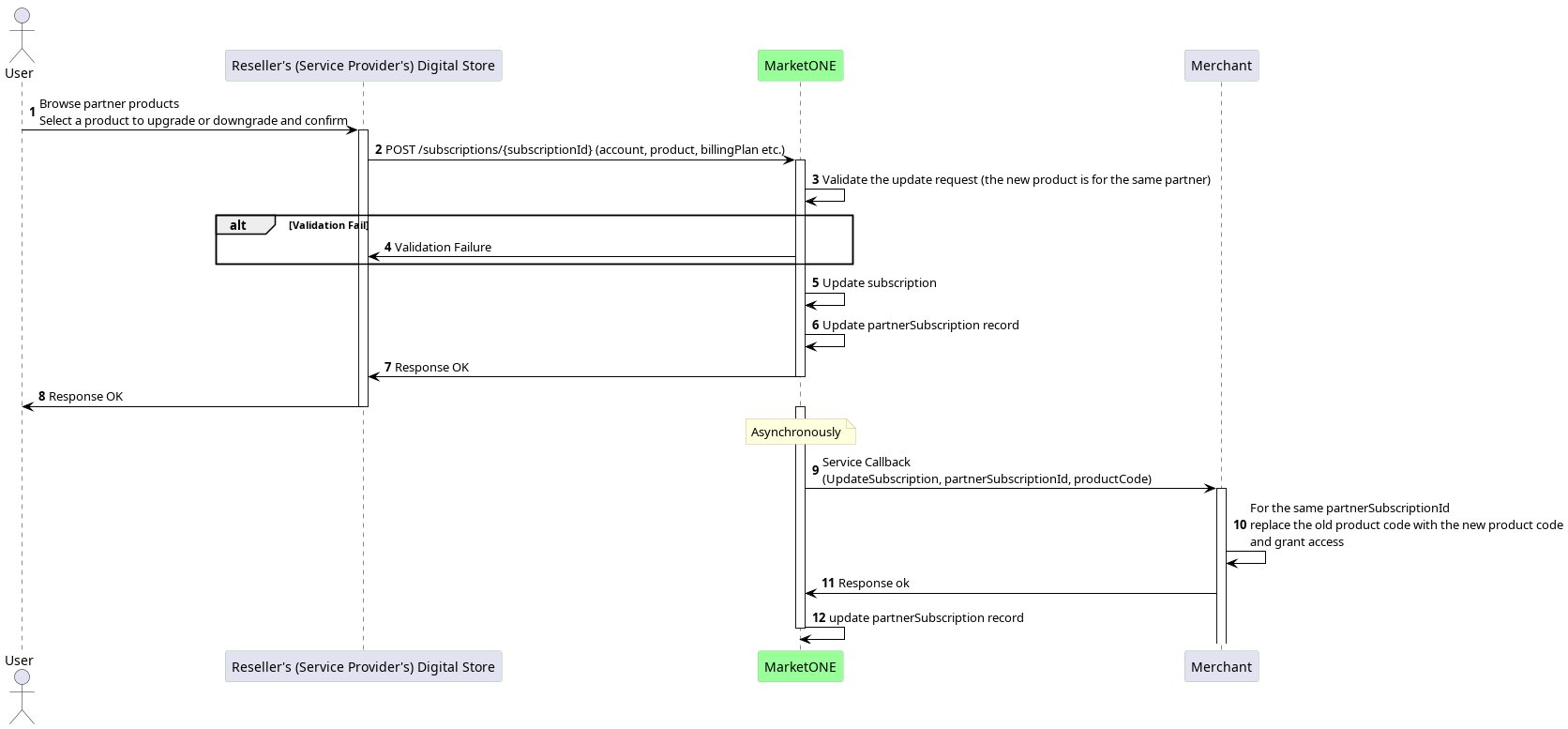 This process works as follows:
1. The user confirms an upgrade or downgrade in the Reseller's (Service Provider's) digital store, which triggers an `UpdateSubscription` event/callback to the Merchant.
**Note:** Whether the user upgrades or downgrades their subscription, it is translated into an `UpdateSubscription` event with a new product code, which identifies the final product the user is upgraded/downgraded to.
2. The Merchant replaces the product code and grants the user access to the new product of the same subscription.
## Delete Subscription
The following sequence diagram describes how to cancel an existing subscription.
This process works as follows:
1. The user confirms an upgrade or downgrade in the Reseller's (Service Provider's) digital store, which triggers an `UpdateSubscription` event/callback to the Merchant.
**Note:** Whether the user upgrades or downgrades their subscription, it is translated into an `UpdateSubscription` event with a new product code, which identifies the final product the user is upgraded/downgraded to.
2. The Merchant replaces the product code and grants the user access to the new product of the same subscription.
## Delete Subscription
The following sequence diagram describes how to cancel an existing subscription.
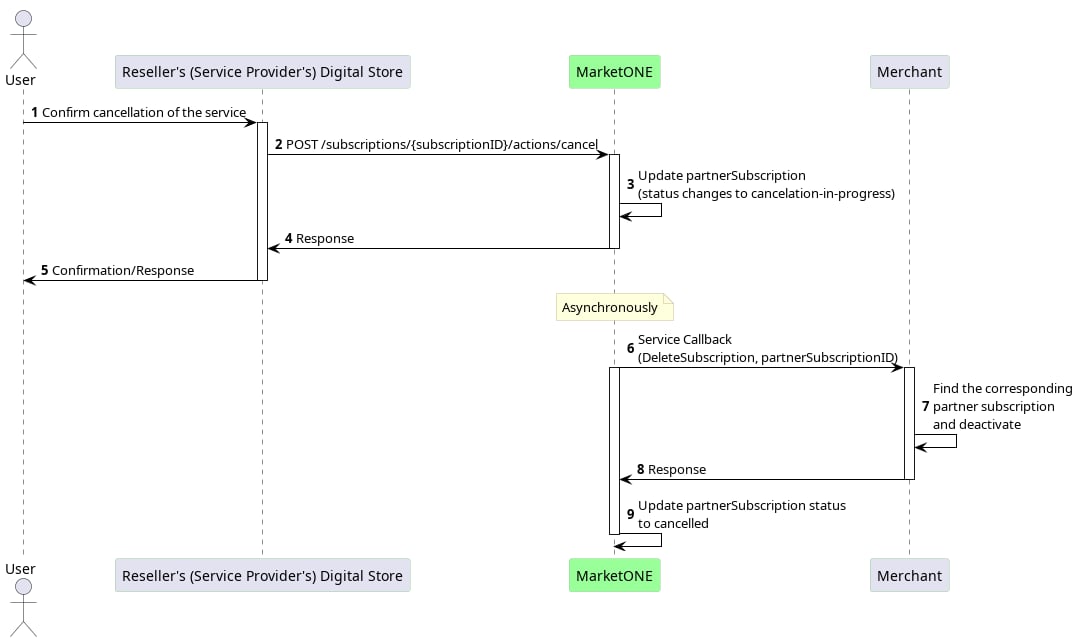 This process works as follows:
1. Either the user cancels their subscription and confirms their choice in the Reseller's (Service Provider's) digital store, or any system error triggers a `DeleteSubscription` callback to the Merchant.
2. The Merchant locates the existing subscription with the `partnerSubscriptionID` sent by MarketONE.
3. The Merchant deactivates the user's entitlement to the subscription.
## Pause Subscription
**Note:** Pause and resume functionality has to be supported by both the Merchant and the Reseller (Service Provider).
Pausing a subscription gives the user the flexibility to temporarily stop the Merchant's service without canceling it. This can be done for various reasons, such as the user requesting a pause or the Reseller (Service Provider) needing to pause the subscription due to payment issues. The following sequence diagram shows how to pause an existing subscription.
This process works as follows:
1. Either the user cancels their subscription and confirms their choice in the Reseller's (Service Provider's) digital store, or any system error triggers a `DeleteSubscription` callback to the Merchant.
2. The Merchant locates the existing subscription with the `partnerSubscriptionID` sent by MarketONE.
3. The Merchant deactivates the user's entitlement to the subscription.
## Pause Subscription
**Note:** Pause and resume functionality has to be supported by both the Merchant and the Reseller (Service Provider).
Pausing a subscription gives the user the flexibility to temporarily stop the Merchant's service without canceling it. This can be done for various reasons, such as the user requesting a pause or the Reseller (Service Provider) needing to pause the subscription due to payment issues. The following sequence diagram shows how to pause an existing subscription.
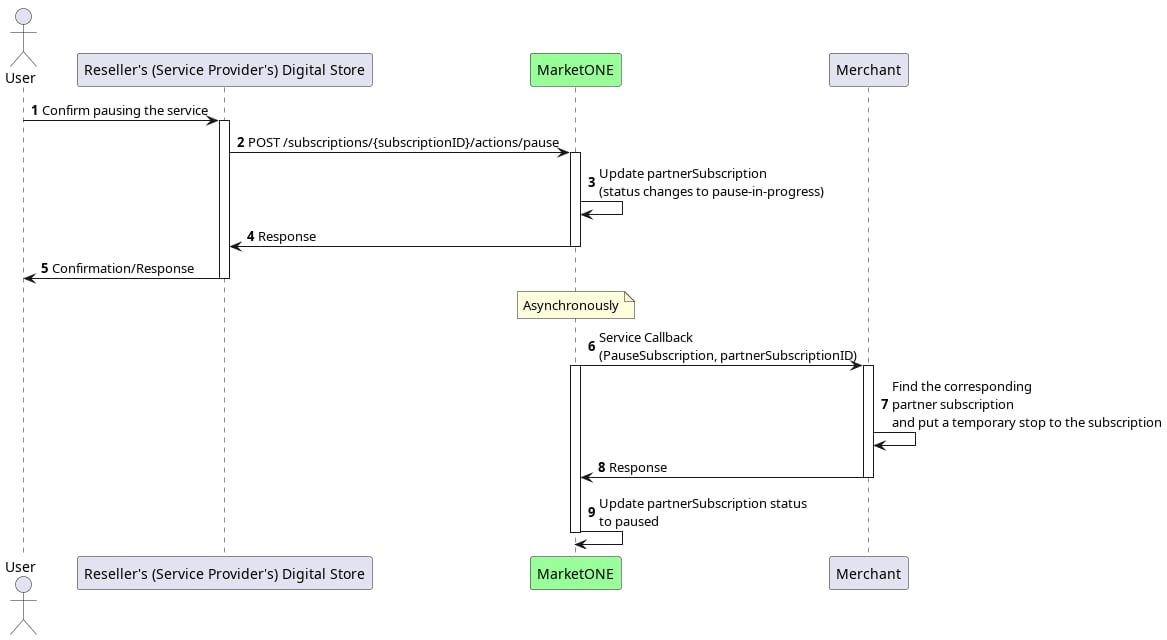 This process works as follows:
1. When a user pauses their existing subscription in the Reseller's (Service Provider's) digital store (the same place they purchased the subscription), it triggers a `PauseSubscription` callback to the Merchant.
2. The Merchant locates the existing subscription with the `partnerSubscriptionID` sent by MarketONE.
3. The Merchant pauses the user's entitlement to the subscription.
## Resume Subscription
**Note:** Pause and resume functionality has to be supported by both the Merchant and the Reseller (Service Provider).
The following sequence diagram describes how to pause an existing subscription.
This process works as follows:
1. When a user pauses their existing subscription in the Reseller's (Service Provider's) digital store (the same place they purchased the subscription), it triggers a `PauseSubscription` callback to the Merchant.
2. The Merchant locates the existing subscription with the `partnerSubscriptionID` sent by MarketONE.
3. The Merchant pauses the user's entitlement to the subscription.
## Resume Subscription
**Note:** Pause and resume functionality has to be supported by both the Merchant and the Reseller (Service Provider).
The following sequence diagram describes how to pause an existing subscription.
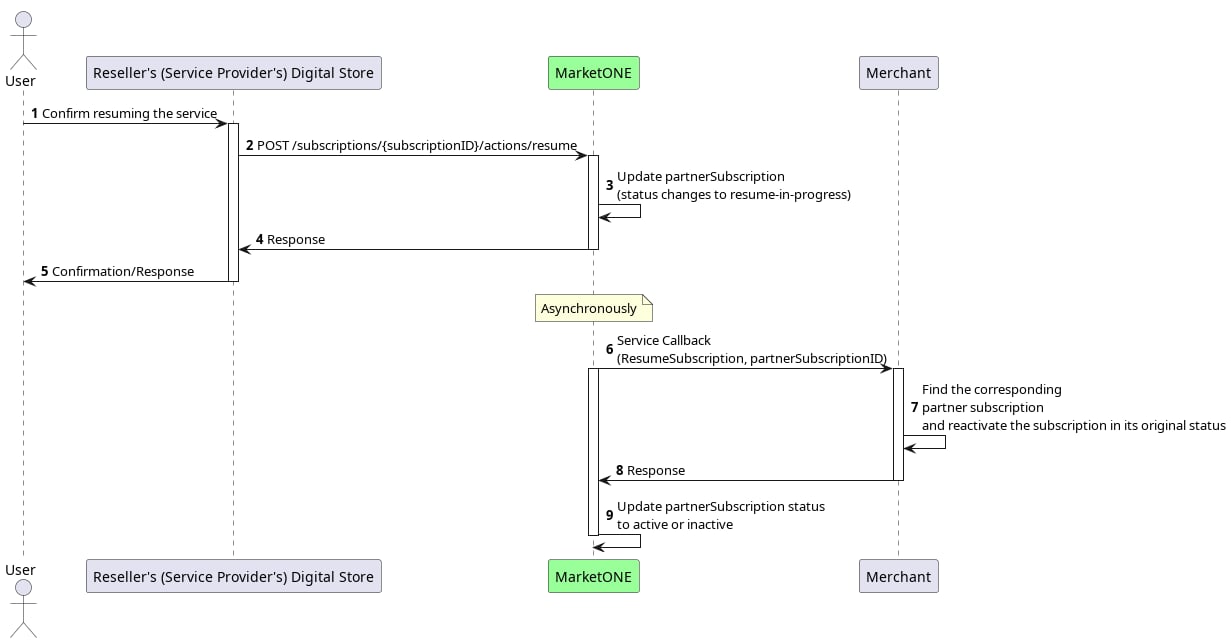 This process works as follows:
1. When a user resumes a paused subscription from the Reseller's (Service Provider's) digital store, it triggers a `ResumeSubscription` callback to the Merchant.
2. The Merchant locates the existing subscription with the `partnerSubscriptionID` sent by MarketONE.
3. The Merchant resumes the user's entitlement.
**Parent topic:**[Merchant-Managed and Platform-Managed Flows](partnerAPIFlows_r)
This documentation is built and hosted on [Mintlify](https://mintlify.com), a developer documentation platform.
This process works as follows:
1. When a user resumes a paused subscription from the Reseller's (Service Provider's) digital store, it triggers a `ResumeSubscription` callback to the Merchant.
2. The Merchant locates the existing subscription with the `partnerSubscriptionID` sent by MarketONE.
3. The Merchant resumes the user's entitlement.
**Parent topic:**[Merchant-Managed and Platform-Managed Flows](partnerAPIFlows_r)
This documentation is built and hosted on [Mintlify](https://mintlify.com), a developer documentation platform.