> ## Documentation Index
> Fetch the complete documentation index at: https://docs.m1amdocs.com/llms.txt
> Use this file to discover all available pages before exploring further.
# Create OIDC Clients
You can register a client application as an OpenID Connect (OIDC) Client or Relying Party (RP) in OIDC terms. Registering an OIDC client allows Storefront Gateway to communicate with your client application as a part of your desired onboarding, authentication, and Single Sign-On (SSO) flows, according to the settings that you configure specifically for that client.
1. Navigate to the **OIDC Clients** page by one of the following methods:
* Sign in to the Admin console. By default, the **OIDC Clients** page appears.
* If you are already signed in and you are on any other page, then click **OIDC Clients** on the left-hand navigation panel.
2. Click **New OIDC Client** on the upper-right corner.
The **New OIDC Client** registration page opens.
3. In the **General Information** pane, enter the following:
* **Client name** is the name used to reference or query your application.
The **Client ID** and **Client Secret** are auto-generated fields that are associated with the **Client name**. This value can be viewed/updated after the OIDC client has been created.
4. In the **Properties** pane, choose the type of application to be created:
* Web or native applications - standard web apps including single-page, and native mobile/device apps.
* Machine-to-machine - supports devices and M2M calls to resources such as a back end service, CLIs, and applications. See [M2M Processes](../../sgRestApiGuide/topics/c_m2mAuthN) for more details.
**Note:** M2M applications use Client Credentials grant and m2m scopes only.
* **Token endpoint authentication method** - The type of authentication method defines how your relying party authenticates with Storefront Gateway. Authentication is required for Authorization Code Grant or Device Authorization Grant flows, in order to prove that the Authorization Code or Device Code is being used by the genuine client and not by a third-party attacker. Select the required token endpoint authentication method from the following:
| Method | Description |
| - | - |
| Client Secret over HTTP Basic | The client supplies its credentials using HTTP Basic Authorization in the Authorization header. Requires a client secret. |
| Client Secret over HTTP Post | The client supplies its credentials in the body of the `/oidc/token` request, as `client_id` and `client_secret` key-value pairs in the `x-www-form-urlencoded` payload.This method should only be used for legacy applications that are unable to make use of HTTP Basic Authorization. Requires a client secret. |
| No authentication (public client) | The token endpoint doesn't require authentication and will respond as long as all other parameters are valid (i.e. the client ID is correct, a valid authorization token has been presented, etc). You **must** select this option if using the **Authorization Code Grant with PKCE** flow, as client secrets are not used for public clients. |
5. In the **Application URIs**, enter the following details about your application:
* **Redirect URIs** - Configure a list of URLs with OIDC landing pages for all web applications (UIs) and mobile applications that use this client. Applications using the Authorization Code Grant must have a redirect URL configured. Applications using the Device Authorization Grant and Client Credentials Grant don't require this type of redirect URL. To add or delete Redirect URLs (dependent on the specified flow) choose one of the following options:
* To add a redirect URL, enter the url and click the  icon to save the entry.
* To delete a redirect URL, click the
icon to save the entry.
* To delete a redirect URL, click the  icon beside the relevant entry.
* **Initiate login URI** - a redirect to a landing page that's used by your application after a successful authentication.
6. In the **Access** pane, select the relevant grants and scopes:
1.
icon beside the relevant entry.
* **Initiate login URI** - a redirect to a landing page that's used by your application after a successful authentication.
6. In the **Access** pane, select the relevant grants and scopes:
1. 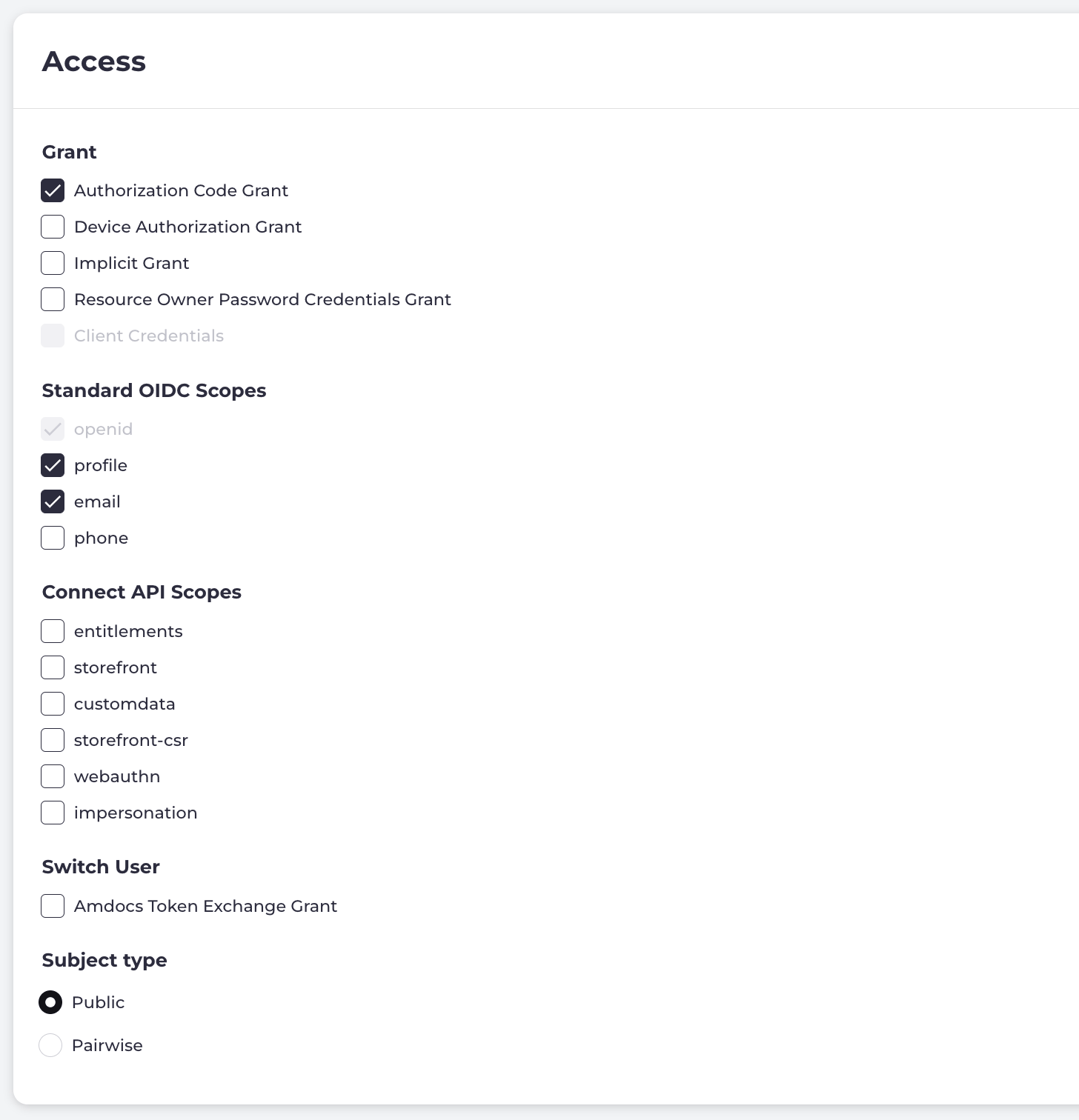 **Grants** - Also know as Authorization flows that defines how your application interacts with the supported APIs for authentication/authorization and accessing resources. Depending on the grant type selected, scopes are updated to only be visible and applicable for the selected grant. The tables below list the different grants for available for your client as required by your application:
| Grants (Authorization flow) | Description |
| - | - |
| Authorization Code Grant | This method is ideal for web-based clients with a back end server.For a detailed walk through of the Authorization Code Grant flow between your registered client and Storefront Gateway, refer to the SSO for Web Apps with a Back End topic. Developers can also refer to [RFC-6749](https://datatracker.ietf.org/doc/html/rfc6749#section-4.1) for the full OAuth 2.0 specification. |
| Authorization Code Grant with PKCE | This method is ideal for public, browser-based clients that do not have a back end service (also known as Single Page Applications). Instead of using the back end channel communications, this flow leverages a Proof Key for Code Exchange (PKCE) to protect against interceptions from malicious actors.This flow cannot be selected from the Storefront Gateway Admin. For a detailed walk through of the Authorization Code Grant with PKCE flow between your registered client and Storefront Gateway, refer to the SSO for Web and Mobile Apps without a Back End topic. Developers can also refer to [RFC-7636](https://datatracker.ietf.org/doc/html/rfc7636) for the full OAuth 2.0 specification. |
| Device Authorization Grant | This method is ideal for internet-connected devices that require the user to provide their credentials to the client service through a separate browser (for example, Smart TV, Set-Top Boxes).For a detailed walk through of the Device Authorization Grant flow between your registered client and Storefront Gateway, refer to the SSO for 10'/3m Devices topic. Developers can also refer to [RFC-8628](https://datatracker.ietf.org/doc/html/rfc8628) for the full OAuth 2.0 specification. |
| Implicit Grant | Although Storefront Gateway fully supports this method, it is considered deprecated. The Authorization Code Grant with PKCE method replaces this method. However, Implicit Grant is an option for older applications that are unable to generate and hash the proper code (and code verifier) for the PKCE flow\.As a deprecated method, this flow is beyond the scope of this guide. Developers can refer to [RFC-6749, section 4.2](https://datatracker.ietf.org/doc/html/rfc6749#section-4.2) for details. |
| Resource Owner Password Credentials Grant | This is an advanced option only for use in particular circumstances. Enabling this grant means you must take responsibility for securely handling user credentials and for protecting end users from having their credentials brute-forced.Developers can refer to [RFC 6749](https://datatracker.ietf.org/doc/html/rfc6749) for details on this flow. |
| Client Credentials | This method is for connected devices that require the client (machine) to provide their credentials (token) to access protected resources such as IoT devices, applications, CLIs, and backend services. An Identity Provider (IdP) or authorization server authenticates/authorizes the client credentials based on the [OAuth 2.0](https://datatracker.ietf.org/doc/html/rfc8628) standard.For a detailed walk through of the Client Credentials Grant flow between your registered client and Storefront Gateway, refer to the Client Credentials topic. Developers can also refer to [RFC-6749](https://datatracker.ietf.org/doc/html/rfc6749#section-1.3.4) for more details. |
2. **Scopes**- Scopes are set depending on your application type as defined by the web/native or machine-to-machine selection. The scopes available for the selected grant are listed in the relevant tables. Select the required scope data that the client can request from Storefront Gateway when configuring your OIDC client.
| Standard OIDC Scope | Description |
| - | - |
| openid | Requests that Storefront Gateway issues an ID token. This enables an OIDC-based flow as opposed to OAuth 2.0 flow. This scope cannot be deselected. |
| profile | Provides the user's `name`, `family_name`, `given_name`, and `picture` claims from Storefront Gateway. |
| email | Provides the user's `email` and `email_verified` claims from Storefront Gateway. |
| phone | Provides the user's `phone_number` and `phone_number_verified` claims from Storefront Gateway. |
**Note:** These scopes are available for all authorization flows except the Client Credentials Grant. See the Scopes for Client Credentials below for more details.
| Storefront Gateway API Scope | Description |
| - | - |
| entitlements | Provides access to the `entitlements` claim.**Note:** Entitlements are segments of data taken from Storefront Gateway Account, Subscription, and Feature entities associated to User entity. When a user signs in to a partner service, that service client can request entitlements from Storefront Gateway, and those entitlements effectively tell the client (RP) what accounts, services, or functionalities to which the user is entitled. |
| storefront | When requested, grants the resulting access token the capability to access Storefront Gateway's Storefront APIs for account and payment management, subscription management, billing authorization management and OTT entitlement provisioning. **Note:** If your application doesn't require any of these Storefront Gateway features, it's recommended to not configure this scope. |
| customdata | When requested, grants the resulting access token the capability to access Storefront Gateway's Custom Data APIs for creating, accessing and updating domain-specific data associated to users that Storefront Gateway does not support in its native data model. **Note:** If your application doesn't require any of these Storefront Gateway features, it's recommended to not configure this scope. |
| storefront-csr | When requested, enables CSRs to perform storefront-related operations on behalf of an end user via impersonation. The access token issued grants the CSR capability to access Storefront Gateway's Storefront APIs for account and payment management, subscription management, billing authorization management and OTT entitlement provisioning. |
| impersonation | When requested, enables CSRs to perform operations on behalf of a user via impersonation. The access token issued grants the CSR capability to access user functionality to complete actions/tasks and manage the user identity. |
| **Note:** These scopes are available for all authorization flows except the Client Credentials Grant. See the Scopes for Client Credentials below for more details. | |
| M2M Scope | Description |
| - | - |
| m2m.customdata.read | To provide read-only access to the APIs |
| m2m.customdata.manage | To access custom data microservice |
| m2m.migration.manage | For data migration from the Migration microservice |
| m2m.storefront.csr.manage | Administrative access to Storefront Transactions and Refund-based APIs |
| m2m.storefront.csr.read | Read-only Access to the StorefrontTransaction APIs |
| m2m.ulm.accounts.manage | Administrative access to the Account-only APIs |
| m2m.ulm.accounts.read | Read-only access to the Account Activation APIs |
| m2m.ulm.groups.manage | Administrative access to the Group-only APIs |
| m2m.ulm.groups.read | Read-only access to the Group Activation APIs |
| m2m.ulm.users.manage | Administrative access to only the User Activation APIs |
| m2m.ulm.users.read | Read-only access to the User Activation APIs |
| m2m.ulm.tokens.manage | The API used to generate and send tokens during authentication. |
3. **Subject type** - Select the required Subject type from below that determines how the `sub` value will be handled across multiple clients.
* **Public** - Clients receive the same `sub` value for the same Storefront Gateway user. This allows them to correlate data. Use this Subject type for all clients that are intrinsic to your application, and handled internally by your organization.
* **Pairwise** - Clients receive their own unique `sub` value. This prevents those clients from correlating the user with other relying parties. Applications that are handled by third parties normally use this Subject type for the issue of user privacy.
4. In the **Tokens** section, define settings to control token behavior and the Storefront Gateway interactions.
1. **Issue refresh tokens** - Turn the toggle on or off to determine whether your application will use refresh tokens. We recommend you to use refresh tokens instead of long-lived (that is, a long expiration period) access tokens. This option is toggled **on** by default. If the toggle is on, provide the following details:
* **Refresh token expiration** - Defines how long before a refresh token expires. We recommend that this be several days, depending on the lifetime of the access tokens, and the frequency with which you expect end users to make use of your application. For example, if a user opens your application once or twice a week, and the refresh token expiration is set to week, minimizes the times a user needs to re-authenticate repeatedly. The user continues to have a valid token for the week to access their services.
* If you require to set expiration for refresh tokens, enter the value of expiry (seconds) in the **Refresh token expiration** field.
* If you require the refresh tokens to never expire, then select **No expiry**.
* **Re-use refresh tokens** - If you set your refresh tokens to expire, then we recommend that you disable re-use of refresh tokens so that new tokens (with a new computed expiry date) are issued whenever a refresh occurs. This option is enabled by default.
* **Revoke access tokens when refresh token is used** - If you set your refresh tokens to never expire, which is considered secure, enable this option to make sure that only a single valid access token exists at any one time. This option is enabled by default.
2. **Access token expiration** - Defines how long before an access token expires. We recommend that you aim for a token lifetime approximate to the typical usage period (that is, how long a user typically interacts with your application). Although, you have the option to make access tokens never expire, we recommend that you do not leverage this option.
* To set expiration for access tokens, enter the value of expiry in the **Access token expiration** field.
* If access tokens are never to expire, then select **No expiry**.
3. **Identity token expiration** - Defines how long before an identity token expires. Alternatively, your application can always use a valid access token to call Storefront Gateway OIDC `/userinfo` endpoint to get the latest information about the user's identity. If you require to set expiration for identity tokens, then enter the value of expiry (seconds) in the **Identity token expiration** field.
5. Select one of the confirmation prompts:
* Click **Save** to save the settings or changes.
* Click **Cancel** to exit without saving and return to the **OIDC Clients** page.
The client (web or machine type application) is provisioned in the Storefront Gateway service as an OIDC client or Relying Party (RP), according to your configurations, in your environment.
**Parent topic:**[OIDC Clients](oidcClients)
This documentation is built and hosted on [Mintlify](https://mintlify.com), a developer documentation platform.
**Grants** - Also know as Authorization flows that defines how your application interacts with the supported APIs for authentication/authorization and accessing resources. Depending on the grant type selected, scopes are updated to only be visible and applicable for the selected grant. The tables below list the different grants for available for your client as required by your application:
| Grants (Authorization flow) | Description |
| - | - |
| Authorization Code Grant | This method is ideal for web-based clients with a back end server.For a detailed walk through of the Authorization Code Grant flow between your registered client and Storefront Gateway, refer to the SSO for Web Apps with a Back End topic. Developers can also refer to [RFC-6749](https://datatracker.ietf.org/doc/html/rfc6749#section-4.1) for the full OAuth 2.0 specification. |
| Authorization Code Grant with PKCE | This method is ideal for public, browser-based clients that do not have a back end service (also known as Single Page Applications). Instead of using the back end channel communications, this flow leverages a Proof Key for Code Exchange (PKCE) to protect against interceptions from malicious actors.This flow cannot be selected from the Storefront Gateway Admin. For a detailed walk through of the Authorization Code Grant with PKCE flow between your registered client and Storefront Gateway, refer to the SSO for Web and Mobile Apps without a Back End topic. Developers can also refer to [RFC-7636](https://datatracker.ietf.org/doc/html/rfc7636) for the full OAuth 2.0 specification. |
| Device Authorization Grant | This method is ideal for internet-connected devices that require the user to provide their credentials to the client service through a separate browser (for example, Smart TV, Set-Top Boxes).For a detailed walk through of the Device Authorization Grant flow between your registered client and Storefront Gateway, refer to the SSO for 10'/3m Devices topic. Developers can also refer to [RFC-8628](https://datatracker.ietf.org/doc/html/rfc8628) for the full OAuth 2.0 specification. |
| Implicit Grant | Although Storefront Gateway fully supports this method, it is considered deprecated. The Authorization Code Grant with PKCE method replaces this method. However, Implicit Grant is an option for older applications that are unable to generate and hash the proper code (and code verifier) for the PKCE flow\.As a deprecated method, this flow is beyond the scope of this guide. Developers can refer to [RFC-6749, section 4.2](https://datatracker.ietf.org/doc/html/rfc6749#section-4.2) for details. |
| Resource Owner Password Credentials Grant | This is an advanced option only for use in particular circumstances. Enabling this grant means you must take responsibility for securely handling user credentials and for protecting end users from having their credentials brute-forced.Developers can refer to [RFC 6749](https://datatracker.ietf.org/doc/html/rfc6749) for details on this flow. |
| Client Credentials | This method is for connected devices that require the client (machine) to provide their credentials (token) to access protected resources such as IoT devices, applications, CLIs, and backend services. An Identity Provider (IdP) or authorization server authenticates/authorizes the client credentials based on the [OAuth 2.0](https://datatracker.ietf.org/doc/html/rfc8628) standard.For a detailed walk through of the Client Credentials Grant flow between your registered client and Storefront Gateway, refer to the Client Credentials topic. Developers can also refer to [RFC-6749](https://datatracker.ietf.org/doc/html/rfc6749#section-1.3.4) for more details. |
2. **Scopes**- Scopes are set depending on your application type as defined by the web/native or machine-to-machine selection. The scopes available for the selected grant are listed in the relevant tables. Select the required scope data that the client can request from Storefront Gateway when configuring your OIDC client.
| Standard OIDC Scope | Description |
| - | - |
| openid | Requests that Storefront Gateway issues an ID token. This enables an OIDC-based flow as opposed to OAuth 2.0 flow. This scope cannot be deselected. |
| profile | Provides the user's `name`, `family_name`, `given_name`, and `picture` claims from Storefront Gateway. |
| email | Provides the user's `email` and `email_verified` claims from Storefront Gateway. |
| phone | Provides the user's `phone_number` and `phone_number_verified` claims from Storefront Gateway. |
**Note:** These scopes are available for all authorization flows except the Client Credentials Grant. See the Scopes for Client Credentials below for more details.
| Storefront Gateway API Scope | Description |
| - | - |
| entitlements | Provides access to the `entitlements` claim.**Note:** Entitlements are segments of data taken from Storefront Gateway Account, Subscription, and Feature entities associated to User entity. When a user signs in to a partner service, that service client can request entitlements from Storefront Gateway, and those entitlements effectively tell the client (RP) what accounts, services, or functionalities to which the user is entitled. |
| storefront | When requested, grants the resulting access token the capability to access Storefront Gateway's Storefront APIs for account and payment management, subscription management, billing authorization management and OTT entitlement provisioning. **Note:** If your application doesn't require any of these Storefront Gateway features, it's recommended to not configure this scope. |
| customdata | When requested, grants the resulting access token the capability to access Storefront Gateway's Custom Data APIs for creating, accessing and updating domain-specific data associated to users that Storefront Gateway does not support in its native data model. **Note:** If your application doesn't require any of these Storefront Gateway features, it's recommended to not configure this scope. |
| storefront-csr | When requested, enables CSRs to perform storefront-related operations on behalf of an end user via impersonation. The access token issued grants the CSR capability to access Storefront Gateway's Storefront APIs for account and payment management, subscription management, billing authorization management and OTT entitlement provisioning. |
| impersonation | When requested, enables CSRs to perform operations on behalf of a user via impersonation. The access token issued grants the CSR capability to access user functionality to complete actions/tasks and manage the user identity. |
| **Note:** These scopes are available for all authorization flows except the Client Credentials Grant. See the Scopes for Client Credentials below for more details. | |
| M2M Scope | Description |
| - | - |
| m2m.customdata.read | To provide read-only access to the APIs |
| m2m.customdata.manage | To access custom data microservice |
| m2m.migration.manage | For data migration from the Migration microservice |
| m2m.storefront.csr.manage | Administrative access to Storefront Transactions and Refund-based APIs |
| m2m.storefront.csr.read | Read-only Access to the StorefrontTransaction APIs |
| m2m.ulm.accounts.manage | Administrative access to the Account-only APIs |
| m2m.ulm.accounts.read | Read-only access to the Account Activation APIs |
| m2m.ulm.groups.manage | Administrative access to the Group-only APIs |
| m2m.ulm.groups.read | Read-only access to the Group Activation APIs |
| m2m.ulm.users.manage | Administrative access to only the User Activation APIs |
| m2m.ulm.users.read | Read-only access to the User Activation APIs |
| m2m.ulm.tokens.manage | The API used to generate and send tokens during authentication. |
3. **Subject type** - Select the required Subject type from below that determines how the `sub` value will be handled across multiple clients.
* **Public** - Clients receive the same `sub` value for the same Storefront Gateway user. This allows them to correlate data. Use this Subject type for all clients that are intrinsic to your application, and handled internally by your organization.
* **Pairwise** - Clients receive their own unique `sub` value. This prevents those clients from correlating the user with other relying parties. Applications that are handled by third parties normally use this Subject type for the issue of user privacy.
4. In the **Tokens** section, define settings to control token behavior and the Storefront Gateway interactions.
1. **Issue refresh tokens** - Turn the toggle on or off to determine whether your application will use refresh tokens. We recommend you to use refresh tokens instead of long-lived (that is, a long expiration period) access tokens. This option is toggled **on** by default. If the toggle is on, provide the following details:
* **Refresh token expiration** - Defines how long before a refresh token expires. We recommend that this be several days, depending on the lifetime of the access tokens, and the frequency with which you expect end users to make use of your application. For example, if a user opens your application once or twice a week, and the refresh token expiration is set to week, minimizes the times a user needs to re-authenticate repeatedly. The user continues to have a valid token for the week to access their services.
* If you require to set expiration for refresh tokens, enter the value of expiry (seconds) in the **Refresh token expiration** field.
* If you require the refresh tokens to never expire, then select **No expiry**.
* **Re-use refresh tokens** - If you set your refresh tokens to expire, then we recommend that you disable re-use of refresh tokens so that new tokens (with a new computed expiry date) are issued whenever a refresh occurs. This option is enabled by default.
* **Revoke access tokens when refresh token is used** - If you set your refresh tokens to never expire, which is considered secure, enable this option to make sure that only a single valid access token exists at any one time. This option is enabled by default.
2. **Access token expiration** - Defines how long before an access token expires. We recommend that you aim for a token lifetime approximate to the typical usage period (that is, how long a user typically interacts with your application). Although, you have the option to make access tokens never expire, we recommend that you do not leverage this option.
* To set expiration for access tokens, enter the value of expiry in the **Access token expiration** field.
* If access tokens are never to expire, then select **No expiry**.
3. **Identity token expiration** - Defines how long before an identity token expires. Alternatively, your application can always use a valid access token to call Storefront Gateway OIDC `/userinfo` endpoint to get the latest information about the user's identity. If you require to set expiration for identity tokens, then enter the value of expiry (seconds) in the **Identity token expiration** field.
5. Select one of the confirmation prompts:
* Click **Save** to save the settings or changes.
* Click **Cancel** to exit without saving and return to the **OIDC Clients** page.
The client (web or machine type application) is provisioned in the Storefront Gateway service as an OIDC client or Relying Party (RP), according to your configurations, in your environment.
**Parent topic:**[OIDC Clients](oidcClients)
This documentation is built and hosted on [Mintlify](https://mintlify.com), a developer documentation platform.