> ## Documentation Index
> Fetch the complete documentation index at: https://docs.m1amdocs.com/llms.txt
> Use this file to discover all available pages before exploring further.
# Add/Update Email, Mobile, or Alias Process
Also known as the **Add or Update AuthN ID** Process. An user either adds an additional authentication identifier (authN ID) to their Storefront Gateway User ID, or updates (i.e., overwrites) an existing authN ID. Valid authN types include an email address or mobile number, and the authN must be verified before the user can use it for notification or authentication purposes.
This Process also includes support for adding non-verifiable user "aliases" that can be used for authentication with a password.
## Multiple Process Orchestration
Many user journeys are facilitated by a single Process. Conversely, there are some cases where Storefront Gateway needs to execute two or more Processes to complete a given user journey.
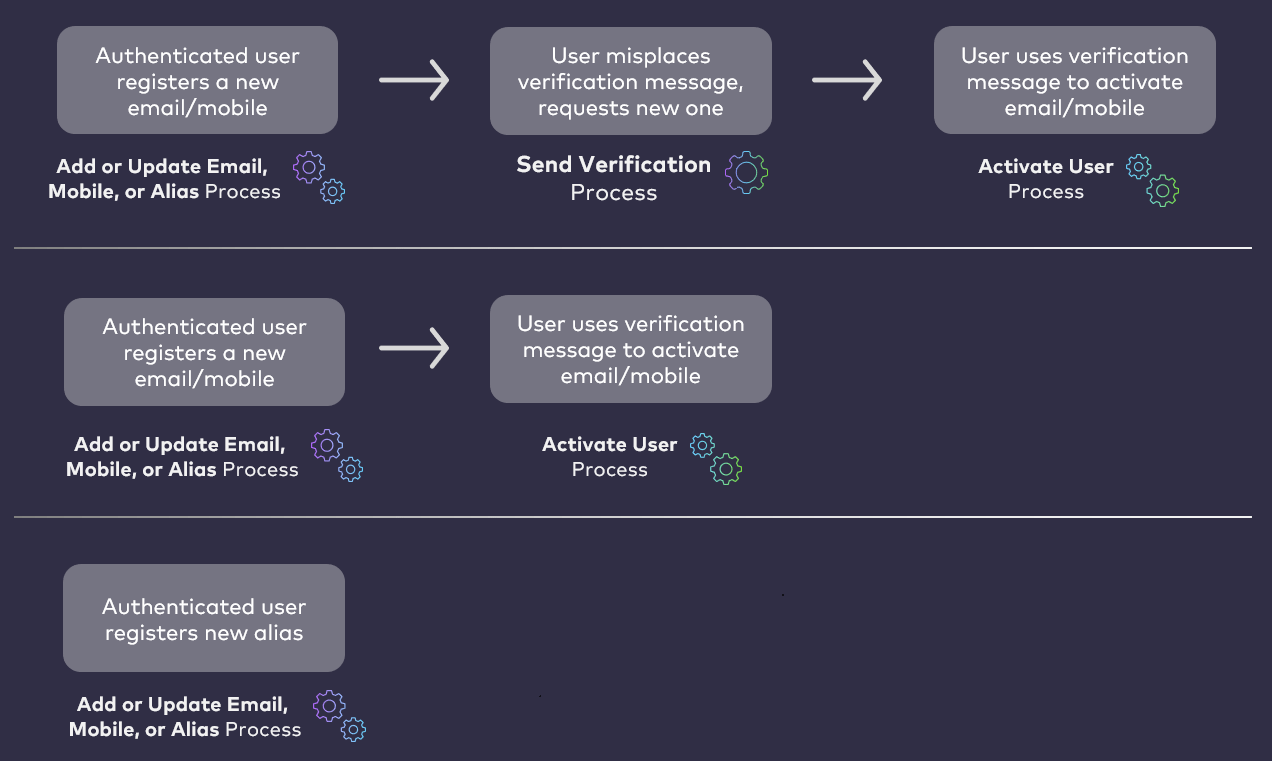 In some use cases, the **Add/Update Email, Mobile, or Alias** begins a multi-Process chain where the user may need to navigate to a separate channel (email or mobile) to verify it, and then invoke the Activate User (and User Attribute) Process to complete their journey. The exception is if the user adds or updates an alias, as those authN IDs do not require verification.
## About AuthN IDs and Aliases
Authentication Identifiers (or authN IDs) are sometimes commonly referred to as usernames. When a user onboards and authenticates into Storefront Gateway, they supply an authN ID (email address or mobile number) and a password. An exception to this is when end users onboard and authenticate using their social accounts.
A regular Storefront Gateway User ID requires at least one verifiable email address or mobile number to be set as an authN ID. This includes the social onboarding scenario wherein the social provider returns an email address or mobile number.
Storefront Gateway also supports the ability for end users to add aliases to their User ID and to log in with them. For example, your business may wish to enable users to authenticate with a desired nickname, or short-form account number.
| Alias AuthN IDs |
| - |
| An alias is an authN ID with the following characteristics: - It is an alphanumeric string - It has a minimum of 6, and maximum of 16, character limit - Its pattern must be distinct from an email address or mobile number pattern - It has no entity **`status`** because it cannot be verified like an email address or mobile number - It is unique across all user authN IDs in Storefront Gateway (i.e., no two users can use the exact same alias) |
| Aliases cannot be verified like an external contact channel. Therefore, a user who adds an alias to their User ID can use it in the [Authenticate User Process](c_authenticateUser) right away. However, in order to be able to add an alias to their User ID, the user must first have **at least one** registered, verified authN ID. |
| Soft Users |
| - |
| Storefront Gateway includes support for "Soft User Profiles." A Soft User Profile is a kind of guest user that a regular, activated user can register under their own User ID. The regular user and then grant the soft user profile provisional access to a shared subscription or feature, if your organization wants to enable that as an option. The most common example is a household wherein a parent with regular User ID registers one of their teenagers as a Soft User Profile, and to grants them limited access to a protected resource (e.g., a streaming service that requires onboarding and authentication). Whereas all regular Users require at least one verified (i.e., activated) authN ID, Soft Users do not require an authN ID at all. |
| In order for users to be able to add aliases, valid alias pattern must be set in the MarketONE Admin console, under the application **Settings** menu. This is the same location where valid email and mobile pattern rules are set as well. |
## Process Flow
This table describes the Process functionality at a high level.
**Preconditions**
* The user is currently authenticated in Storefront Gateway
**Basic Flow**
1. The user selects to either add a new email, mobile, or alias, or to edit an existing one.
2. The user enters their desired new authN ID value, then clicks **Add**. The following conditions apply:
* The provided authN ID value must be unique across all of Storefront Gateway.
* The provided authN ID must be in a valid format.
* Email and mobile valid formats are defined in MarketONE Admin console's Settings menu
* If the user is updating an existing authN ID, the old and new must have the same format.
3. Storefront Gateway registers the new email/mobile as an authentication identifier (authN ID). The authN ID is stored as a new attribute on the User entity. The attribute status depends on the operation:
1. If the user is adding a new a new email/mobile, then Storefront Gateway stores the attribute with an **`activating`** status.
2. If the user is updating an existing email/mobile. then Storefront Gateway stores the attribute with a **`pending`** status.
The following conditions apply:
* If the user is updating an email/mobile, they can still log into Storefront Gateway with their original email/mobile until the new one is verified.
* The user can update the same email/mobile multiple times before verification. Storefront Gateway keeps only the most recently updated value.
* If the user is adding or updating an alias, they can use it immediately.
**Post-conditions**
* The new or updated email, mobile, or alias is stored on the User entity as an attribute.
* Storefront Gateway sends an action token out to the email/mobile in a verification message.
**Possible or Common Errors**
* Authentication identifier already exists. The user-provided email or mobile already exists in Storefront Gateway.
* Invalid authentication identifier format. The original and updated email/mobile are not in the same format.
* Empty authN ID. The new or updated email/mobile value is blank.
* Invalid authN ID. The new or updated email/mobile format is invalid.
## Settings
Certain aspects of the Process' behavior are controlled by configurable App Settings. Your organization can manage these and other settings in the MarketONE Admin Portal.
| Application Settings | Default Setting | |
| - | - | - |
| **Max Aliases** | This setting defines the maximum number of aliases that a user can register. | 3 aliases |
| **Token URL** | This setting defines the base URL to which Storefront Gateway will append a full, long-form action token whenever it needs to send a notification to a user with a clickable verification link. The URL should point to a landing page in your client application. When a user clicks the link in a notification message, they'll be directed to that landing page. The client extracts the token value appended to the URL, and use it in the [Session Token API](c_sessionToken) to invoke the subsequent [Activate User (and User Attribute) Process](c_activateUser) Process. For this Process, this setting is applicable for when a user adds a new email/mobile authN ID. The Process sends the token out to that email/SMS for verification. It does not apply if the user adds an alias. | [https://idp/user\\\_confirm?token\\\_value=](https://idp/user\\_confirm?token\\_value=) |
| **Token (long-form) expiration** | Determines the number of minutes before a verification link expires. | 10080 minutes (7 days) |
| **Token (short-form) Expiration** | Determines the number of minutes before an OTP expires. **This setting is not configurable, and is simply noted here for context, and to contrast with the configurable long-form token lifespan.** | 5 minutes |
| **Valid Email Pattern** | Defines the basic validation criteria for what an acceptable email address looks like, defined in Regular Expression (or "regex"). Your organization can change this setting if it needs to, but we generally recommend that you leave it as is unless you have a particular use case for accepting only certain email addresses or domains. | `.+@.+\..+` |
| **Valid Mobile Pattern** | Defines the basic validation criteria for what an acceptable mobile phone number looks like, defined in Regular Expression (or "regex"). Your organization can change this setting if it needs to, but we generally recommend that you leave it as is unless you have a particular use case for accepting only phone numbers from certain regions or area codes. | `^\s*(?:\+?(\d{1,3}))?[-. (]*(\d{3})[-. )]*(\d{3})[-. ]*(\d{4})?\s*$` |
## User Journey Diagram
This diagram illustrates the standard user journey using the **Add or Update Email, Mobile, or Alias** Process, and some of the paths the Process can take based on settings and/or user input.
In some use cases, the **Add/Update Email, Mobile, or Alias** begins a multi-Process chain where the user may need to navigate to a separate channel (email or mobile) to verify it, and then invoke the Activate User (and User Attribute) Process to complete their journey. The exception is if the user adds or updates an alias, as those authN IDs do not require verification.
## About AuthN IDs and Aliases
Authentication Identifiers (or authN IDs) are sometimes commonly referred to as usernames. When a user onboards and authenticates into Storefront Gateway, they supply an authN ID (email address or mobile number) and a password. An exception to this is when end users onboard and authenticate using their social accounts.
A regular Storefront Gateway User ID requires at least one verifiable email address or mobile number to be set as an authN ID. This includes the social onboarding scenario wherein the social provider returns an email address or mobile number.
Storefront Gateway also supports the ability for end users to add aliases to their User ID and to log in with them. For example, your business may wish to enable users to authenticate with a desired nickname, or short-form account number.
| Alias AuthN IDs |
| - |
| An alias is an authN ID with the following characteristics: - It is an alphanumeric string - It has a minimum of 6, and maximum of 16, character limit - Its pattern must be distinct from an email address or mobile number pattern - It has no entity **`status`** because it cannot be verified like an email address or mobile number - It is unique across all user authN IDs in Storefront Gateway (i.e., no two users can use the exact same alias) |
| Aliases cannot be verified like an external contact channel. Therefore, a user who adds an alias to their User ID can use it in the [Authenticate User Process](c_authenticateUser) right away. However, in order to be able to add an alias to their User ID, the user must first have **at least one** registered, verified authN ID. |
| Soft Users |
| - |
| Storefront Gateway includes support for "Soft User Profiles." A Soft User Profile is a kind of guest user that a regular, activated user can register under their own User ID. The regular user and then grant the soft user profile provisional access to a shared subscription or feature, if your organization wants to enable that as an option. The most common example is a household wherein a parent with regular User ID registers one of their teenagers as a Soft User Profile, and to grants them limited access to a protected resource (e.g., a streaming service that requires onboarding and authentication). Whereas all regular Users require at least one verified (i.e., activated) authN ID, Soft Users do not require an authN ID at all. |
| In order for users to be able to add aliases, valid alias pattern must be set in the MarketONE Admin console, under the application **Settings** menu. This is the same location where valid email and mobile pattern rules are set as well. |
## Process Flow
This table describes the Process functionality at a high level.
**Preconditions**
* The user is currently authenticated in Storefront Gateway
**Basic Flow**
1. The user selects to either add a new email, mobile, or alias, or to edit an existing one.
2. The user enters their desired new authN ID value, then clicks **Add**. The following conditions apply:
* The provided authN ID value must be unique across all of Storefront Gateway.
* The provided authN ID must be in a valid format.
* Email and mobile valid formats are defined in MarketONE Admin console's Settings menu
* If the user is updating an existing authN ID, the old and new must have the same format.
3. Storefront Gateway registers the new email/mobile as an authentication identifier (authN ID). The authN ID is stored as a new attribute on the User entity. The attribute status depends on the operation:
1. If the user is adding a new a new email/mobile, then Storefront Gateway stores the attribute with an **`activating`** status.
2. If the user is updating an existing email/mobile. then Storefront Gateway stores the attribute with a **`pending`** status.
The following conditions apply:
* If the user is updating an email/mobile, they can still log into Storefront Gateway with their original email/mobile until the new one is verified.
* The user can update the same email/mobile multiple times before verification. Storefront Gateway keeps only the most recently updated value.
* If the user is adding or updating an alias, they can use it immediately.
**Post-conditions**
* The new or updated email, mobile, or alias is stored on the User entity as an attribute.
* Storefront Gateway sends an action token out to the email/mobile in a verification message.
**Possible or Common Errors**
* Authentication identifier already exists. The user-provided email or mobile already exists in Storefront Gateway.
* Invalid authentication identifier format. The original and updated email/mobile are not in the same format.
* Empty authN ID. The new or updated email/mobile value is blank.
* Invalid authN ID. The new or updated email/mobile format is invalid.
## Settings
Certain aspects of the Process' behavior are controlled by configurable App Settings. Your organization can manage these and other settings in the MarketONE Admin Portal.
| Application Settings | Default Setting | |
| - | - | - |
| **Max Aliases** | This setting defines the maximum number of aliases that a user can register. | 3 aliases |
| **Token URL** | This setting defines the base URL to which Storefront Gateway will append a full, long-form action token whenever it needs to send a notification to a user with a clickable verification link. The URL should point to a landing page in your client application. When a user clicks the link in a notification message, they'll be directed to that landing page. The client extracts the token value appended to the URL, and use it in the [Session Token API](c_sessionToken) to invoke the subsequent [Activate User (and User Attribute) Process](c_activateUser) Process. For this Process, this setting is applicable for when a user adds a new email/mobile authN ID. The Process sends the token out to that email/SMS for verification. It does not apply if the user adds an alias. | [https://idp/user\\\_confirm?token\\\_value=](https://idp/user\\_confirm?token\\_value=) |
| **Token (long-form) expiration** | Determines the number of minutes before a verification link expires. | 10080 minutes (7 days) |
| **Token (short-form) Expiration** | Determines the number of minutes before an OTP expires. **This setting is not configurable, and is simply noted here for context, and to contrast with the configurable long-form token lifespan.** | 5 minutes |
| **Valid Email Pattern** | Defines the basic validation criteria for what an acceptable email address looks like, defined in Regular Expression (or "regex"). Your organization can change this setting if it needs to, but we generally recommend that you leave it as is unless you have a particular use case for accepting only certain email addresses or domains. | `.+@.+\..+` |
| **Valid Mobile Pattern** | Defines the basic validation criteria for what an acceptable mobile phone number looks like, defined in Regular Expression (or "regex"). Your organization can change this setting if it needs to, but we generally recommend that you leave it as is unless you have a particular use case for accepting only phone numbers from certain regions or area codes. | `^\s*(?:\+?(\d{1,3}))?[-. (]*(\d{3})[-. )]*(\d{3})[-. ]*(\d{4})?\s*$` |
## User Journey Diagram
This diagram illustrates the standard user journey using the **Add or Update Email, Mobile, or Alias** Process, and some of the paths the Process can take based on settings and/or user input.
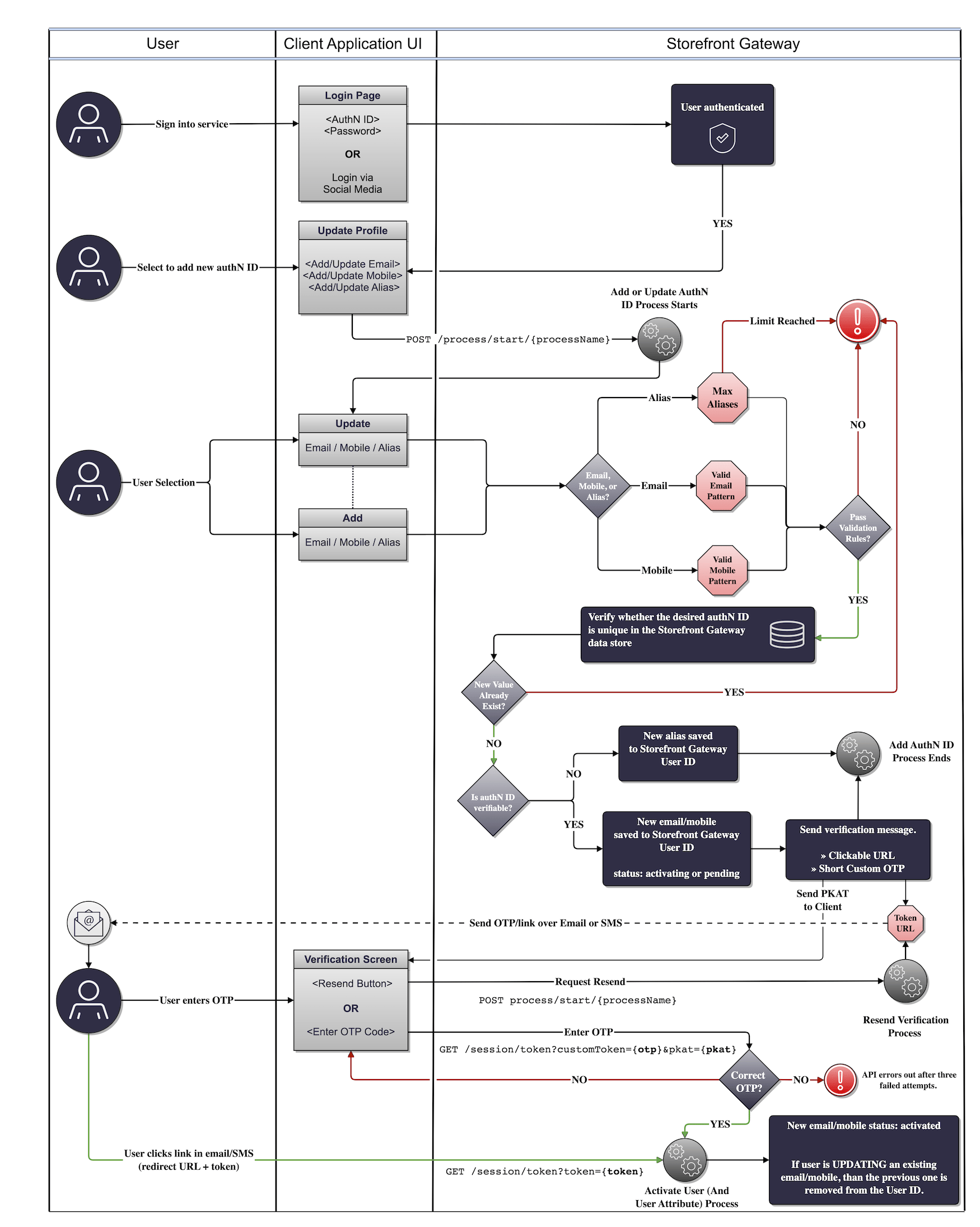 This journey also incorporates user authentication, the Activate User Process (invoked by the Session Token API), and an OTP resend option that can be provided through either the PUT /session/token API or the Send Verification Process.
**Note:** If the user enters an incorrect OTP three times, the Session Token API will lock out and invalidate the OTP. The user must then request a token resend. They can do this through one of three methods:
* PUT /session/token — Typically in cases where the user is anonymous. The client will need to supply the PKAT
* Send Verification Process — Typically in cases where the user is authenticated. The client needs to supply the target email or mobile directly in the initial request URL or request body.
* Authenticate User Process — If the user attempts to sign in with an unverified authN ID, the Process will issue an action token and send it that contact channel. The Process will then end without authenticating the end user.
## Use Cases
The following use cases provide guided API walkthoughs of this Process for client developers:
* [Register a new email address or mobile number](c_useCaseAddNewEmailMobile)
* [Change an existing email address or mobile number](c_useCaseUpdateEmailMobile)
* [Add or update authN ID errors](c_addUpdateAuthNErrors)
* **[Add a new email address or mobile number](c_useCaseAddNewEmailMobile)**
* **[Update an existing email or mobile](c_useCaseUpdateEmailMobile)**
* **[Add or update authN ID errors](c_addUpdateAuthNErrors)**
**Parent topic:**[Identity Management Processes](../images/c_identityProcesses)
This documentation is built and hosted on [Mintlify](https://mintlify.com), a developer documentation platform.
This journey also incorporates user authentication, the Activate User Process (invoked by the Session Token API), and an OTP resend option that can be provided through either the PUT /session/token API or the Send Verification Process.
**Note:** If the user enters an incorrect OTP three times, the Session Token API will lock out and invalidate the OTP. The user must then request a token resend. They can do this through one of three methods:
* PUT /session/token — Typically in cases where the user is anonymous. The client will need to supply the PKAT
* Send Verification Process — Typically in cases where the user is authenticated. The client needs to supply the target email or mobile directly in the initial request URL or request body.
* Authenticate User Process — If the user attempts to sign in with an unverified authN ID, the Process will issue an action token and send it that contact channel. The Process will then end without authenticating the end user.
## Use Cases
The following use cases provide guided API walkthoughs of this Process for client developers:
* [Register a new email address or mobile number](c_useCaseAddNewEmailMobile)
* [Change an existing email address or mobile number](c_useCaseUpdateEmailMobile)
* [Add or update authN ID errors](c_addUpdateAuthNErrors)
* **[Add a new email address or mobile number](c_useCaseAddNewEmailMobile)**
* **[Update an existing email or mobile](c_useCaseUpdateEmailMobile)**
* **[Add or update authN ID errors](c_addUpdateAuthNErrors)**
**Parent topic:**[Identity Management Processes](../images/c_identityProcesses)
This documentation is built and hosted on [Mintlify](https://mintlify.com), a developer documentation platform.