> ## Documentation Index
> Fetch the complete documentation index at: https://docs.m1amdocs.com/llms.txt
> Use this file to discover all available pages before exploring further.
# New user accepts invitation
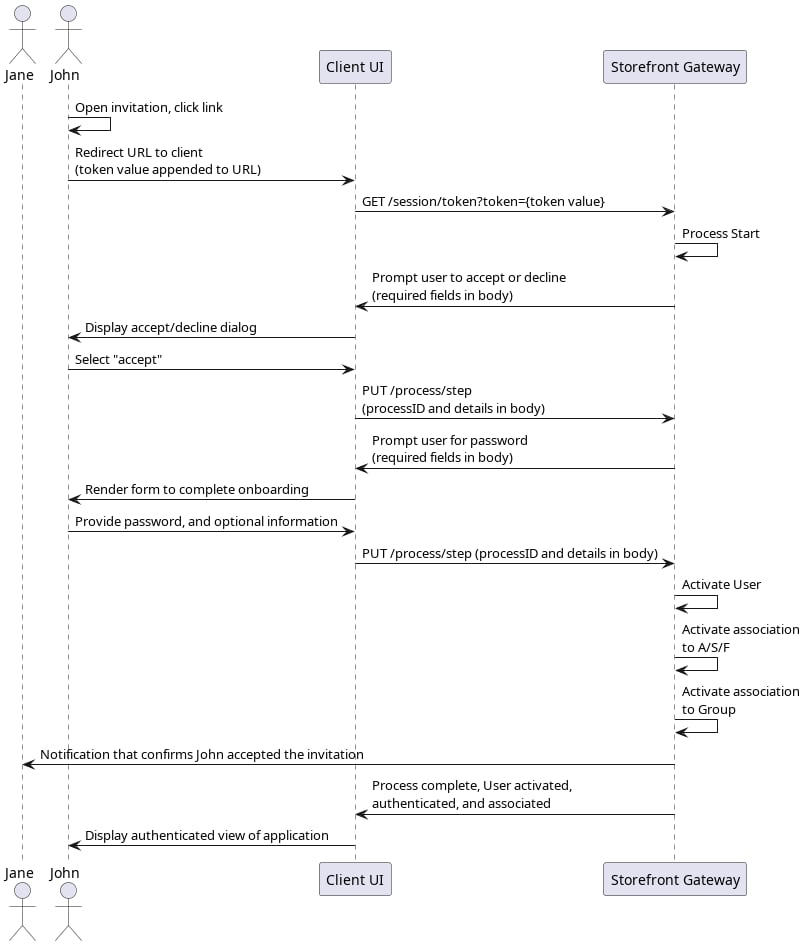
Storefront Gateway User Jane invites her roommate John to share access to one of her services. The client application for the service uses the [Share Access to an Account/Subscription/Feature](c_shareAccessASF) Process. At the end of that Process, Storefront Gateway sends an invitation to John's email or mobile number (whichever Jane provided to the previous Process). John then uses that link to redirect to the application, and explicitly accept her invitation.
In this use case, John is not yet a registered Storefront Gateway User, so this Process also handles the onboarding parts of John's journey.
 ## Initial Request
The invitee user clicks the invitation link, which then redirects them back to a dedicated landing page in your application. Your client takes the action token value directly from the redirect URL, and calls the [Session Token](c_sessionToken) API with the token value as a URL parameter. This initializes the Process:
```
**GET https://\{your.url\}/session/token?value=681e508b-aa16-48db-a9f7-3d58d464e7c3**
```
## Response: Accept or Decline
Storefront Gateway responds with a prompt for the user to explicitly accept or decline the invitation:
```
**RESPONSE - body**
{
"processId": "de4f55a4-e9df-4142-98b4-5de739c82188",
"processName": "entitlementManagement.UserAcceptDeclineInvite.v1.0",
"stepName": "AcceptPrompt",
"displayMessage": "Please input required information",
"parameters": {
"accept": "Boolean"
}
}
```
| `processId` | Unique identifier for the current instance of this Process. |
| - | - |
| `processName` | Full name of the Process, including the category and version number. |
| `stepName` | Name of the specific step that the Process is currently on. |
| `displayMessage` | Optional message that the UI can display to the user. |
| `parameters` | Object that specifies the info this Process requires to continue its task. |
| `accept` | Boolean that indicates if the user accepts the service invitation. |
## Next Request: User Accepts
The user explicitly accepts, and your client passes this choice back to the Process through the [Process Step](c_processStep) API:
```
**PUT https://\{your.url\}/process/step**
{
"processId": "c18d8e7b-6817-4a0c-9ca8-76036b82b0fc",
"parameters": {
"accept": **true
** }
}
```
| `processId` | Unique identifier for the current instance of this Process. |
| - | - |
| `parameters` | Object that contains the data requested in the previous Process response. |
| `accept` | Boolean that indicates if the user accepts the service invitation. |
## Response: Complete Onboarding
The invitee does not yet have a fully activated Storefront Gateway User ID. Therefore, the Process returns a prompt for a password (and any additional, optional information) to complete the user's onboarding:
```
**RESPONSE - body**
{
"processId": "de4f55a4-e9df-4142-98b4-5de739c82188",
"processName": "entitlementManagement.UserAcceptDeclineInvite.v1.0",
"stepName": "UserDetailsPrompt",
"displayMessage": "Please input required information",
"parameters": {
"firstName": "String",
"lastName": "String",
"password": "String",
"displayName": "String",
"lang": "String"
}
}
```
| `processId` | Unique identifier for the current instance of this Process. |
| - | - |
| `processName` | Full name of the Process, including the category and version number. |
| `stepName` | Name of the specific step that the Process is currently on. |
| `lastStep` | Boolean that indicates whether or not this was the last step in the Process. |
| `displayMessage` | Optional message that the UI can display to the user. |
| `parameters` | Object that specifies the info this Process requires to continue its task. |
| `password` | (**Mandatory**) User's desired password. |
| `firstName` | (**Optional)** User's first name. |
| `lastName` | **(Optional)** User's last name. |
| `displayName` | **(Optional)** A display name for the user. This could be just a combination of the user's first and last name, or a nickname. |
| `lang` | **(Optional)** User's preferred language, as per [ISO 639-1:2002](https://www.iso.org/standard/22109.html). |
## Final Request
The user provides a password, and your client and the client passes this through the [Process Step](c_processStep) API request:
```
**PUT https://\{your.url\}/process/step**
{
"processId": "de4f55a4-e9df-4142-98b4-5de739c82188",
"parameters": {
"password": "**L3tm3inpl4ase**",
}
}
```
| `processId` | Unique identifier for the current instance of this Process. |
| - | - |
| `parameters` | Object that contains the data requested in the previous Process response. |
| `password` | User's desired password. |
| `firstName` | User's first name. |
| `lastName` | User's last name. |
| `displayName` | A display name for the user. This could be just a combination of the user's first and last name, or a nickname. |
| `lang` | User's preferred language, as per [ISO 639-1:2002](https://www.iso.org/standard/22109.html). |
## Process Complete
If the user's password is valid, then Storefront Gateway activates the following:
* The new Storefront Gateway User entity
* The new user's AuthN ID
* The associations between the new User entity and the shared accounts / services (that were selected by the inviting user during the [Share A/S/F](c_useCaseShareASFnew) Process)
* The association between the new User entity and the relevant Storefront Gateway Group (to which the shared A/S/F is associated)
The Process then automatically authenticates the user, and returns a `200 HTTP` status:
```
**RESPONSE - body**
{
"processId": "de4f55a4-e9df-4142-98b4-5de739c82188",
"processName": "entitlementManagement.UserAcceptDeclineInvite.v1.0",
"lastStep": **true**,
"runtimeId": 5010,
"userId": **6014**,
"userAuthenticated": **true**
}
```
The user now has access to their own User ID, and any of the accounts/services that were shared with them.
| `processId` | The unique identifier for this instance of the Process. |
| - | - |
| `processName` | Full name of the Process, including the category and version number. |
| `lastStep` | Boolean that indicates whether or not this was the last step in the Process. |
| `runtimeId` | Identifier of the Storefront Gateway Runtime entity currently associated to the Storefront Gateway User entity. \*\*About Runtime Entities:\*\*Upon user creation or authentication, Storefront Gateway looks for a JRUNTIMEID cookie in the end user's browser or application. If no cookie is found, Storefront Gateway creates a Runtime Entity with a unique ID and associates it to the user during the login phase. Storefront Gateway will generate and pass a corresponding JRUNTIMEID cookie for clients to store and return with subsequent requests. |
| `userId` | The unique identifier of the current user. |
| `userAuthenticated` | Boolean that indicates if the user was authenticated into Storefront Gateway. |
| **Parent topic:**[Accept or Decline Service Invitation Process](c_acceptDeclineServiceInvitation) | |
This documentation is built and hosted on [Mintlify](https://mintlify.com), a developer documentation platform.
## Initial Request
The invitee user clicks the invitation link, which then redirects them back to a dedicated landing page in your application. Your client takes the action token value directly from the redirect URL, and calls the [Session Token](c_sessionToken) API with the token value as a URL parameter. This initializes the Process:
```
**GET https://\{your.url\}/session/token?value=681e508b-aa16-48db-a9f7-3d58d464e7c3**
```
## Response: Accept or Decline
Storefront Gateway responds with a prompt for the user to explicitly accept or decline the invitation:
```
**RESPONSE - body**
{
"processId": "de4f55a4-e9df-4142-98b4-5de739c82188",
"processName": "entitlementManagement.UserAcceptDeclineInvite.v1.0",
"stepName": "AcceptPrompt",
"displayMessage": "Please input required information",
"parameters": {
"accept": "Boolean"
}
}
```
| `processId` | Unique identifier for the current instance of this Process. |
| - | - |
| `processName` | Full name of the Process, including the category and version number. |
| `stepName` | Name of the specific step that the Process is currently on. |
| `displayMessage` | Optional message that the UI can display to the user. |
| `parameters` | Object that specifies the info this Process requires to continue its task. |
| `accept` | Boolean that indicates if the user accepts the service invitation. |
## Next Request: User Accepts
The user explicitly accepts, and your client passes this choice back to the Process through the [Process Step](c_processStep) API:
```
**PUT https://\{your.url\}/process/step**
{
"processId": "c18d8e7b-6817-4a0c-9ca8-76036b82b0fc",
"parameters": {
"accept": **true
** }
}
```
| `processId` | Unique identifier for the current instance of this Process. |
| - | - |
| `parameters` | Object that contains the data requested in the previous Process response. |
| `accept` | Boolean that indicates if the user accepts the service invitation. |
## Response: Complete Onboarding
The invitee does not yet have a fully activated Storefront Gateway User ID. Therefore, the Process returns a prompt for a password (and any additional, optional information) to complete the user's onboarding:
```
**RESPONSE - body**
{
"processId": "de4f55a4-e9df-4142-98b4-5de739c82188",
"processName": "entitlementManagement.UserAcceptDeclineInvite.v1.0",
"stepName": "UserDetailsPrompt",
"displayMessage": "Please input required information",
"parameters": {
"firstName": "String",
"lastName": "String",
"password": "String",
"displayName": "String",
"lang": "String"
}
}
```
| `processId` | Unique identifier for the current instance of this Process. |
| - | - |
| `processName` | Full name of the Process, including the category and version number. |
| `stepName` | Name of the specific step that the Process is currently on. |
| `lastStep` | Boolean that indicates whether or not this was the last step in the Process. |
| `displayMessage` | Optional message that the UI can display to the user. |
| `parameters` | Object that specifies the info this Process requires to continue its task. |
| `password` | (**Mandatory**) User's desired password. |
| `firstName` | (**Optional)** User's first name. |
| `lastName` | **(Optional)** User's last name. |
| `displayName` | **(Optional)** A display name for the user. This could be just a combination of the user's first and last name, or a nickname. |
| `lang` | **(Optional)** User's preferred language, as per [ISO 639-1:2002](https://www.iso.org/standard/22109.html). |
## Final Request
The user provides a password, and your client and the client passes this through the [Process Step](c_processStep) API request:
```
**PUT https://\{your.url\}/process/step**
{
"processId": "de4f55a4-e9df-4142-98b4-5de739c82188",
"parameters": {
"password": "**L3tm3inpl4ase**",
}
}
```
| `processId` | Unique identifier for the current instance of this Process. |
| - | - |
| `parameters` | Object that contains the data requested in the previous Process response. |
| `password` | User's desired password. |
| `firstName` | User's first name. |
| `lastName` | User's last name. |
| `displayName` | A display name for the user. This could be just a combination of the user's first and last name, or a nickname. |
| `lang` | User's preferred language, as per [ISO 639-1:2002](https://www.iso.org/standard/22109.html). |
## Process Complete
If the user's password is valid, then Storefront Gateway activates the following:
* The new Storefront Gateway User entity
* The new user's AuthN ID
* The associations between the new User entity and the shared accounts / services (that were selected by the inviting user during the [Share A/S/F](c_useCaseShareASFnew) Process)
* The association between the new User entity and the relevant Storefront Gateway Group (to which the shared A/S/F is associated)
The Process then automatically authenticates the user, and returns a `200 HTTP` status:
```
**RESPONSE - body**
{
"processId": "de4f55a4-e9df-4142-98b4-5de739c82188",
"processName": "entitlementManagement.UserAcceptDeclineInvite.v1.0",
"lastStep": **true**,
"runtimeId": 5010,
"userId": **6014**,
"userAuthenticated": **true**
}
```
The user now has access to their own User ID, and any of the accounts/services that were shared with them.
| `processId` | The unique identifier for this instance of the Process. |
| - | - |
| `processName` | Full name of the Process, including the category and version number. |
| `lastStep` | Boolean that indicates whether or not this was the last step in the Process. |
| `runtimeId` | Identifier of the Storefront Gateway Runtime entity currently associated to the Storefront Gateway User entity. \*\*About Runtime Entities:\*\*Upon user creation or authentication, Storefront Gateway looks for a JRUNTIMEID cookie in the end user's browser or application. If no cookie is found, Storefront Gateway creates a Runtime Entity with a unique ID and associates it to the user during the login phase. Storefront Gateway will generate and pass a corresponding JRUNTIMEID cookie for clients to store and return with subsequent requests. |
| `userId` | The unique identifier of the current user. |
| `userAuthenticated` | Boolean that indicates if the user was authenticated into Storefront Gateway. |
| **Parent topic:**[Accept or Decline Service Invitation Process](c_acceptDeclineServiceInvitation) | |
This documentation is built and hosted on [Mintlify](https://mintlify.com), a developer documentation platform.