> ## Documentation Index
> Fetch the complete documentation index at: https://docs.m1amdocs.com/llms.txt
> Use this file to discover all available pages before exploring further.
# Reset password with verification link
This use case is the second half of the "forgot password?" user journey, delivered by the [Reset Password](c_forgotPassword) Process. In this flow, the end user received a clickable verification link.
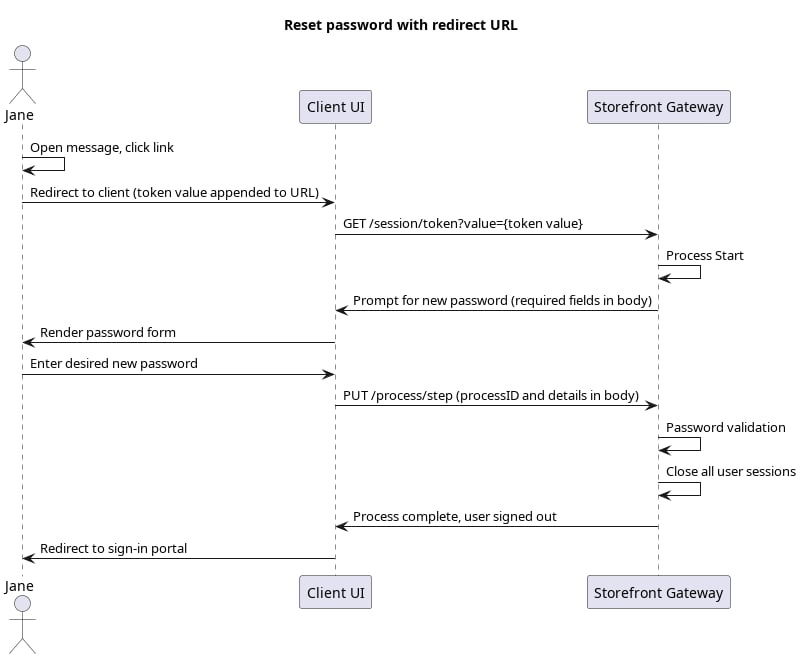
An anonymous end user ha gone through the Recover ID Process, and received an action token in their email or SMS. In this use case, the end user receives their action token in the form of a clickable recovery link. The link is composed of two parts:
* A redirect URL back to client application (set in the MarketONE Admin web app settings)
* The actual Storefront Gateway action token appended to the end of the URL (generated by the Recover ID Process)
| Action Token Redirect URLs |
| - |
| Two things are required to set up redirect URLs to work automatically. First, you'll need to build the appropriate landing page that, when visited, automatically takes the token value from the URL to call the `GET /session/token?token={token value}` API method. Then, navigate to the MarketONE Admin console and set the redirect URL to that landing page on the Security page under Advanced Token Settings. When the enduser completes the relevant Process, Storefront Gateway sends the redirect URL with the token value appended to the end of the string, and your client then uses that token value in the [Session Token](c_sessionToken) API. |
|  |
## Initial Request: User clicks link
The end user goes to their email/SMS and clicks the link. This directs their browser to the client application, and the client takes the token value from URL and passes it into the [Session Token](c_sessionToken) API:
```
**GET https://\{your.url\}/session/token?value=4cba991d-83ba-4f58-85ed-18a9dc32327f**
```
## Response
Storefront Gateway responds with a request for a new password:
```
**RESPONSE - body**
{
"processId": "de11cb72-c03b-423f-a6ed-4e13e2c6ddd2",
"processName": "recovery.PasswordReset.v1.0",
"displayMessage": "Please input required information",
"parameters": {
"newPassword": "String"
},
"stepName": "NewPasswordPrompt",
"lastStep": false
}
```
| `processId` | Unique identifier for the current instance of this Process. |
| - | - |
| `processName` | Full name of the Process, including the category and version number. |
| `stepName` | Name of the specific step that the Process is currently on. |
| `lastStep` | Boolean that indicates whether or not this was the last step in the Process. |
| `displayMessage` | Optional message that the UI can display to the end user. |
| `parameters` | Object that specifies the info this Process requires to continue its task. |
| `newPassword` | The new password, as required by the Process. |
## Final Request: User Password
Your client calls the [Process Step](c_processStep) API, and passes the user-supplied password to the Process:
```
**PUT https://\{your.url\}/process/step**
{
"processId": "de11cb72-c03b-423f-a6ed-4e13e2c6ddd2",
"parameters": {
"newPassword": "Sp4rinkl35"
}
}
```
| `processId` | Unique identifier for the current instance of this Process. |
| - | - |
| `parameters` | Data object that contains the data request in the previous Process response. |
| `newPassword` | The new password, as supplied by the user. |
## Process Complete
If the password passes complexity rules, then Storefront Gateway replaces the end user's paword. The Process completes and returns a `200 HTTP` status:
```
**RESPONSE - body**
{
"processId": "de11cb72-c03b-423f-a6ed-4e13e2c6ddd2",
"processName": "recovery.PasswordReset.v1.0",
"lastStep": true
}
```
Storefront Gateway automatically closes any and all open sessions that the user may have. The end user will need to sign in with their new password.
| `processId` | Unique identifier for the current instance of this Process. |
| - | - |
| `processName` | Full name of the Process, including the category and version number. |
| `lastStep` | Boolean that indicates whether or not this was the last step in the Process. |
| **Parent topic:**[Recover ID & Reset Password Processes](c_forgotPassword) | |
This documentation is built and hosted on [Mintlify](https://mintlify.com), a developer documentation platform.
|
## Initial Request: User clicks link
The end user goes to their email/SMS and clicks the link. This directs their browser to the client application, and the client takes the token value from URL and passes it into the [Session Token](c_sessionToken) API:
```
**GET https://\{your.url\}/session/token?value=4cba991d-83ba-4f58-85ed-18a9dc32327f**
```
## Response
Storefront Gateway responds with a request for a new password:
```
**RESPONSE - body**
{
"processId": "de11cb72-c03b-423f-a6ed-4e13e2c6ddd2",
"processName": "recovery.PasswordReset.v1.0",
"displayMessage": "Please input required information",
"parameters": {
"newPassword": "String"
},
"stepName": "NewPasswordPrompt",
"lastStep": false
}
```
| `processId` | Unique identifier for the current instance of this Process. |
| - | - |
| `processName` | Full name of the Process, including the category and version number. |
| `stepName` | Name of the specific step that the Process is currently on. |
| `lastStep` | Boolean that indicates whether or not this was the last step in the Process. |
| `displayMessage` | Optional message that the UI can display to the end user. |
| `parameters` | Object that specifies the info this Process requires to continue its task. |
| `newPassword` | The new password, as required by the Process. |
## Final Request: User Password
Your client calls the [Process Step](c_processStep) API, and passes the user-supplied password to the Process:
```
**PUT https://\{your.url\}/process/step**
{
"processId": "de11cb72-c03b-423f-a6ed-4e13e2c6ddd2",
"parameters": {
"newPassword": "Sp4rinkl35"
}
}
```
| `processId` | Unique identifier for the current instance of this Process. |
| - | - |
| `parameters` | Data object that contains the data request in the previous Process response. |
| `newPassword` | The new password, as supplied by the user. |
## Process Complete
If the password passes complexity rules, then Storefront Gateway replaces the end user's paword. The Process completes and returns a `200 HTTP` status:
```
**RESPONSE - body**
{
"processId": "de11cb72-c03b-423f-a6ed-4e13e2c6ddd2",
"processName": "recovery.PasswordReset.v1.0",
"lastStep": true
}
```
Storefront Gateway automatically closes any and all open sessions that the user may have. The end user will need to sign in with their new password.
| `processId` | Unique identifier for the current instance of this Process. |
| - | - |
| `processName` | Full name of the Process, including the category and version number. |
| `lastStep` | Boolean that indicates whether or not this was the last step in the Process. |
| **Parent topic:**[Recover ID & Reset Password Processes](c_forgotPassword) | |
This documentation is built and hosted on [Mintlify](https://mintlify.com), a developer documentation platform.