> ## Documentation Index
> Fetch the complete documentation index at: https://docs.m1amdocs.com/llms.txt
> Use this file to discover all available pages before exploring further.
# Single step update notification
This is the "expedited flow" use case delivered by [Update Notification Channel](c_updateNotificationChannel) Process.
The flow is similar to the [standard use case](c_useCaseUpdateChannel), except that the user's desired notification channel is provided upfront in the Process API request as an `updatedContactChannel` parameter. Storefront Gateway starts the Process, consumes the target authN ID and, if valid, sets it as the new primary notification channel.
Your client may need to retrieve and displays the relevant choices to the user in advance of Process invocation. This can be accomplished with a GET /user request when the user signs in, or navigates to a "profile management" or equivalent menu in the client application. The GET /user request returns the full User entity, which includes a list of authentication identifiers that are registered as User entity attributes.
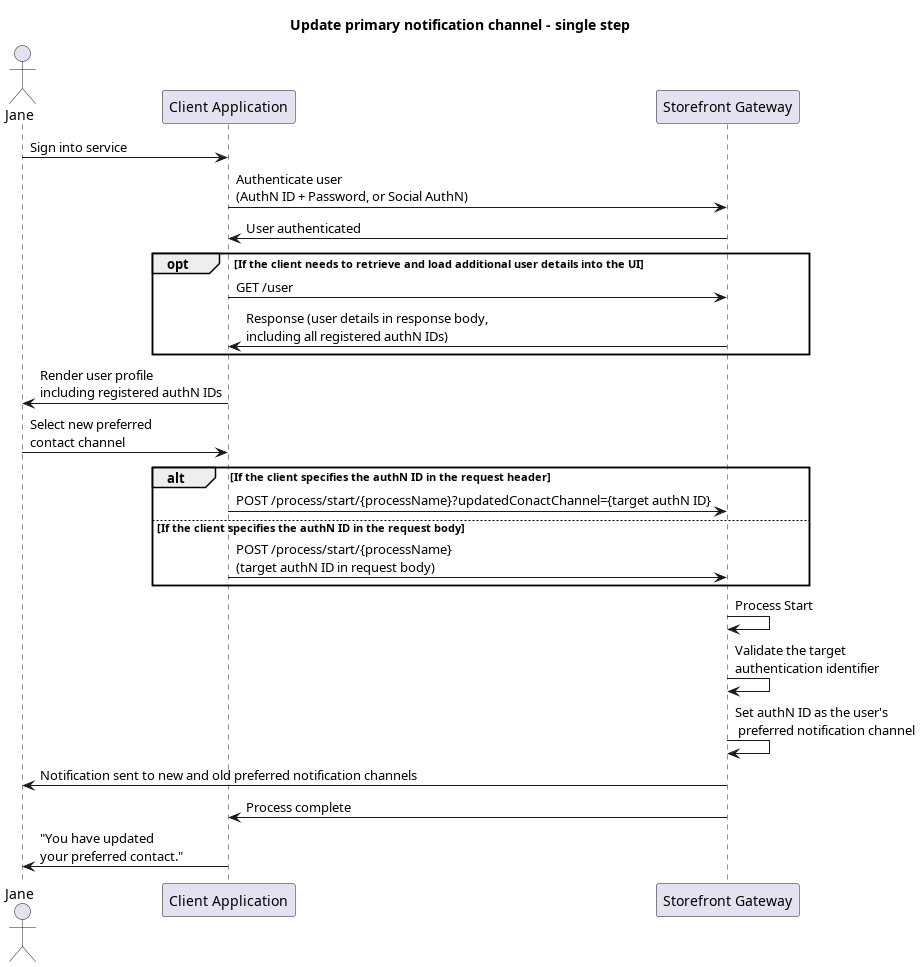 This flow is applicable in case where the client first collects the user's target authN ID, and supplies it upfront in the initial Process API request. The key to this flow is presenting the applicable options to the user first, and the best way to do this is using a GET /user call (either when the user authenticates, or when they navigate to the relevant page on your application UI) and display the applicable options.
Here's an example GET /user response:
This flow is applicable in case where the client first collects the user's target authN ID, and supplies it upfront in the initial Process API request. The key to this flow is presenting the applicable options to the user first, and the best way to do this is using a GET /user call (either when the user authenticates, or when they navigate to the relevant page on your application UI) and display the applicable options.
Here's an example GET /user response:
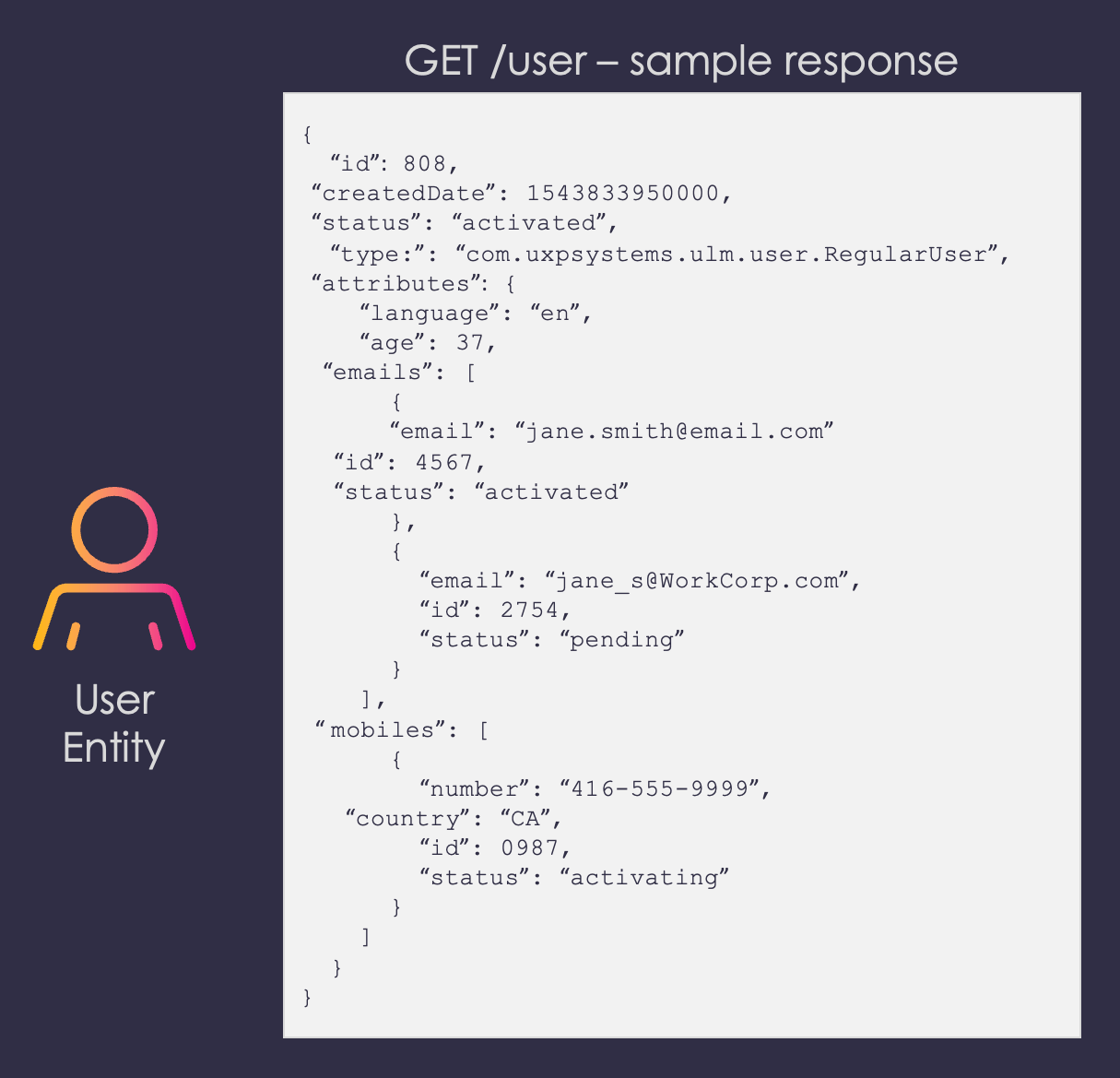 In the User entity, the `**preferredNotificationChannel**` attribute indicates that the current PNC is under the `**emails**` array, and is the email value with a corresponding `**id**` of 7.Your application can display all authN IDs, and add any additional signifiers such as an authN IDs type and/or status.
**Note:** When initiating the Process for a single step flow, you must ensure that the user cannot specify any of their current authN IDs that don't meet the following criteria:
* The desired authN ID is not already the current PNC
* The desired authN ID is a valid contact channel type (email or mobile – no aliases)
* The desired authN ID is verified, or has an `activated` status
You can check out the [User entity](r_connectUserEntity) definition in our introductory [REST API Reference Guide](../../sgRestApiGuide/topics/c_restAPIGuide) for a full list of all possible properties and attributes on the User entity.
## Request
The user selects one of their registered authN IDs (e.g., [jane.smith@email.ca](mailto:jane.smith@email.ca)) to be their new primary contact channel, and the client passes that selection to Storefront Gateway in the [Process Start](c_processStart) API request.
Here's an example of the request with the target authN ID in the request body. The required data is wrapped inside a `parameters` object, like in most standard Process flows:
```
**POST https://\{your.url\}/process/start/userManagement.UpdateNotificationChannel.v1.0**
{
"parameters": {
"updatedContactChannel": "jane.smith@email.ca"
}
}
```
Here's an example of the same request, but the authN ID is in the request URL:
```
**POST /process/start/userManagement.UpdateNotificationChannel.v1.0?updatedContactChannel=jane.smith@email.ca**
```
Either of these methods will suffice to initialize the Process.
## Process Complete
Storefront Gateway validates target authN ID. If the authN ID passes validation, then Storefront Gateway immediately sets it as the user's primary notification channel. All system-generated notification messages for this user will now be sent to the new PNC.
```
**RESPONSE - body**
{
"processId": "92929121-979d-4fec-bee6-28dcfdf0a8ca",
"processName": "userManagement.UpdateNotificationChannel.v1.0",
"lastStep": true
}
```
| `processId` | Unique identifier for the current instance of this Process. | |
| - | - | - |
| `processName` | Full name of the Process, including the category and version number. | |
| `stepName` | Name of the specific step that the Process is currently on. | |
| `lastStep` | Boolean that indicates whether or not this was the last step in the Process. | |
| `displayMessage` | Optional message that the UI can display to the user. | |
| `output` | Object that contains data that the client can consume, retain, and use for additional operations (i.e., subsequent Process step requests). | |
| | `options` | Object that contains one or more indexed authentication identifiers that the user can specify. Each name-value pairing consists of the contact channel and it's type (email or mobile). |
| `parameters` | Object that specifies the info this Process requires to continue its task. | |
| `optionId` | The index of the target authN ID (obtained from the `options` object). | |
## Final Request
The user selects their desired authN ID, and the client passes that choice to Storefront Gateway in a [Process Step](c_processStep) API request:
```
**PUT https://\{your.url\}/process/step**
{
"processId": "92929121-979d-4fec-bee6-28dcfdf0a8ca",
"parameters": {
"optionId": "0"
}
}
```
| `processId` | Unique identifier for the current instance of this Process. |
| - | - |
| `parameters` | Object that contains the data that was requested in the previous Process response. |
| `optionId` | The user's current password, supplied by the user. |
## Process Complete
Storefront Gateway sets authN ID (that was specified by the index number) as the user's primary notification channel. All system-generated notification messages for that user will now be sent to that channel. The Process ends and returns a `200 HTTP` status:
```
**RESPONSE - body**
{
"processId": "92929121-979d-4fec-bee6-28dcfdf0a8ca",
"processName": "userManagement.UpdateNotificationChannel.v1.0",
"lastStep": true
}
```
| `processId` | Unique identifier for the current instance of this Process. |
| - | - |
| `processName` | Full name of the Process, including the category and version number. |
| `lastStep` | Boolean that indicates whether or not this was the last step in the Process. |
| **Note:** If your organization's integration with Storefront Gateway involves the use of your own notification dispatch service, then Storefront Gateway will first send the message details to your service. In that scenario, the message will specify the end user's primary notification channel as the destination for that message, and your service can then construct and forward the message accordingly. | |
**Parent topic:**[Update Notification Channel Process](c_updateNotificationChannel)
This documentation is built and hosted on [Mintlify](https://mintlify.com), a developer documentation platform.
In the User entity, the `**preferredNotificationChannel**` attribute indicates that the current PNC is under the `**emails**` array, and is the email value with a corresponding `**id**` of 7.Your application can display all authN IDs, and add any additional signifiers such as an authN IDs type and/or status.
**Note:** When initiating the Process for a single step flow, you must ensure that the user cannot specify any of their current authN IDs that don't meet the following criteria:
* The desired authN ID is not already the current PNC
* The desired authN ID is a valid contact channel type (email or mobile – no aliases)
* The desired authN ID is verified, or has an `activated` status
You can check out the [User entity](r_connectUserEntity) definition in our introductory [REST API Reference Guide](../../sgRestApiGuide/topics/c_restAPIGuide) for a full list of all possible properties and attributes on the User entity.
## Request
The user selects one of their registered authN IDs (e.g., [jane.smith@email.ca](mailto:jane.smith@email.ca)) to be their new primary contact channel, and the client passes that selection to Storefront Gateway in the [Process Start](c_processStart) API request.
Here's an example of the request with the target authN ID in the request body. The required data is wrapped inside a `parameters` object, like in most standard Process flows:
```
**POST https://\{your.url\}/process/start/userManagement.UpdateNotificationChannel.v1.0**
{
"parameters": {
"updatedContactChannel": "jane.smith@email.ca"
}
}
```
Here's an example of the same request, but the authN ID is in the request URL:
```
**POST /process/start/userManagement.UpdateNotificationChannel.v1.0?updatedContactChannel=jane.smith@email.ca**
```
Either of these methods will suffice to initialize the Process.
## Process Complete
Storefront Gateway validates target authN ID. If the authN ID passes validation, then Storefront Gateway immediately sets it as the user's primary notification channel. All system-generated notification messages for this user will now be sent to the new PNC.
```
**RESPONSE - body**
{
"processId": "92929121-979d-4fec-bee6-28dcfdf0a8ca",
"processName": "userManagement.UpdateNotificationChannel.v1.0",
"lastStep": true
}
```
| `processId` | Unique identifier for the current instance of this Process. | |
| - | - | - |
| `processName` | Full name of the Process, including the category and version number. | |
| `stepName` | Name of the specific step that the Process is currently on. | |
| `lastStep` | Boolean that indicates whether or not this was the last step in the Process. | |
| `displayMessage` | Optional message that the UI can display to the user. | |
| `output` | Object that contains data that the client can consume, retain, and use for additional operations (i.e., subsequent Process step requests). | |
| | `options` | Object that contains one or more indexed authentication identifiers that the user can specify. Each name-value pairing consists of the contact channel and it's type (email or mobile). |
| `parameters` | Object that specifies the info this Process requires to continue its task. | |
| `optionId` | The index of the target authN ID (obtained from the `options` object). | |
## Final Request
The user selects their desired authN ID, and the client passes that choice to Storefront Gateway in a [Process Step](c_processStep) API request:
```
**PUT https://\{your.url\}/process/step**
{
"processId": "92929121-979d-4fec-bee6-28dcfdf0a8ca",
"parameters": {
"optionId": "0"
}
}
```
| `processId` | Unique identifier for the current instance of this Process. |
| - | - |
| `parameters` | Object that contains the data that was requested in the previous Process response. |
| `optionId` | The user's current password, supplied by the user. |
## Process Complete
Storefront Gateway sets authN ID (that was specified by the index number) as the user's primary notification channel. All system-generated notification messages for that user will now be sent to that channel. The Process ends and returns a `200 HTTP` status:
```
**RESPONSE - body**
{
"processId": "92929121-979d-4fec-bee6-28dcfdf0a8ca",
"processName": "userManagement.UpdateNotificationChannel.v1.0",
"lastStep": true
}
```
| `processId` | Unique identifier for the current instance of this Process. |
| - | - |
| `processName` | Full name of the Process, including the category and version number. |
| `lastStep` | Boolean that indicates whether or not this was the last step in the Process. |
| **Note:** If your organization's integration with Storefront Gateway involves the use of your own notification dispatch service, then Storefront Gateway will first send the message details to your service. In that scenario, the message will specify the end user's primary notification channel as the destination for that message, and your service can then construct and forward the message accordingly. | |
**Parent topic:**[Update Notification Channel Process](c_updateNotificationChannel)
This documentation is built and hosted on [Mintlify](https://mintlify.com), a developer documentation platform.