> ## Documentation Index
> Fetch the complete documentation index at: https://docs.m1amdocs.com/llms.txt
> Use this file to discover all available pages before exploring further.
# Update user password
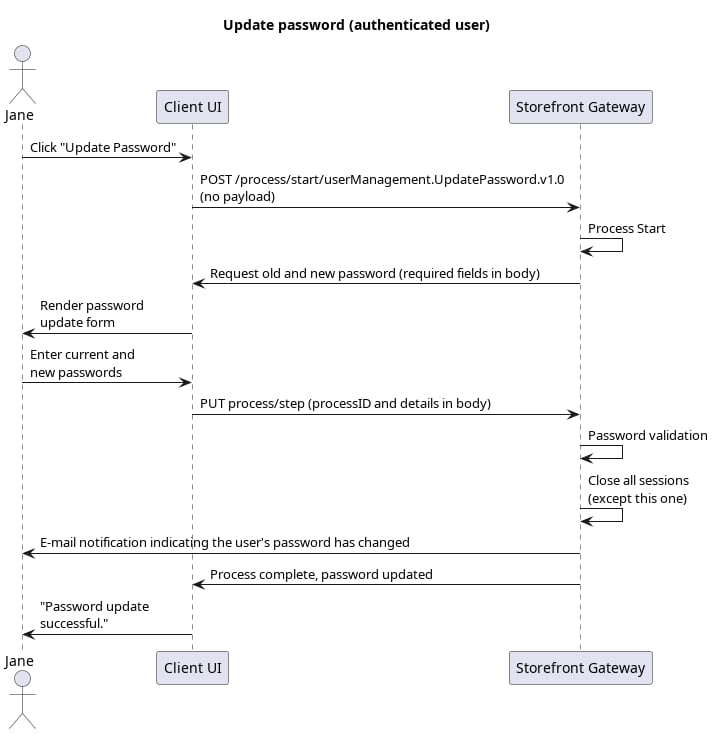
This is the standard user case delivered by the [Update Password Process](c_updatePassword) .
An authenticated user replaces their existing password with a new one.
 ## Initial Request
Your client calls the [Process Start](c_processStart) API to initialize the Process:
```
**REQUEST - POST https://\{your.url\}/process/start/userManagement.UpdatePassword.v1.0**
```
## Response: Prompt to select authN ID
Storefront Gateway responds with a request to provide both the user's current password and their desired new password:
```
**RESPONSE - body**
{
"processId": "8e32c1b6-f9f2-4cb7-9885-55ba89eeddca",
"processName": "userManagement.UpdatePassword.v1.0",
"displayMessage": "Please input required information",
"parameters": {
"oldPassword": "String",
"newPassword": "String"
},
"stepName": "PasswordPrompt",
"lastStep": false
}
```
**Note:** Entering the current password proves/validates the current user's identity (as opposed to another individual attempting to hijack the end user's profile).
| `processId` | Unique identifier for the current instance of this Process. |
| - | - |
| `processName` | Full name of the Process, including the category and version number. |
| `stepName` | Name of the specific step that the Process is currently on. |
| `lastStep` | Boolean that indicates whether or not this was the last step in the Process. |
| `displayMessage` | Optional message that the UI can display to the user. |
| `parameters` | Object that specifies the info this Process requires to continue its task. |
| `oldPassword` | The user's current password, used as verification the user themselves are trying to modify their password. |
| `newPassword` | The desired new password. |
| Tip: Ask for the new password twice | |
| ----------------------------------- | |
| Storefront Gateway does not require the user to provide their new desired password twice. However, as a best practice, your UI should implement this logic before passing the new credential back to the Process. This can help the user avoid making a mistake before the new password is set. | |
## Final Request: Provide new password
The user provides their old and new credentials, and the client passes that information to Storefront Gateway with the [Process Step](c_processStep) API:
```
**REQUEST - PUT https://\{your.url\}/process/step**
{
"processId": "8e32c1b6-f9f2-4cb7-9885-55ba89eeddca",
"parameters": {
"oldPassword": "L3tm3inplease",
"newPassword": "thi5i54Sup3rS3cur3p455w0rd"
}
}
```
| `processId` | Unique identifier for the current instance of this Process. |
| - | - |
| `parameters` | Object that contains the data that was requested in the previous Process response. |
| `oldPassword` | The user's current password, supplied by the user |
| `newPassword` | The desired new password, supplied by the user |
## Process Complete
Storefront Gateway saves the new password, and the Process ends. The user must now use the new password set whenever they are prompted to provide it.
```
**RESPONSE - body**
{
"processId": "8e32c1b6-f9f2-4cb7-9885-55ba89eeddca",
"processName": "userManagement.UpdatePassword.v1.0",
"lastStep": true
}
```
| `processId` | Unique identifier for the current instance of this Process. |
| - | - |
| `processName` | Full name of the Process, including the category and version number. |
| `lastStep` | Boolean that indicates whether or not this was the last step in the Process. |
| **Parent topic:**[Update Password Process](c_updatePassword) | |
This documentation is built and hosted on [Mintlify](https://mintlify.com), a developer documentation platform.
## Initial Request
Your client calls the [Process Start](c_processStart) API to initialize the Process:
```
**REQUEST - POST https://\{your.url\}/process/start/userManagement.UpdatePassword.v1.0**
```
## Response: Prompt to select authN ID
Storefront Gateway responds with a request to provide both the user's current password and their desired new password:
```
**RESPONSE - body**
{
"processId": "8e32c1b6-f9f2-4cb7-9885-55ba89eeddca",
"processName": "userManagement.UpdatePassword.v1.0",
"displayMessage": "Please input required information",
"parameters": {
"oldPassword": "String",
"newPassword": "String"
},
"stepName": "PasswordPrompt",
"lastStep": false
}
```
**Note:** Entering the current password proves/validates the current user's identity (as opposed to another individual attempting to hijack the end user's profile).
| `processId` | Unique identifier for the current instance of this Process. |
| - | - |
| `processName` | Full name of the Process, including the category and version number. |
| `stepName` | Name of the specific step that the Process is currently on. |
| `lastStep` | Boolean that indicates whether or not this was the last step in the Process. |
| `displayMessage` | Optional message that the UI can display to the user. |
| `parameters` | Object that specifies the info this Process requires to continue its task. |
| `oldPassword` | The user's current password, used as verification the user themselves are trying to modify their password. |
| `newPassword` | The desired new password. |
| Tip: Ask for the new password twice | |
| ----------------------------------- | |
| Storefront Gateway does not require the user to provide their new desired password twice. However, as a best practice, your UI should implement this logic before passing the new credential back to the Process. This can help the user avoid making a mistake before the new password is set. | |
## Final Request: Provide new password
The user provides their old and new credentials, and the client passes that information to Storefront Gateway with the [Process Step](c_processStep) API:
```
**REQUEST - PUT https://\{your.url\}/process/step**
{
"processId": "8e32c1b6-f9f2-4cb7-9885-55ba89eeddca",
"parameters": {
"oldPassword": "L3tm3inplease",
"newPassword": "thi5i54Sup3rS3cur3p455w0rd"
}
}
```
| `processId` | Unique identifier for the current instance of this Process. |
| - | - |
| `parameters` | Object that contains the data that was requested in the previous Process response. |
| `oldPassword` | The user's current password, supplied by the user |
| `newPassword` | The desired new password, supplied by the user |
## Process Complete
Storefront Gateway saves the new password, and the Process ends. The user must now use the new password set whenever they are prompted to provide it.
```
**RESPONSE - body**
{
"processId": "8e32c1b6-f9f2-4cb7-9885-55ba89eeddca",
"processName": "userManagement.UpdatePassword.v1.0",
"lastStep": true
}
```
| `processId` | Unique identifier for the current instance of this Process. |
| - | - |
| `processName` | Full name of the Process, including the category and version number. |
| `lastStep` | Boolean that indicates whether or not this was the last step in the Process. |
| **Parent topic:**[Update Password Process](c_updatePassword) | |
This documentation is built and hosted on [Mintlify](https://mintlify.com), a developer documentation platform.