> ## Documentation Index
> Fetch the complete documentation index at: https://docs.m1amdocs.com/llms.txt
> Use this file to discover all available pages before exploring further.
# Manage Missed Activation Settings
In **Platform Settings** > **Activation** > **Missed Activations**, you can:
* Automatically cancel unactivated subscriptions after a specified number of days from the provisioning date.
* Configure a warning and final reminder to encourage customers to activate their subscriptions before cancellation. Notification timing is fully customizable per Merchant product.
When configured, the system sends the reminders you create to your communication platform, where you can further customize and deliver them to customers. Settings can also be tailored per Merchant to support different account needs.
These capabilities help reduce missed activations and support revenue retention.
1. Navigate to **Platform Settings** > **Activation** > **Missed Activations**.
The **Missed Activations** page appears.
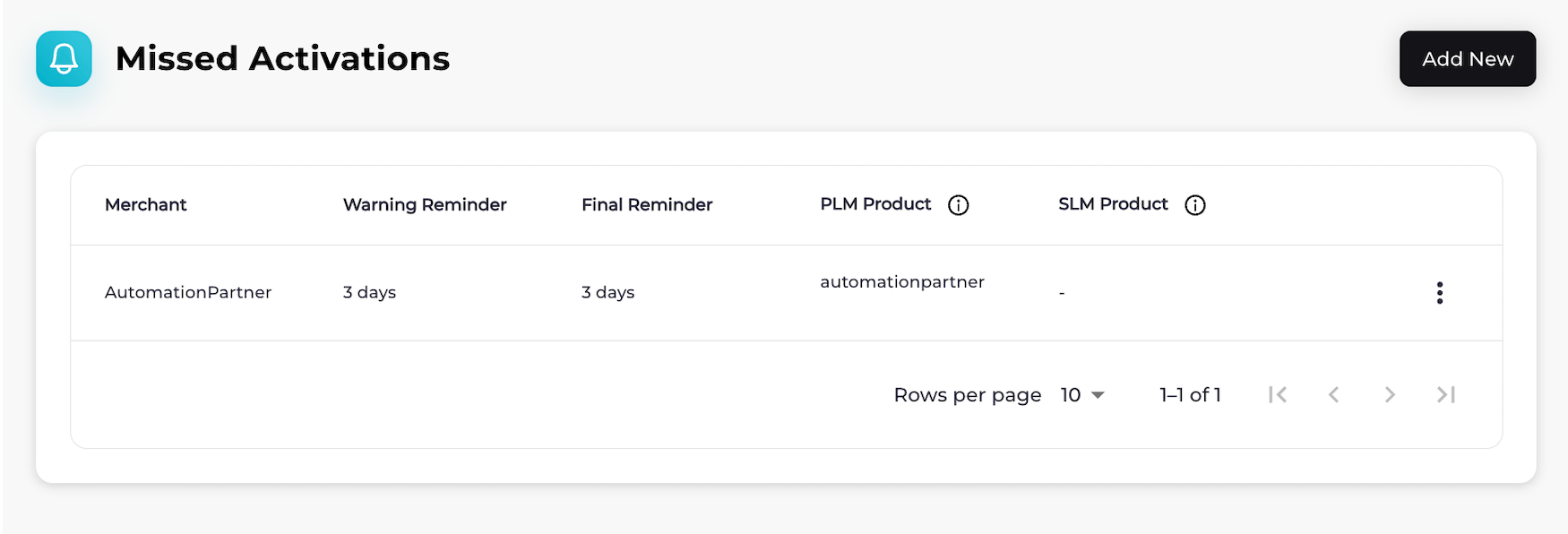 2. Choose what you'd like to do:
* To add missed activation settings for a Merchant, select **Add New**.
The **Missed Activations** page appears.
2. Choose what you'd like to do:
* To add missed activation settings for a Merchant, select **Add New**.
The **Missed Activations** page appears.
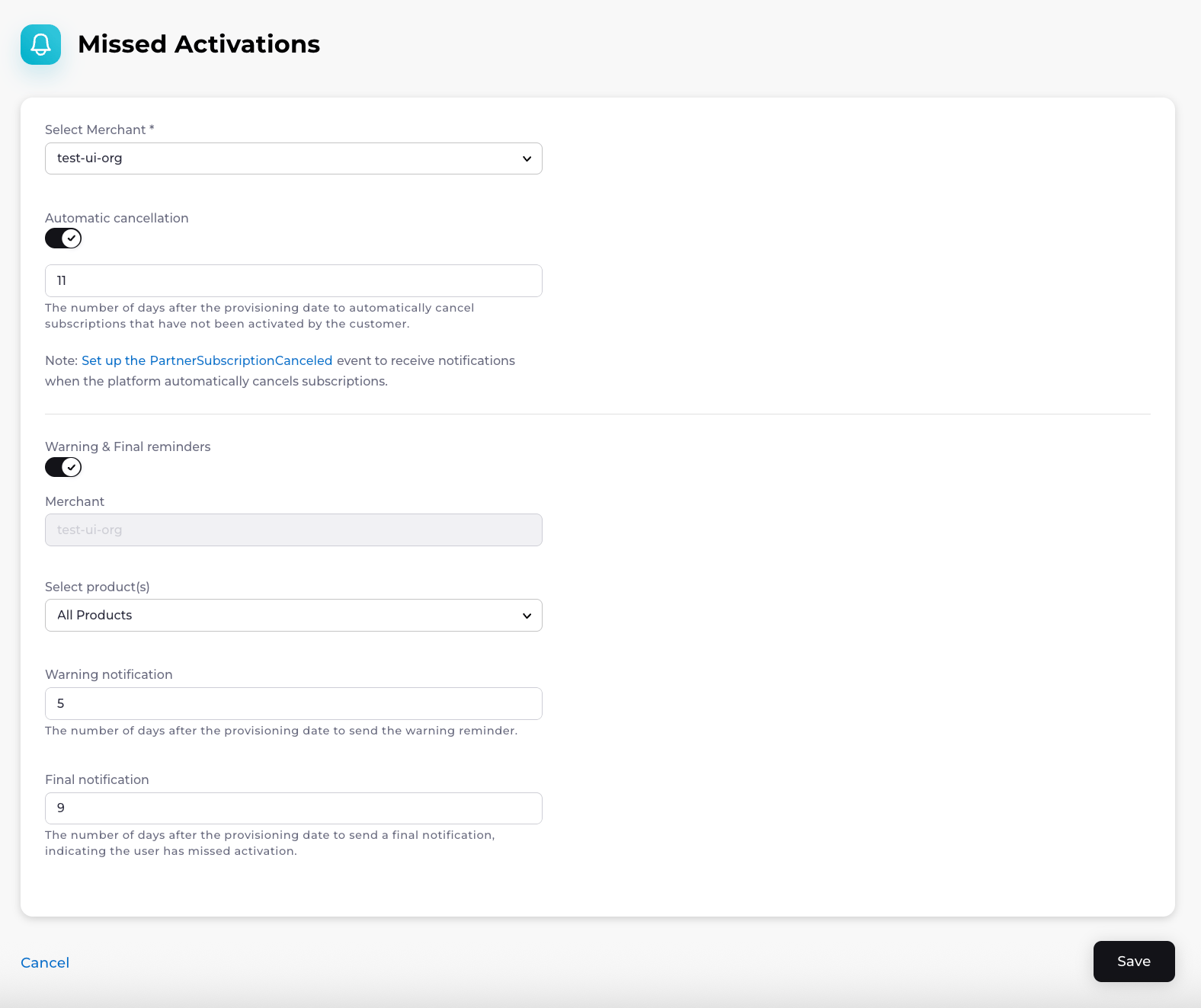 Fill in the required fields, and complete any optional fields if needed. See the table below for guidance.
Selected **Save**.
The missed activation settings for the Merchant have been successfully created.
* To edit missed activation settings for a Merchant, find the Merchant on the **Missed Activations** page and select the three dot menu on the same row. Select **Edit**.
The **Edit Missed Activations** dialog appears.
Fill in the required fields, and complete any optional fields if needed. See the table below for guidance.
Select **Save**.
Your changes to the missed activation settings have been saved.
* To view missed activation settings for a Merchant, find the Merchant on the **Missed Activations** page and select the three dot menu on the same row. Select **View**.
* To delete missed activation settings for a Merchant, find the Merchant on the **Missed Activations** page and select the three dot menu on the same row. Select **Delete**.
A **Delete Missed Activations** confirmation box appears. Confirm your choice.
The activation reminder schedule has been successfully deleted.
* **[Missed Activations Details](r_missedActivationManage#missed-activations-details)**
**Parent topic:**[Activation](activationAggregatorsAbout)
## Missed Activations Details
| Field Name | Guidance | Required or Optional |
| - | - | - |
| **Select Merchant** | Select a Merchant to apply these settings to. | Required |
### Automatic Cancellation Fields
| Field Name | Guidance | Required or Optional |
| - | - | - |
| **Automatic cancellation** | To automatically cancel subscriptions that haven't been activated within a certain number of days after provisioning:1. Turn on the **Automatic cancellation** toggle. 2. Enter the number of days after the provisioning date. Subscriptions that are not activated by the customer within this time will be automatically canceled. **Note:** [Subscribe to the PartnerSubscriptionCanceled webhook event](r_webhooksManage) to receive notifications when the platform automatically cancels subscriptions. | Optional |
### Warning & Final Reminder Fields
| Field Name | Guidance | Required or Optional |
| - | - | - |
| **Warning & final reminders** | Turn on the **Warning & Final Reminders** toggle to send reminder messages to customers who purchased the selected product(s), encouraging them to activate their subscriptions before they are canceled. | Optional |
| **Merchant** | This is the Merchant to whom these settings apply.**Note:** This field is read-only and cannot be edited. | |
| **Select product(s)** | Choose the products these reminder settings should apply to. | Optional |
| **Warning notification** | Enter the number of days after the provisioning date to send the warning reminder. | Optional |
| **Final notification** | Enter the number of days after the provisioning date to send the final notification, informing the user that they missed the activation window. | Optional |
| **Parent topic:**[Manage Missed Activation Settings](r_missedActivationManage) | | |
This documentation is built and hosted on [Mintlify](https://mintlify.com), a developer documentation platform.
Fill in the required fields, and complete any optional fields if needed. See the table below for guidance.
Selected **Save**.
The missed activation settings for the Merchant have been successfully created.
* To edit missed activation settings for a Merchant, find the Merchant on the **Missed Activations** page and select the three dot menu on the same row. Select **Edit**.
The **Edit Missed Activations** dialog appears.
Fill in the required fields, and complete any optional fields if needed. See the table below for guidance.
Select **Save**.
Your changes to the missed activation settings have been saved.
* To view missed activation settings for a Merchant, find the Merchant on the **Missed Activations** page and select the three dot menu on the same row. Select **View**.
* To delete missed activation settings for a Merchant, find the Merchant on the **Missed Activations** page and select the three dot menu on the same row. Select **Delete**.
A **Delete Missed Activations** confirmation box appears. Confirm your choice.
The activation reminder schedule has been successfully deleted.
* **[Missed Activations Details](r_missedActivationManage#missed-activations-details)**
**Parent topic:**[Activation](activationAggregatorsAbout)
## Missed Activations Details
| Field Name | Guidance | Required or Optional |
| - | - | - |
| **Select Merchant** | Select a Merchant to apply these settings to. | Required |
### Automatic Cancellation Fields
| Field Name | Guidance | Required or Optional |
| - | - | - |
| **Automatic cancellation** | To automatically cancel subscriptions that haven't been activated within a certain number of days after provisioning:1. Turn on the **Automatic cancellation** toggle. 2. Enter the number of days after the provisioning date. Subscriptions that are not activated by the customer within this time will be automatically canceled. **Note:** [Subscribe to the PartnerSubscriptionCanceled webhook event](r_webhooksManage) to receive notifications when the platform automatically cancels subscriptions. | Optional |
### Warning & Final Reminder Fields
| Field Name | Guidance | Required or Optional |
| - | - | - |
| **Warning & final reminders** | Turn on the **Warning & Final Reminders** toggle to send reminder messages to customers who purchased the selected product(s), encouraging them to activate their subscriptions before they are canceled. | Optional |
| **Merchant** | This is the Merchant to whom these settings apply.**Note:** This field is read-only and cannot be edited. | |
| **Select product(s)** | Choose the products these reminder settings should apply to. | Optional |
| **Warning notification** | Enter the number of days after the provisioning date to send the warning reminder. | Optional |
| **Final notification** | Enter the number of days after the provisioning date to send the final notification, informing the user that they missed the activation window. | Optional |
| **Parent topic:**[Manage Missed Activation Settings](r_missedActivationManage) | | |
This documentation is built and hosted on [Mintlify](https://mintlify.com), a developer documentation platform.