Account
The account is the end customer account which is referenced in the Reseller (Service Provider) system. It holds the terms of a relationship for the Merchant services that has been entitled to a customer.Admin
The Admin is the specific individual associated with an organization. The Admin will be in charge of creating and maintaining the data entities associated with the Merchant.Agreement
The agreement is the official contract between a Reseller (Service Provider) and a Merchant organization that defines the terms of the settlement when a customer buys a Merchant’s product.Entitlement
An entitlement represents ownership of a Merchant’s product by an end customer in a Platform-managed flow. An entitlement is granted when an end customer purchases a subscription from the Reseller’s (Service Provider’s) digital store.Organization
The organization is the business group (or sub-entity), which can be either the Merchant or Reseller (Service Provider).Partnership
The partnership consists of a Reseller (Service Provider) and a Merchant that agree to do business together in MarketONE.Partner Subscription
A partner subscription (represented by thepartnerSubscription object in the MarketONE OpenAPI) is MarketONE’s representation of a customer’s subscription to a Merchant’s service. When a customer buys a Merchant’s product in a Reseller’s (Service Provider’s) store, a partnerSubscription object is created in MarketONE to represent the subscription entitlement.
The Merchant and Reseller use the partner subscription resource to communicate. In API requests, the partnerSubscription object informs the Merchant about updates made by the Reseller to the subscription, and vice versa.
Within MarketONE, the partner subscription resource is identified by partnerSubscriptionId and represented by a partnerSubscription object.
Partner Subscription: A State Machine
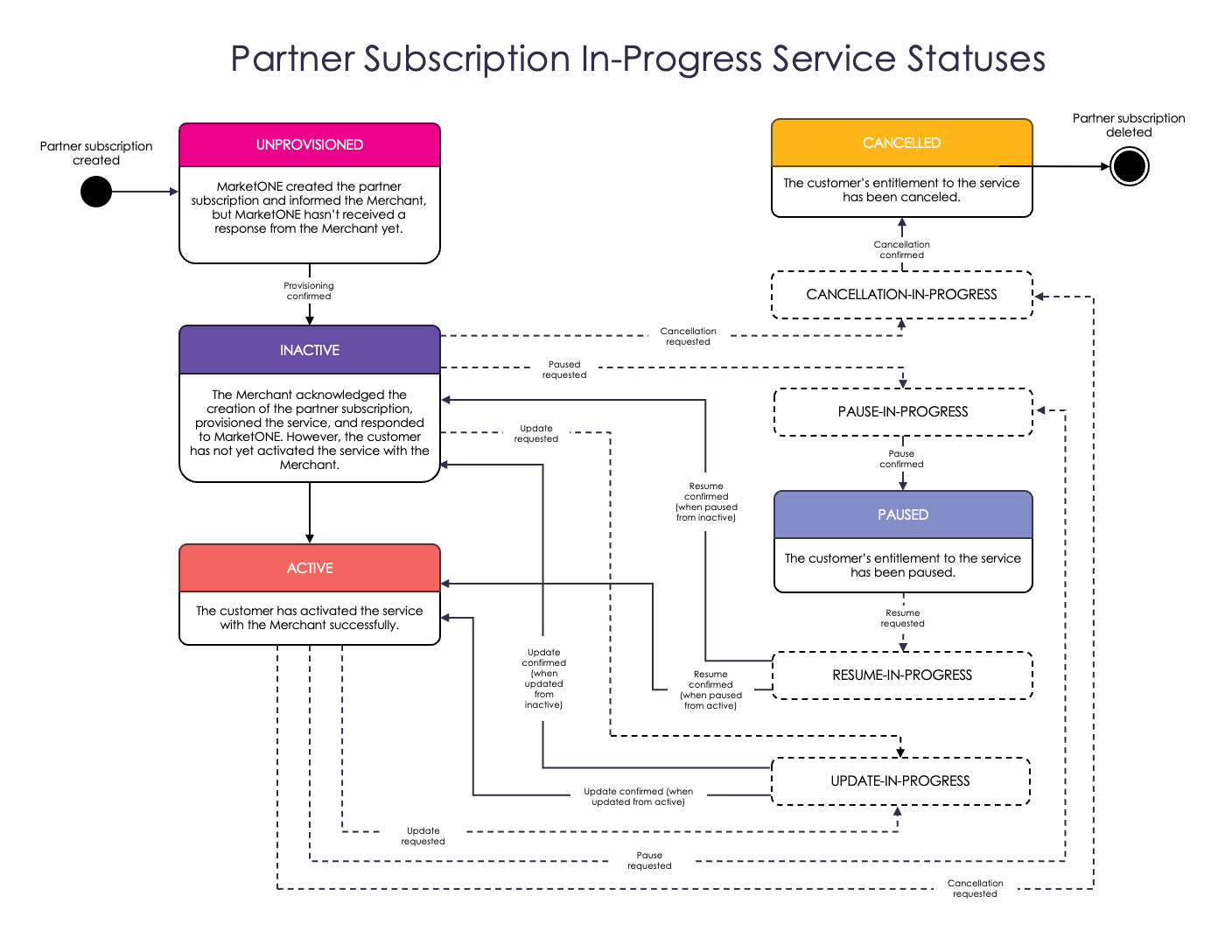
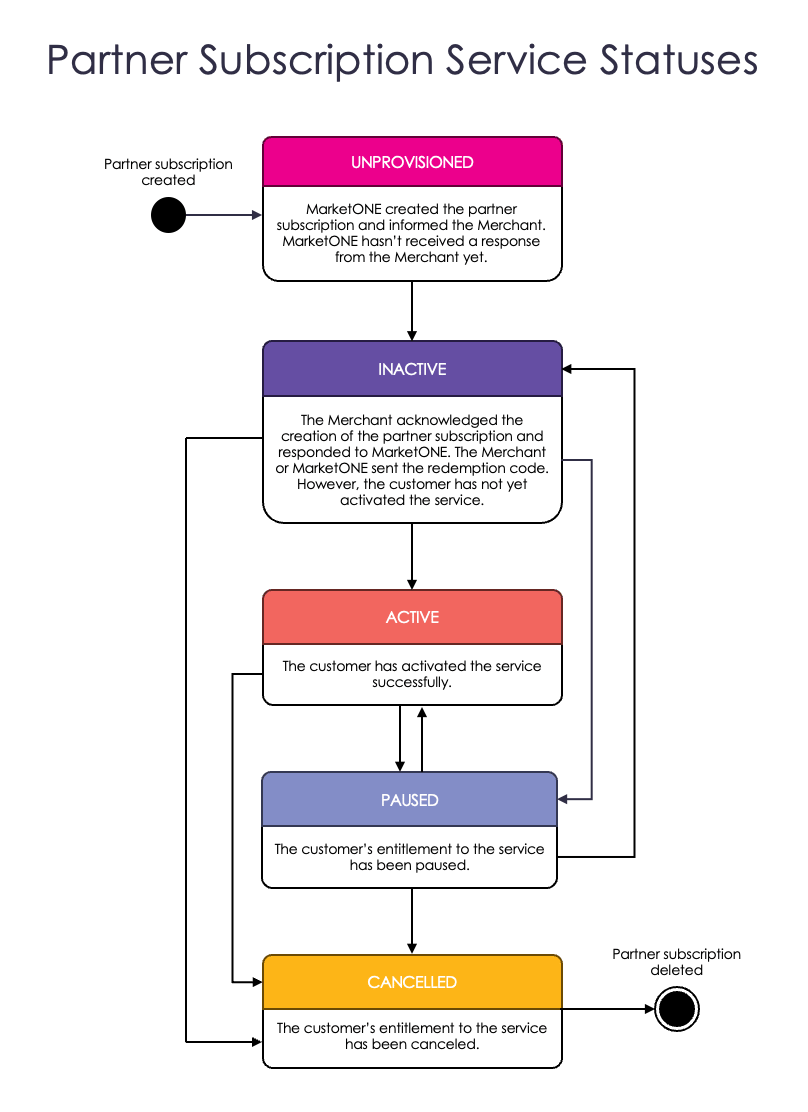
MarketONE simplifies the management of bundled Platform-managed subscriptions by tracking the flow status in a state machine. A state machine is a model that defines an entity’s various states and the transitions that occur based on different actions or events.
Merchants and Resellers (Service Providers) are asynchronously notified of changes to the partner subscription’s service status by events sent to their webhooks (or notification endpoints, which only apply to Resellers). Events include the partnerSubscription object which shows the partner subscription’s latest serviceStatus.
For example:
- UNPROVISIONED: The initial
serviceStatusfor every partner subscription isUNPROVISIONED. At the Reseller’s (Service Provider’s) instruction, MarketONE created the partner subscription and informed the Merchant. MarketONE hasn’t received a response from the Merchant yet. Merchants won’t see this status, but Resellers may view it until the Merchant responds.- Next steps: The Merchant needs to acknowledge the subscription, signaling they are ready to process it. Until then, the subscription remains
UNPROVISIONED.
- Next steps: The Merchant needs to acknowledge the subscription, signaling they are ready to process it. Until then, the subscription remains
- INACTIVE: The Merchant acknowledged the creation of the partner subscription and responded to MarketONE. The Merchant or MarketONE generated and sent the redemption code. However, the customer has not yet activated the service.
- Next steps: The customer needs to activate their subscription. This typically involves following a link to the Merchant’s site and providing an activation code.
- ACTIVE: The customer has successfully activated the service. The customer now has access to the service as the Reseller originally intended. Both the Reseller and Merchant can now consider the subscription provisioned and active.
- PAUSED: The customer’s entitlement to the service has been paused. This can occur for various reasons, such as billing issues or the customer choosing to pause their subscription (if the Merchant supports this feature). When the service is paused, the customer should not be able to access subscription features. When the reason for pausing the partner subscription is resolved, the partner subscription will go back to its previous status.
- Next steps: Service can typically be resumed once the payment is retried and successfully processed or upon the user’s request for reactivation.
- CANCELLED: The partner subscription and the customer’s entitlement to the service have been canceled. The customer’s access to the Merchant’s service has ended. Cancellation may result from a customer payment failure, the subscription reaching the end of its cycle without renewal, or a Reseller canceling the subscription, on behalf of the customer, through an API request to MarketONE. When the partner subscription has been canceled, it can’t be renewed. A new subscription would need to be created. For more information on cancellation scenarios, see Canceled Subscriptions and Reason Codes.
Common Customer Scenarios
- User activation delayed: If a customer doesn’t activate their service promptly, the partner subscription stays
INACTIVE. The Reseller (Service Provider) or Merchant can send a reminder or offer support to complete the activation. - Paused state due to billing: When billing fails, an
ACTIVEpartner subscription might move toPAUSED. Customers need to resolve the billing issue to regain access. - Cancellation and what it means: Cancellation might occur because it was initiated by the customer or by system issues such as prolonged billing failures. Once
CANCELLED, the partner subscription cannot be restored. A new one must be created to regain access.
UPDATE-IN-PROGRESS. These in-progress statuses indicate an action needs to be taken by one party. These statuses often occur quickly and may not always be visible to Merchants and Resellers.