

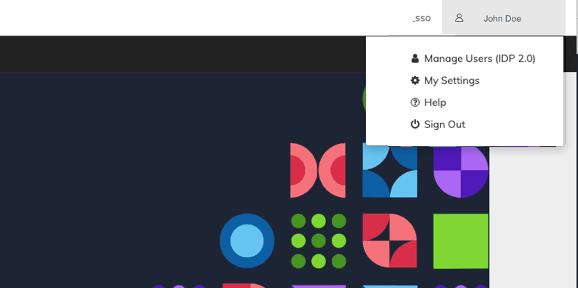
- Configure My Settings: Your personal account area, which provides customizable settings for your account.
- Manage Users: Admins (Super User) can access User Management in the IDP console.
- In My Settings area, request a new Password for existing Resellers (Service Providers) or access IDP to change your sign in credentials.
- Help: Access the full online help guide for contextual guidance within the portal. The online help opens in a new tab.
- Sign out: Leave the Portal.
- Portal My Settings
Your personal account area, which provides customizable settings for your account. - User Sign In - IDP
Amdocs products are built to keep data secure and compliant and meet Payment Card Industry (PCI) SSAE-18 SOC 1 Type 2 and SOC 2 Type 2 requirements and ISO 27001 security requirements. Accordingly, Commerce Engine Portal users sign in to the Portal via the IDP (Identity Provider) app. Users define their own password and can reset it within the simple-to-use Identity Provider app. - External User Sign In
Amdocs products are built to keep data secure and compliant and meet Payment Card Industry (PCI) security requirements. Your organization uses an external identity management system for authentication and log in to the Commerce Engine Portal. - Portal Password
Portal users are assigned a randomly generated password that meet Payment Card Industry (PCI) SSAE-18 SOC 1 Type 2 and SOC 2 Type 2 requirements and ISO 27001 security requirements. The Portal provides a password of at least 8 characters and strong Password complexity. Users are blocked after 5 invalid access attempts.