

- Make sure you’ve created a Product and Billing Plan first.
- To apply eligibility rules, configure the relevant fields in the Custom Campaign Data section. For information about the fields, see the Custom Campaign Data table below. For information about configuring eligibility rules, see Configuring Eligibility Rules.
- You can create a dedicated Campaign for each Product, or reuse a single Campaign across multiple Products, depending on your use case.
- Only one Campaign should apply to a Product at a time.
-
Select your starting point from the following options:
- To create a new Campaign, click the + New button and select Campaign.
- To clone an existing Campaign, select the relevant existing campaign from Catalog > Campaigns and click Clone.
- To edit an existing inactive Campaign, select the relevant existing campaign (ID) from Catalog > Campaigns and click Edit. The Campaign page appears.
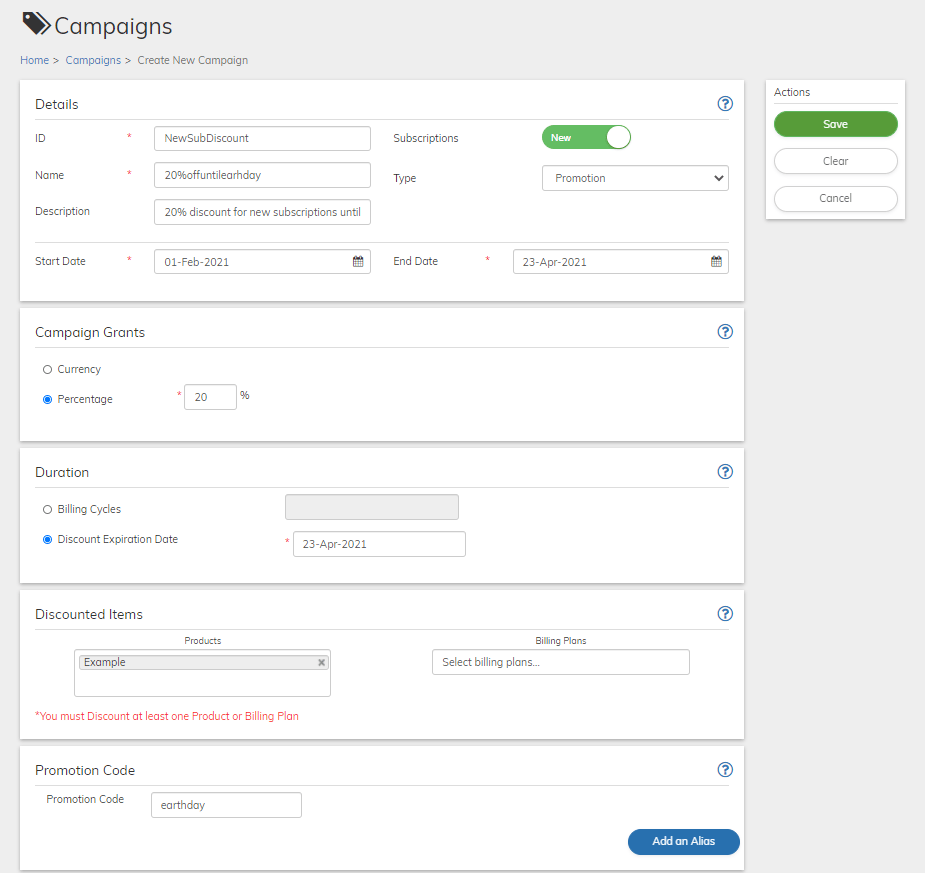
- Define the Campaign fields as needed. Refer to the tables below for guidance regarding the fields.
- When you’re done, click Save or Update. The Campaign is saved in Pending state.
- Click the Activate button that appears in the Actions panel.
- To temporarily stop the campaign, click the Deactivate button that appears in the Actions panel.
- To permanently stop the campaign, click the Cancel button that appears in the Actions panel. A confirmation message appears. Click Cancel Campaign to continue.
- Campaign Details Pane
-
Campaign Grants Pane
A Campaign Grant is the discount that you want to offer -
Campaign Duration Pane
Campaign Duration is the period of time for which the discount is granted. -
Campaign Discounted Items Pane
Discounted Items are the Product and/or Billing Plans that are eligible for the discount. -
Campaign Promotion Code Pane
A promotion code is not unique to individual users and is typically publicly available through mass distribution. You can define any alphanumeric string as your promotion code. -
Custom Campaign Data
Enter the field name and the appropriate value based on your desired campaign configuration. To apply eligibility rules, refer to the table below for field names, descriptions, value sources, and example values.
Campaign Details Pane
Campaign Grants Pane
A Campaign Grant is the discount that you want to offer| Field | Guidance | Relevancy |
|---|---|---|
| Select one of the radio buttons: | Required | |
| Currency | This allows you to offer a flat rate discount or in other words a specific discount amount. Enter the amount in the currency field. A grant can be provided in a single currency. | Optional |
By default, the US Dollars currency is displayed. If you need to change or add additional currencies, do the following:1. Click the down pointing arrow to the right of USD. A list of ISO currencies appears 2. Place your cursor in the search box and enter the letters of the desired currency 3. Select the desired currency from the list. 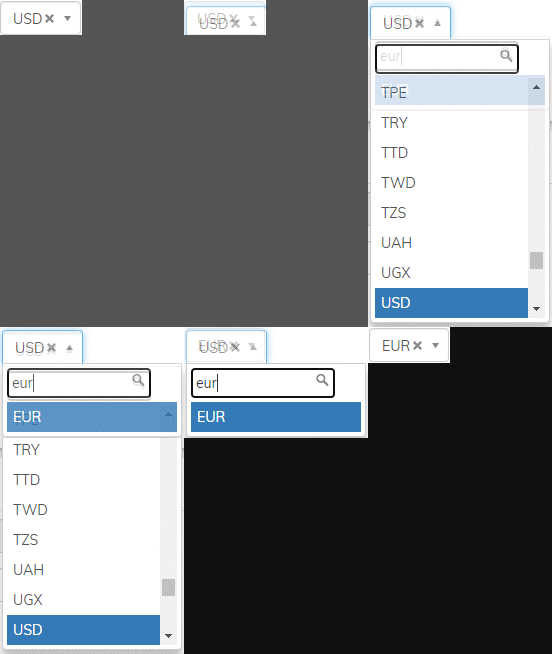 | Optional | |
| Percentage | Enter the discount percentage in the percentage field. For example, enter 10 to offer a 10% discount. | Optional |
| Field | Guidance | Relevancy |
| ----- | -------- | --------- |
| Campaign Type | The type of campaign. Either Promotion or Coupon. | View Only |
| Discount and Duration | The Currency or Percentage amount and the expiration date of the discount. | View Only |
| Fixed Period | The specific end date up to which the discount is valid. | View Only For Campaigns with a specified Discount Expiration Date |
| Rolling Period | The defined number of Billing Cycles for a discount. | View Only For Campaigns with Fixed Billing Cycles |