

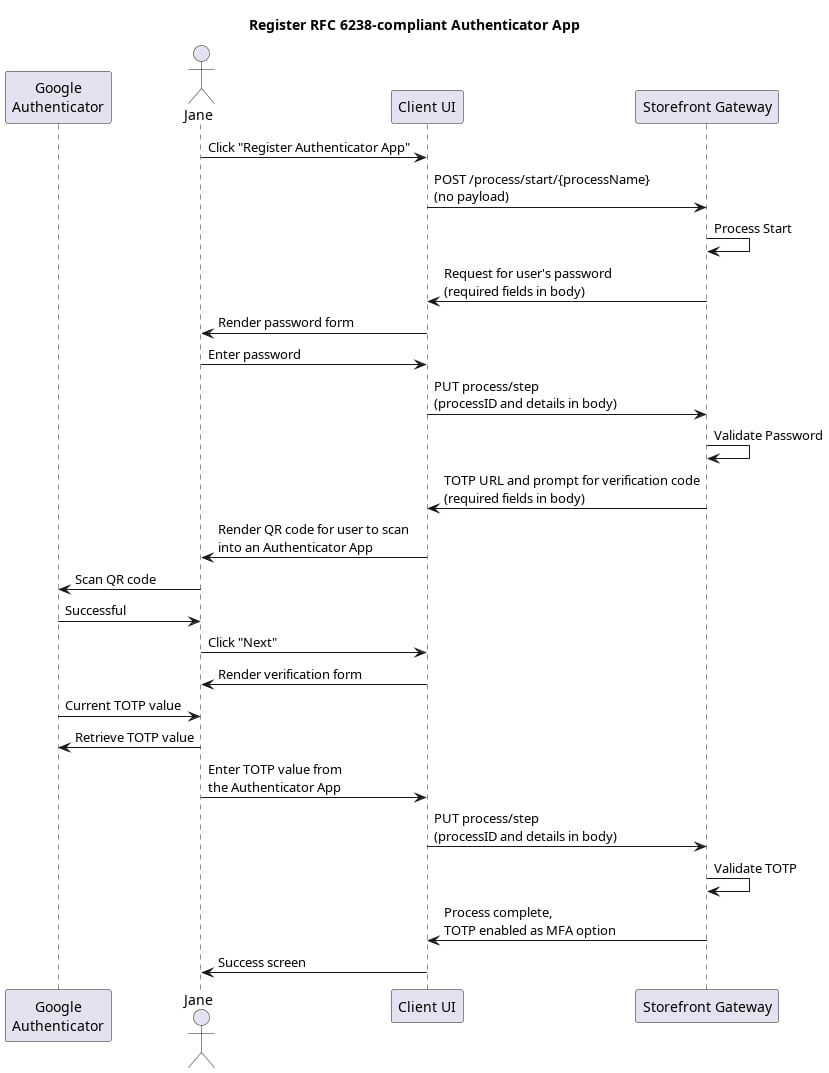
Initial Request
Your client calls the Process Start API to initialize the Process:Response: Password prompt
Storefront Gateway checks to see if the current end user has a registered password. If they do, then the Process returns a prompt for that password.Next Step: User provides password
The user enters their password, and your client passes it to Storefront Gateway in a Process Step API request:Response: QR validation
Storefront Gateway internally generates a secret key, and the Process returns a protocol-compliant URL (intended to be encoded in a Quick Response, or QR code) to your client, intended for the end user to see and for the Authenticator App to consume. The Authenticator App reads the QR code, configures the end user’s Storefront Gateway User profile within that application, and then produces a visible code for the end user. The Process response includes a request for that app-generated code:Final Request: User provides verification code
The end user retrieves the verification code from the authenticator app, and then enters it into your client UI. The client then passes the code to Storefront Gateway in a Process Step API request:Process Complete
Storefront Gateway validates the verification code, and registers the TOTP option as an attribute on the User entity. The Process returns a200 HTTP status: