

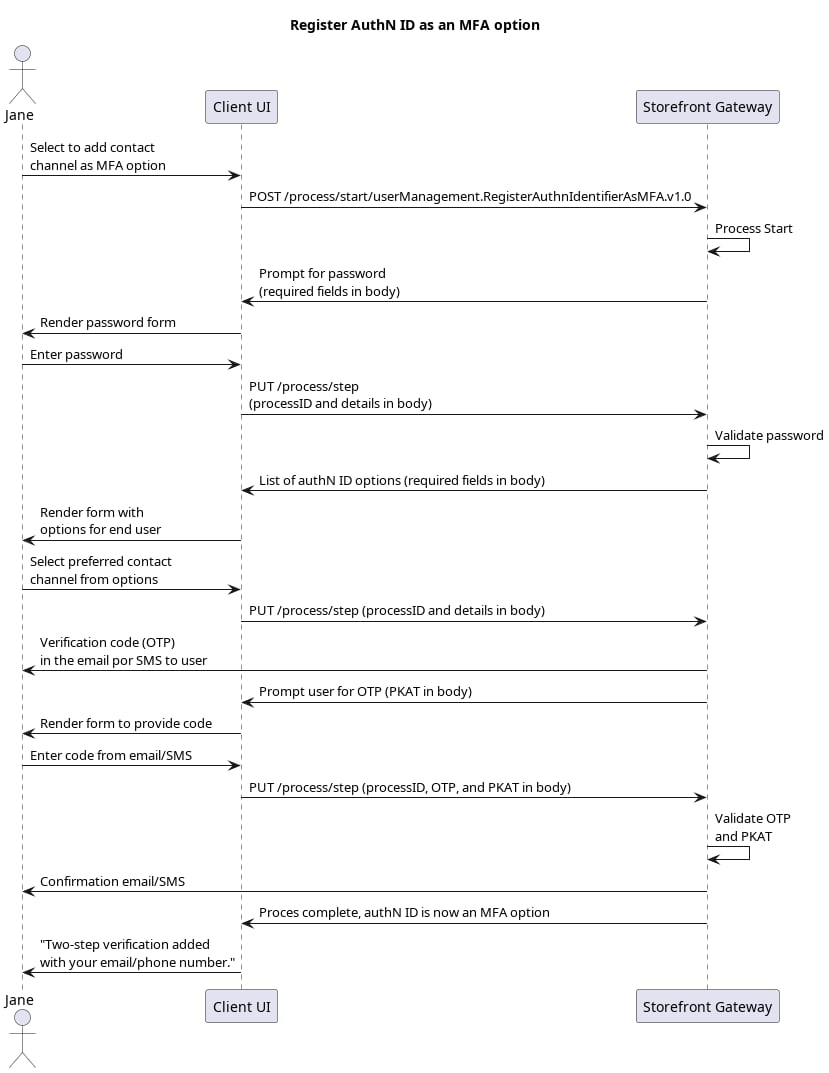
Initial Request
Your client calls the Process Start API to initialize the Process:Response: password prompt
Storefront Gateway checks to see if the current end user has a registered password. If they do, then the Process returns a prompt for that password.Next Step: User provides password
The user enters their password, and your client passes it to Storefront Gateway in a Process Step API request:Response: Prompt to select authN ID
Storefront Gateway returns an indexed list of the current end user’s applicable authN IDs:Next Request: User selection
The end user selects their desired authN ID, and your client passes that choice to Storefront Gateway in a Process Step API request:Response: Verification required
Storefront Gateway generates an action token, and sends it to the user as a One-Time Passcode (OTP) to the selected method (in an email or SMS). The Process then returns a Proof Key for Action Token (PKAT) to the client, and requests for it to be sent back along with the user-supplied OTP:Final Request: OTP verification
The end user retrieves the OTP from their email or SMS, and then supplies it to your client UI. You client then passes it (along with the PKAT) back through the Process Step API request:Process Complete
Storefront Gateway sets the selected email address or mobile number as an MFA option. On the back end, the system registers an “MFA” attribute on the selected User authN ID. The Process returns a200 HTTP status: