

activated status. Non-verifiable aliases cannot be added as an MFA option.
Process Flow
This flow describes the Process at a high level. Preconditions- The user is currently authenticated.
- The desired email address or mobile number is already a registered, verified authN ID.
- The user navigates to the Security settings (or your client UI’s equivalent) and selects to register their email or mobile for Multi-Factor Authentication. The client initializes the Process.
- Storefront Gateway prompts the client for the user’s password, and the client UI prompts the user to enter it. Note: The Process errors out if the end user does not have a password (i.e., they onboarded with a social account ).
- The user provides their password, and the client passes it back to Storefront Gateway.
- Storefront Gateway returns an indexed list of the current user’s registered, verified authN IDs, and the client renders the list for the user.
- The user makes a selection, and the client passes that selection back to Storefront Gateway.
- Storefront Gateway sets the selected email or mobile as an MFA option.
- The authN ID (email or mobile) is now an option for the user if they trigger an MFA check.
- If the user is prompted for MFA during their sign-in, then they can select this option as the target channel to receive an MFA code.
- Invalid authN ID specified by the client.
- Failed and reached the maximum number of retry attempts.
- The user does not have a password, and must first set one.
Settings
This Process currently has no relevant app settings to configure the Process API responses or Process logic/behavior. However, additional settings may be introduced over the course of future releases.User Journey Flow Diagram
This diagram illustrates the standard user journey using the Register Email or Mobile as MFA Process.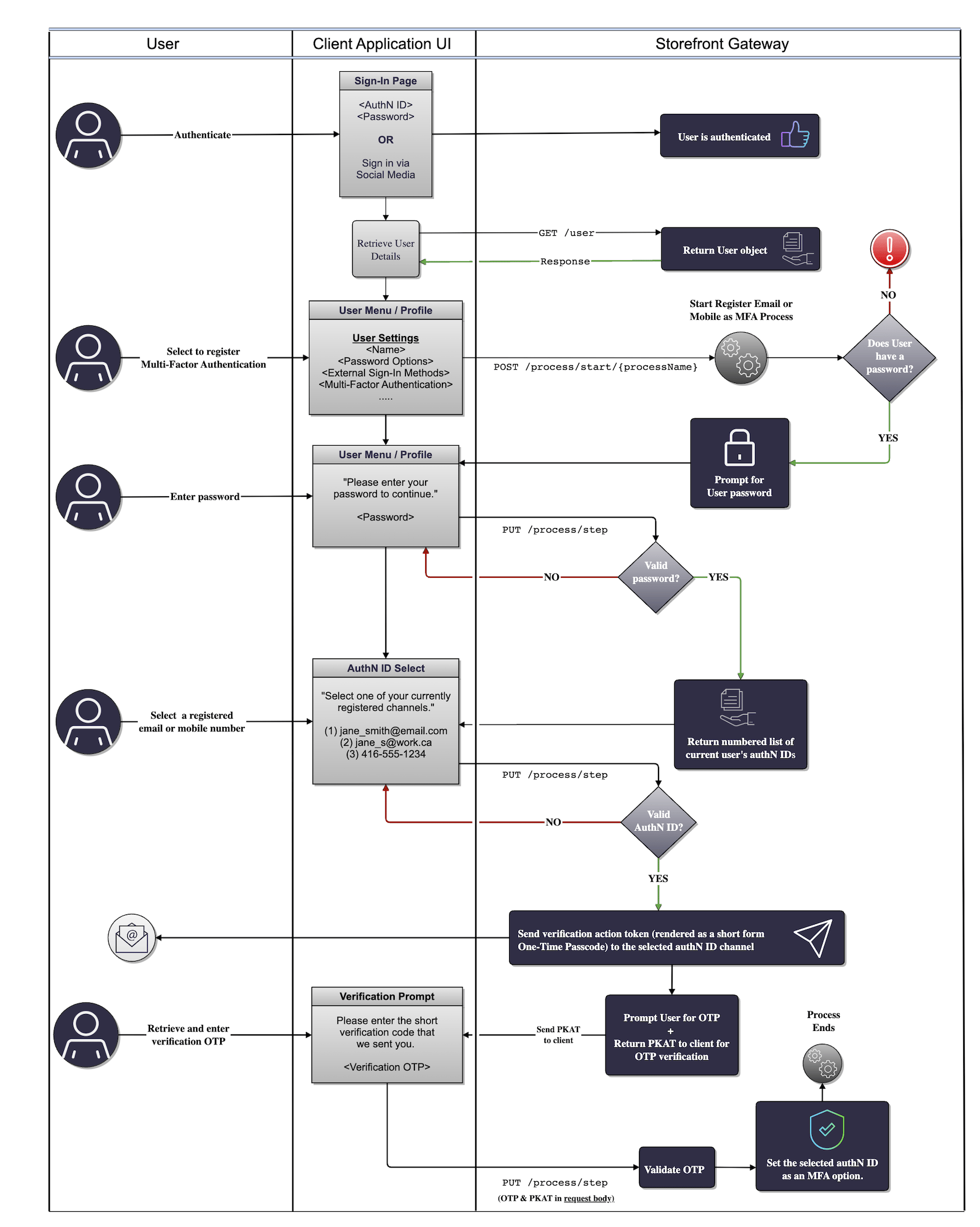
Use Cases
The following use cases provide guided API walk-throughs of this Process for client developers:- Register authN ID as MFA option
- MFA registration errors
- Register authentication identifier as MFA
- Register AuthN ID as MFA Errors