

The following color scheme is used:
- Gray color indicates terminal statuses.
- Purple arrows indicate system-performed status transition.
- Blue arrows indicate transitions that are either user-performed or system-performed.
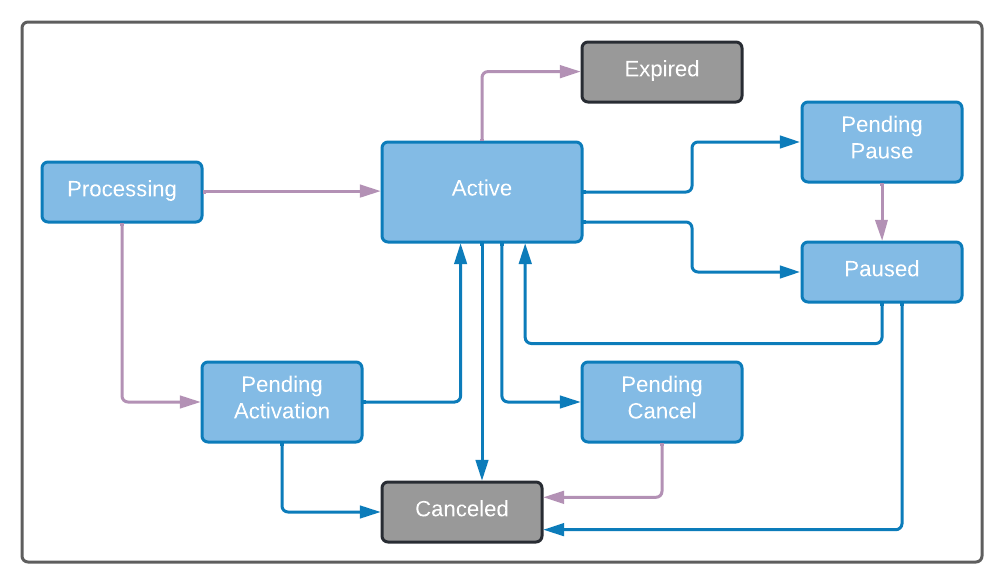
-
Subscriptions can be created in one of the following ways:
- Via Commerce Engine API, a recurring purchase sent from the Reseller’s (Service Provider’s) online store.
- Via Commerce Engine Portal created from the Account page.
- Use the Commerce Engine Portal to create a subscription or to view the subscription details. Subscriptions can start immediately or be created with a deferred start date (Pending Activation).
- When first creating a Subscription with an associated payment method, it is sent for authorization to the payment processors. The capture of the subscription can take place simultaneously. Typically, a batch capture of the authorized payments will take place at a later time. At this authorization point, customers may be required to authenticate themselves as the owners of the credit card for example as required by 3DS (PSD2) authentication.
- When editing an active subscription, you can edit subscription details without monetary effects, such as the name, or the shipping address. You can also edit details that will have a monetary effect, such as adding/removing a Subscription Item (the subscription’s product) or applying a discount campaign to the subscription. Tip: For Subscription Items change, consider whether the update is immediate and whether pro-ration is needed.
- Pause an active Subscription at any time at the beginning of the next billing cycle (default) or immediately with a reason for the pause. Subscription Pause revokes entitlements on the effective date of the pause. If no other action is taken upon the Subscription, it will remain paused for 5 years, and then cancel. Paused subscriptions can either be resumed or canceled.
- For a paused Subscription, resume the Subscription and decide whether to keep the previously used billing date (default) or make the current date the new subscription billing date.
- Cancel a Subscription at any time and define the deletion parameters from the Commerce Engine Portal.
- Use the Subscription reports, available as part of the Insights menu, for an aggregated view of subscriptions over a period.
- Learn about the projected revenue of specific product sales as part of a subscription in Projections Summary by Product Report or projections of all subscriptions in Projections Detail Report as part of the Insights menu.