

Initial Request
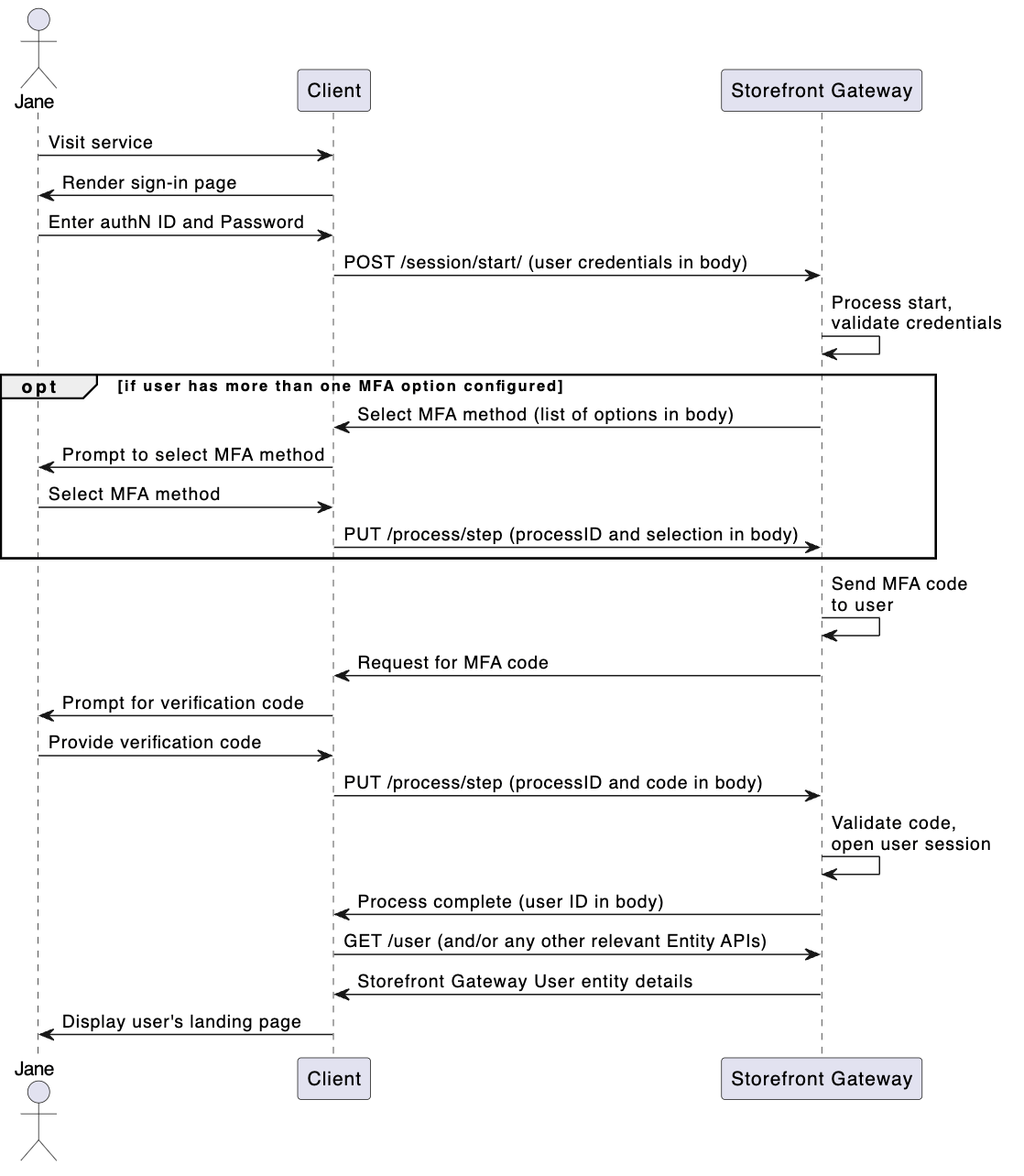
The client calls the Session Start API to initialize the Process. The user’s credentials are included in the request body:(Conditional) Response: Select the desired MFA option
If the user has configured more than one two-factor authentication method (e.g. both an e-mail address and mobile phone number, or e-mail address and authenticator app), then the Process prompts for the user to select which method they would like to use in order to obtain their verification code. The Process provides a list of available methods to ease selection. Methods are obfuscated in the response to the client, so as not to unintentionally reveal sensitive information to those who should not see it, whether it’s another individual observing the user, or an unauthorized individual attempting to gain access to a User profile. If the user has only one configured two-factor authentication method, this step is not performed by the Process and instead the Process provides the next response in this flow (the prompt to provide the verification code).Request: Provide MFA selection
The user selects their preferred MFA option, and the client passes that selection to the Process with the Process Step:Response: Prompt for MFA code
If the user provides valid credentials, the Storefront Gateway then sends the code to that option (either to the authentication app, or directly to the authN ID contact channel). The Process requests that code from the client, and provides the Proof Key for Action Token (handled transparently by a UI without user intervention). In addition to this, the Process response provides an option for the user to specify that they want to trust the current device. If the user opts to trust this device, subsequent authentication attempts from this device will not prompt for MFA. Other non-trusted devices will continue to use the MFA flow.Request: Provide MFA code
Using the Process Step API, the client submits the verification code obtained from the user, as well as the Proof Key for Action Token obtained from the previous response. If the user selects to trust this device, then the client includes that in the request as well:Process Complete
If the user provides a valid verification code the Process responds with anHTTP 200 status code, and user details in the body:
Parent topic:Authenticate User Process