

Accounts, Associations, and Groups
Storefront Gateway enables account and service sharing by way of associations between Storefront Gateway Users, Storefront Gateway Groups, and Storefront Gateway Accounts (which contain Subscriptions and Features). See the intro sections inAssociate Billing Account and Share Access to Account, Subscription, or Feature Processes for more information. But here are a few basic reminders: Customer Accounts and Services as Storefront Gateway Accounts, Subscriptions, and Features- External accounts and services are mapped to Storefront Gateway Accounts, Subscriptions, and Features (A/S/F) entitlement entities.
- Each Account owns or contains Subscriptions, and each Subscription can contains its own Features.
- Mapping of external record data to Storefront Gateway entity data is based on an integration between Storefront Gateway and the service provider’s external Billing / Operations Support System (B/OSS).
- When a user associates their account (i.e., when the Account/Subscription/Feature hierarchy are provisioned in Storefront Gateway), that account is automatically associated to the User, and to a Group in which the User is the “Group Primary.”
- Either the Storefront Gateway User selects one of their existing Groups (if any exist), or a Group is automatically created and the A/S/F is associated to it.
- The Group to which an A/S/F is associated is sometimes referred to as the “Account Group”, but it’s technically known as a User Group first a foremost.
- The Storefront Gateway User who owns the A/S/F and the Group is designated the “Group Primary” or “Primary User”
- When the Primary User invites other Storefront Gateway Users to share access to an Account or Service, they select specific Storefront Gateway Accounts, Subscriptions, or Features (not necessarily all or even more than one entity).
- The Primary User also sets permissions for the invitee User to have (either consumption, management, or both).
- When the invitee accepts, their Storefront Gateway User entity is added to (i.e., associated to) the Storefront Gateway Group and the specified Accounts, Subscriptions, or Features.
- In order for any Storefront Gateway User to have access to an Account, Subscription, or Feature, they must:
- Be associated to the Storefront Gateway Group
- Be associated directly to the Specific Account, Subscription, or Feature
- When a user signs into an application, that application can call various connect API to check and see if the user is associated to the relevant entitlement entity, and then grant them access to that service.
Process Flow
This flow describes the Process at a high level. Preconditions- The user is currently authenticated
- The user has at least one account/service associated to their User ID, and they are the Primary User (owner).
- The target Storefront Gateway User is in at least one of the current user’s Storefront Gateway Account Groups
- The current user selects to remove another Storefront Gateway User from their group.
- The UI prompts the user to select a target user.
- The client may need to leverage Storefront Gateway APIs to retrieve the relevant Group information (e.g., to what Groups is the current User associated, and what other Storefront Gateway Users are in those Groups)
- The user selects a target user to remove.
- The client must provide the selection using the target user’s Storefront Gateway User
idproperty.
- The client must provide the selection using the target user’s Storefront Gateway User
- (Conditional) If the user and the target user are in multiple Groups together, then Storefront Gateway prompts the client for a Group selection, and the UI prompts the user to select the specific Group
- (Conditional) The user specifies the Group.
- Storefront Gateway removes the target User entity from the Group.
- The target User entity is disassociated from the specified Storefront Gateway Group.
- All associations between the target Storefront Gateway User and accounts or services from the Group are removed.
- The target user is not in any of the current user’s groups.
- This current user does not have Primary or Admin permissions for the specified group.
Settings
This Process currently has no relevant settings that configure the Process API response or Process logic/behaviour. However, additional settings are coming in future releases.User Journey Diagram
This diagram illustrates the standard user journey using the Remove User from Group Process.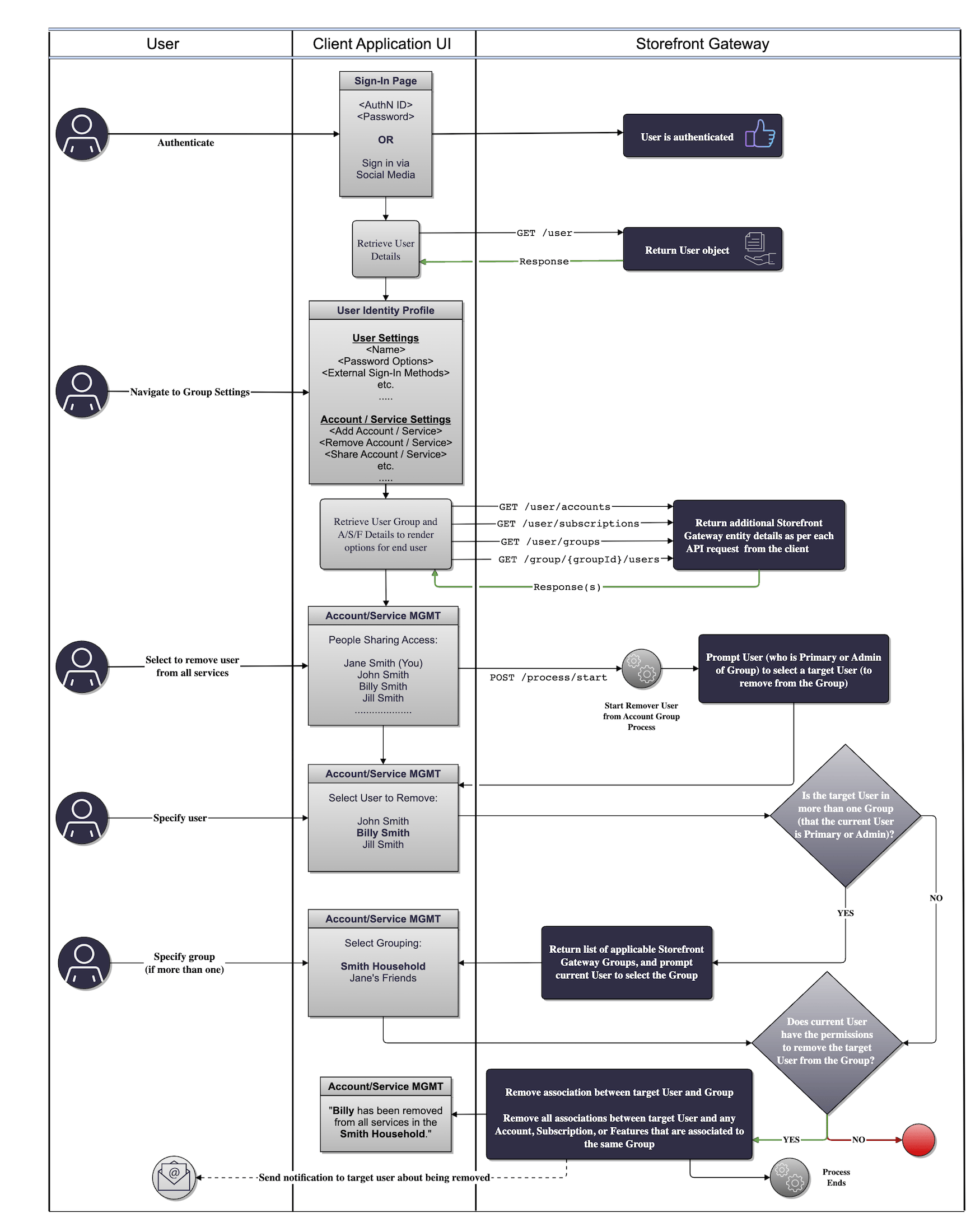
Use Cases
The following use cases provide guided API walk-throughs of this Process for client developers:- Remove user from group (single group)
- Remove user from multiple groups (multiple groups)
- Remove user errors
- Remove user from group
- Remove user from group (multiple groups)
- Remove user from group errors