

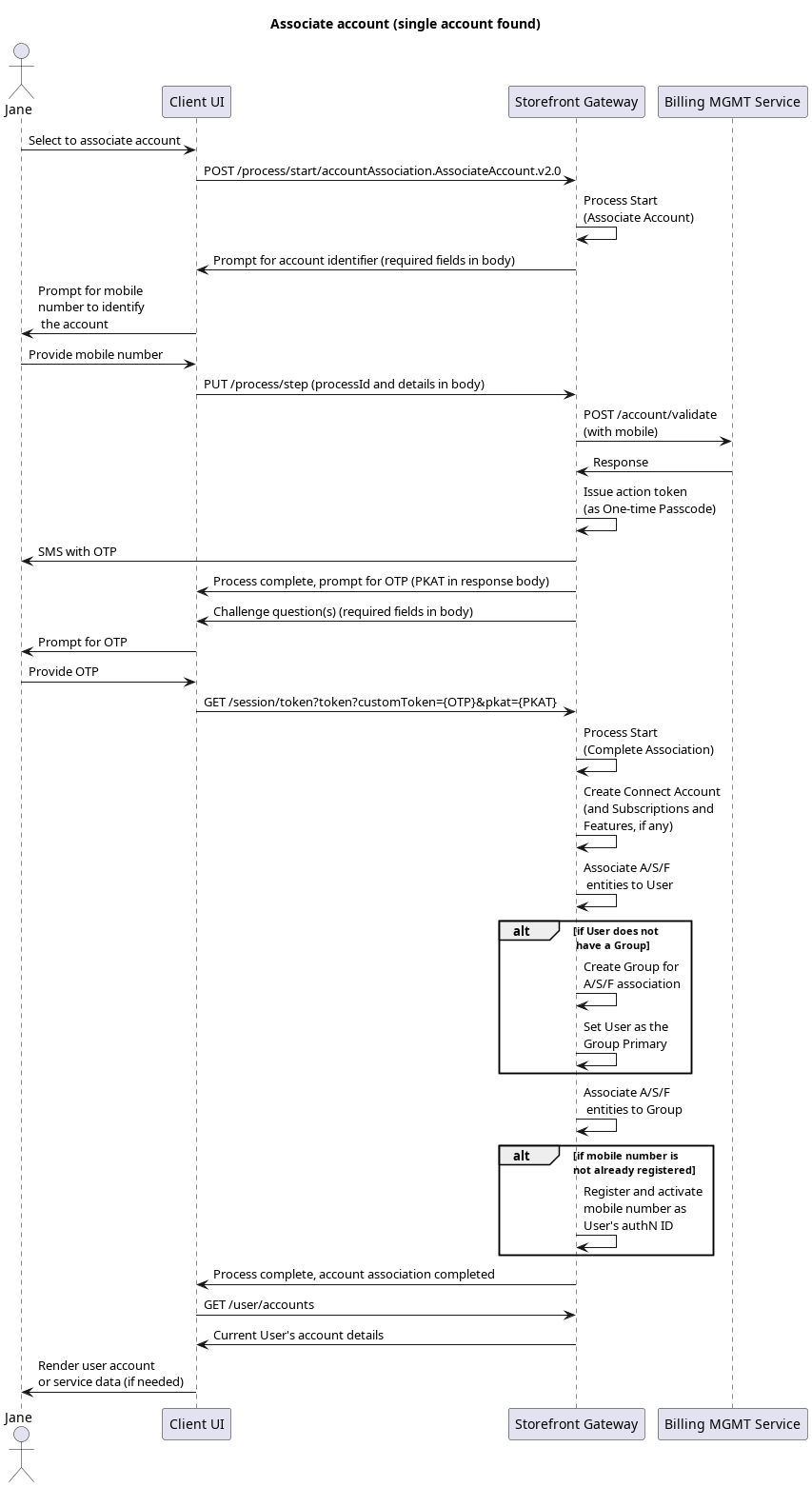
Initial Request
Your client calls the Process Start API to initialize the Process:Response: prompt for account identifier
Storefront Gateway responds with a request for the a mobile number to identify the external accoun:Next Request: account identifier
The user provides their mobile number, and the client passes that to Storefront Gateway in a Process Step API request:Response: issue OTP, return PKAT
Storefront Gateway queries the external account system with the user-supplied identifier. If the external system returns an account, Storefront Gateway then generates an action token and delivers it to the mobile number for ownership verification. This Process returns a PKAT in its final response, and then ends:GET /session/token?customToken={OTP}&pkat={pkat} API to invoke the Complete Account Association Process.
Final Request
The user retrieves the OTP from their SMS, and supplies it to the client application. The client then calls the Session Token API, and supplies both the OTP and PKAT in the request URL:Response: Process complete
The Process performs creates the Storefront Gateway Account entity (and any Storefront Gateway Subscription and Storefront Gateway Feature entities, based on the integration and mapping between Storefront Gateway and the external system), and associates it to the user’s profile (i.e., to their corresponding User entity). Additionally, Storefront Gateway will associate the Account/Subscriptions/Features hierarchy to a Storefront Gateway Group. The following conditions apply:- If the user already has a Group (of which they are the Primary): Storefront Gateway associates the A/S/F hierarchy to the Group.
- If the user does not yet have any Group: Storefront Gateway automatically creates a Group, assigns this user as the Group Primary, and associates the A/S/F hierarchy to the Group.
200 HTTPS status, and ends: