

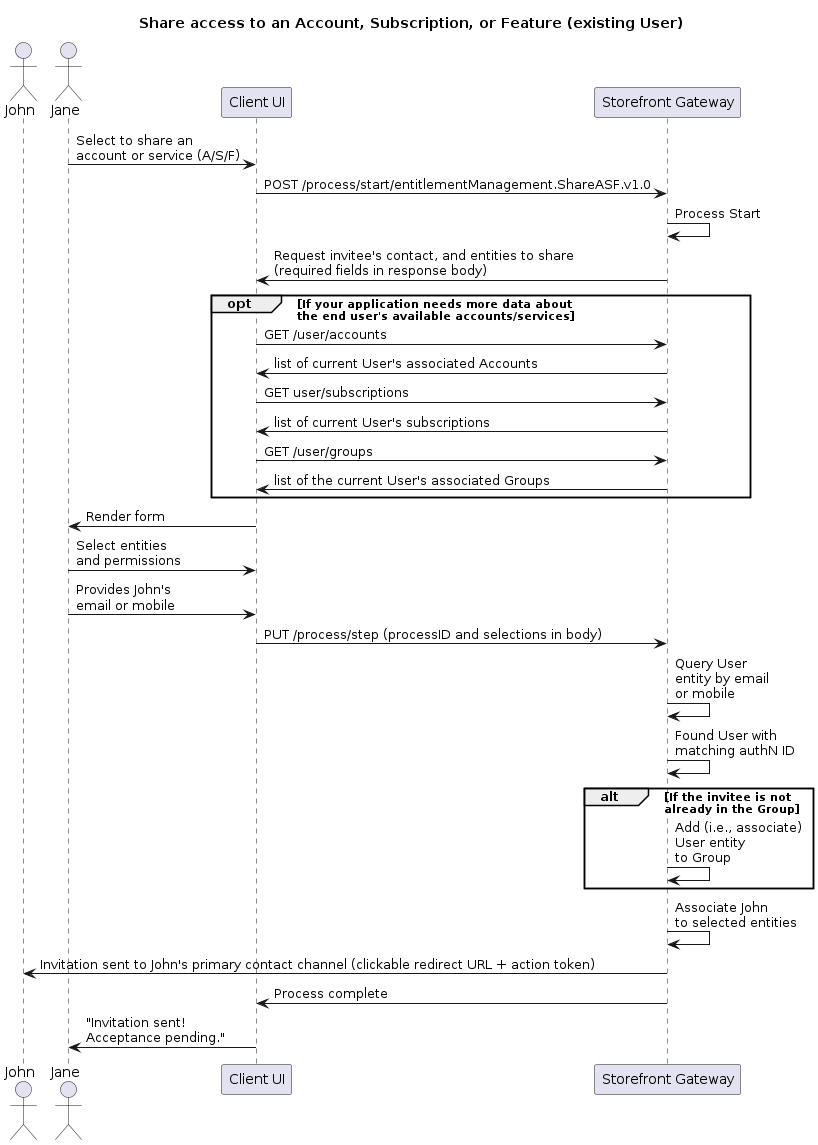
Initial Request
Your client calls the Process Start API to initialize the Process:Response: Specify the invitee, entities, and permissions
Storefront Gateway responds with a prompt to specify the invitee by their contact channel, and to specify the Account, Subscription, or Feature entitlement entities to share. The response also includes a list of applicable entity types for the client to specify:id property on each Storefront Gateway entity. As this number is likely not known to the user, the client application should leverage the relevant APIs (e.g., GET /user/accounts API, or GET /user/subscriptions), in conjunction with this Process, to retrieve additional details stored on each entity, and then render them to the user.
Note: The parameters object indicates what it needs from the client to continue its task. In this scenario, the values for each field in the object are generic and indicative of format (strings and integers), but not the specific exact values expected in the next request. In other words, the client should ignore the any sample values (e.g., “user@Example.com,” 12345, “consumption,”) in this response, and instead simply return the user’s selections (the invitee contact channel, each account or service – identified by the unique id field on the Storefront Gateway entity – and the permissions level).
Final Request: User Selections
The user provides the invitee’s email or mobile, and selects the account or service(s) that they want to share. Your client passes the user’s explicit selections to the Process using the Process Step API:entities array. For example:
Process Complete
The Process queries the Storefront Gateway datastore for the email address or mobile number provided by the user. In this scenario, the email or mobile is already registered on as an authentication identifier (authN ID) on an existing Storefront Gateway User ID. Therefore, the Storefront Gateway then performs the following back-end associations:- The invitee is added to the relevant group (i.e., the invitee’s Storefront Gateway User entity is associated to the Storefront Gateway Group entity that is used for the relevant Account/Subscription/Feature hierarchy)
- The invitee’s Storefront Gateway User ID is associated to to specified Account(s), Subscription(s), and Feature(s).
activating status until the invitee explicitly accepts or declines the invitation through the Accept or Decline Process. This ensures that the invitee cannot access any of the shared account(s) or service(s) until they explicitly accept. The following conditions apply:
- If the invitee accepts, then that Process fully activates the associations.
- If the invitee explicitly declines, Storefront Gateway removes the associations immediately.
- If the invitee simply never opens the invitation, then Storefront Gateway automatically removes the associations after a length of time.
200 HTTP status:
Next Process
Storefront Gateway sends a notification message to the invitee’s email address or mobile number. The message contains a clickable redirect URL with a Storefront Gateway Action Token appended to the end of the link. The invitee will need to click the link, and that link redirects them back to a dedicated page of your client application that takes token value directly from the URL, and calls the[GET /session/token?token=\{token\}](c_sessionToken) API. This will trigger the Accept or Decline Process, wherein the invitee can explicitly accept or decline the access being offered.
Parent topic:Share Access to an Account, Subscription, or Feature