

- Sign in to the Care console.
-
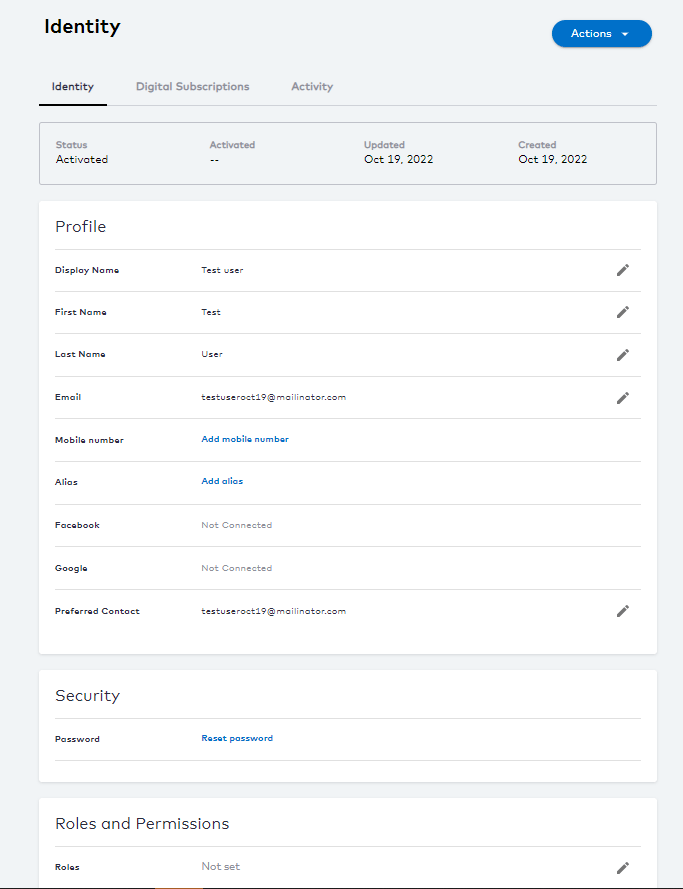
Search for the desired user. The selected user’s Identity page opens.
-
Edit the following Profile details by clicking

- Display Name - enter the user’s preferred display name.
- First Name - enter the user’s given name.
- Last Name - enter the user’s family name.
- Mobile - enter the user’s phone number for display.
- Email - enter the user’s email for display.
-
After each edit, click one of the following options:
- Save to update the changes immediately.
- Cancel to revert the changes and return to the user’s Identity page.
- Edit the Security details to reset the user password.
- To assign Roles and Permissions, see the assign user roles section.
- Authentication Identifiers
- Aliases
- Social Connections
-
Preferred Contact
The preferred contact channel is a user’s primary point of contact to receive all Storefront Gateway-driven notification messages.