

About AuthN IDs
Here are a few basic things to remember about how authentication identifiers (authN IDs) work in Storefront Gateway:- AuthN IDs are commonly referred to as usernames. AuthN IDs include emails, mobile numbers, and aliases.
- Aliases are unique, non-verifiable “nicknames” the user can register to use for authentication.
- Storefront Gateway supports the ability for a user to register, verify, and use multiple authN IDs.
- When a user registers an authN ID, it is stored on the User entity in the Storefront Gateway data store.
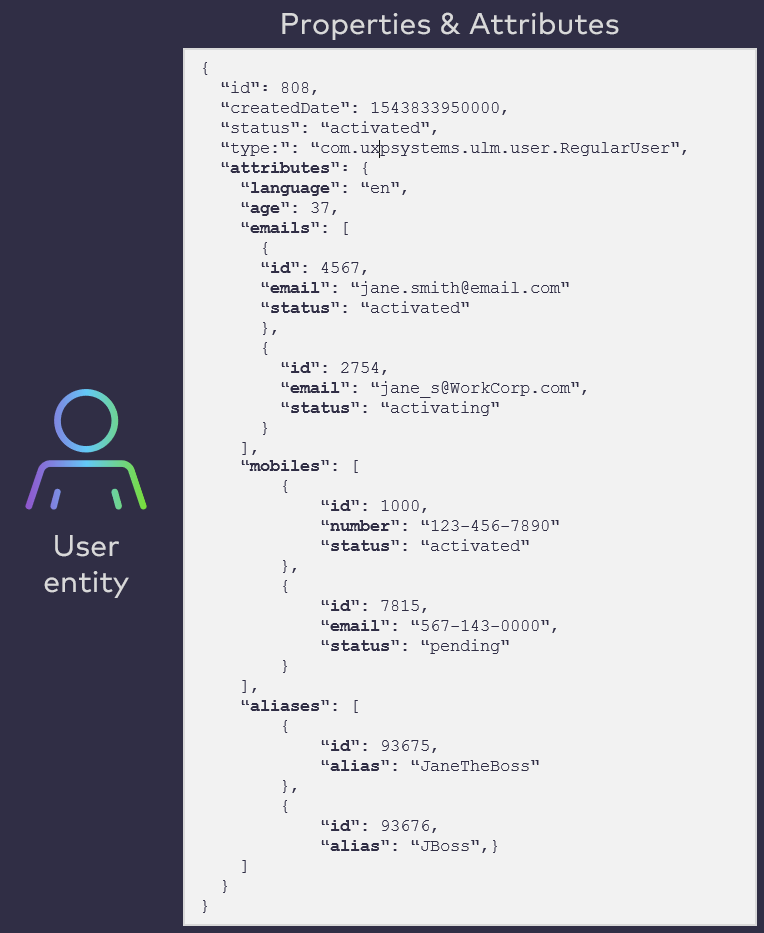
- An user’s authN IDs are stored on the Storefront Gateway User entity as attributes.
- Specifically, each authN ID type is grouped under its own type array.
- Each individual authN ID has its own unique identifying number (which the Process requires)
- See the next section for a visual aid.
- Every Storefront Gateway User requires at least one verified authN ID (the User entity will not be activated without one).
- The exception to this rule are Soft Profile Users, which are created by and “owned” by regular Users.
AuthN IDs are User Entity Attributes
Storefront Gateway is built on top of a user-centric and entitlement-specific data model comprised of Storefront Gateway data entities. Each entity type is defined by a set of default and extensible attributes. Some attributes are simple name/value pairs, and others are more complex arrays (i.e., an array objects that make up a single attribute value).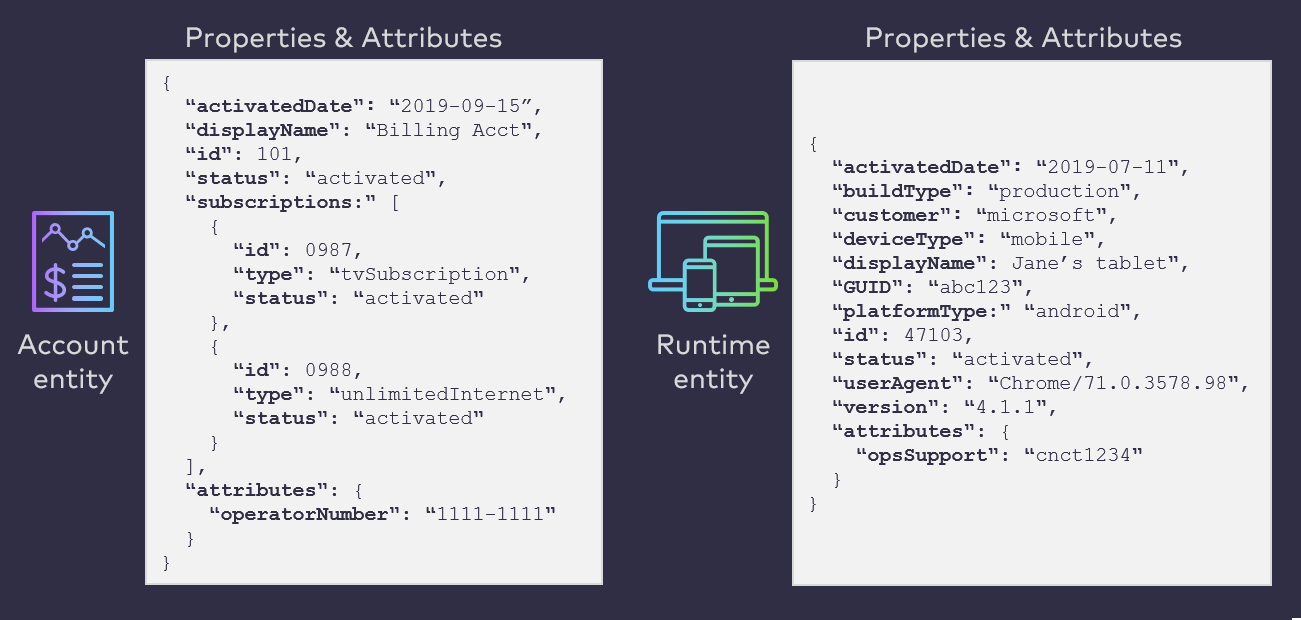
attributes array.
Process Flow
This flow describes the Remove User Attribute Process at a high level. Preconditions- The user is currently authenticated in Storefront Gateway.
- The user selects to delete an email address, mobile number, or alias.
- Once a user authenticates, the client application can retrieve a list of all the user’s currently authN IDs with the GET /user API, and then display those authN IDs to the user on the relevant UI page.
- The client application then needs to supply the selected authN ID in the format specified by the Process.
- Storefront Gateway checks the status of the selected authN ID.
- The process can remove the selected attribute without issue if:
- The authN ID has an
activatingorpendingstatus (i.e., it is unverified). - The attribute is an
activatedauthN ID, but the User entity has at least one otheractivatedauthN ID. - The attribute is the only
**activated**authN ID, but the user has at least one associated social account. - The attribute is not the user’s current preferred notification channel.
- The authN ID has an
- The process halts if the selected attribute does not meet the above criteria.
- The process can remove the selected attribute without issue if:
- (Conditional) If the selected authN ID is the user’s current preferred notification channel, then Storefront Gateway prompts the user to first set a new preferred channel. The process then ends, and the user will need to retry.
- Storefront Gateway then removes the attribute from the User ID.
- The selected email, mobile, or alias is removed.
- The user can not longer use that removed value to authenticate.
- The selected attribute is not valid for removal.
- The attribute value does not exist or was not found.
- The selected attribute is the preferred notification channel. First set a new notification channel, and then try again.
- The selected attribute is the user’s only verified authN ID.
- Multiple results found with the provided attribute value.
App Settings
This Process currently has no relevant settings to configure the Process behavior.User Journey Diagram
This flow diagram illustrates a standard Remove Email user journey using the Remove Attribute Process.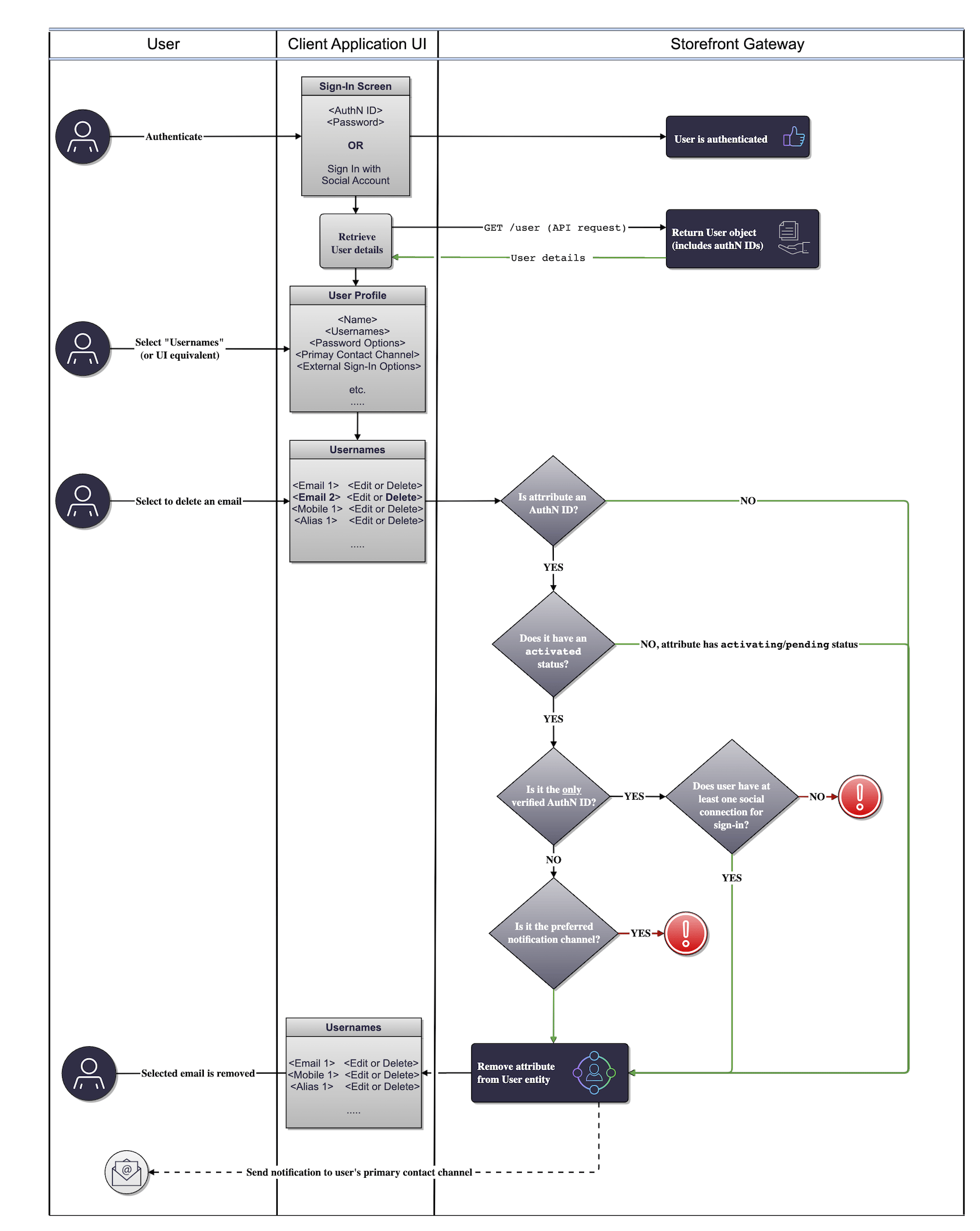
attribute level on the User entity. However, authN IDs are currently the only applicable use case at this time.
Use Cases
- Remove email address / mobile number
- Remove attribute errors
- Remove user email, mobile, or alias
- Remove AuthN ID Errors