

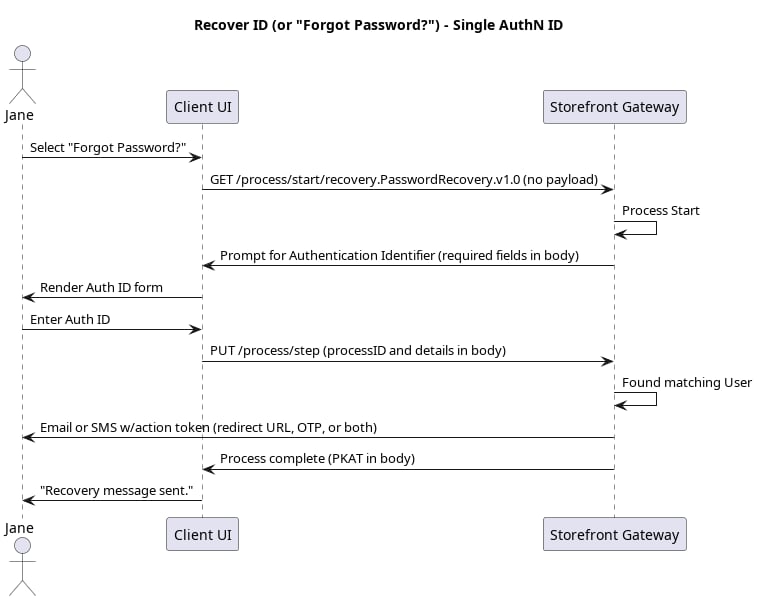
Initial Request
Your client calls the Process Start API to initialize the Process:Response
Storefront Gateway responds with a request to provide a registered (and verified) email or mobile:Next Request: User’s AuthN ID
Your client calls the Process Step API, and passes the user-supplied authN ID to the Process:Process Complete
The end user only has one authN ID, so Storefront Gateway delivers a notification to that email/mobile with either a clickable redirect URL or a short One-time Passcode (or both) which can be used to complete the recovery. The Process ends, and returns a200 HTTP status:
GET[/session/token?customToken=\{OTP\}&pkat=\{pkat\}](c_sessionToken) API to invoke the subsequent Activate User Process to complete the user onboarding.
In cases where the user is anonymous, the PKAT is required if the application wants to provide a quick token resend option on the UI, using the [PUT /session/token?pkat=\{pkat\}](c_putSessionToken) API. This method applies to cases where the user is anonymous (i.e., they are not authenticated in Storefront Gateway). However, if the user is currently authenticated in Storefront Gateway, the client application can instead invoke the Resend Verification Process for this purpose.
Parent topic:Recover ID & Reset Password Processes