

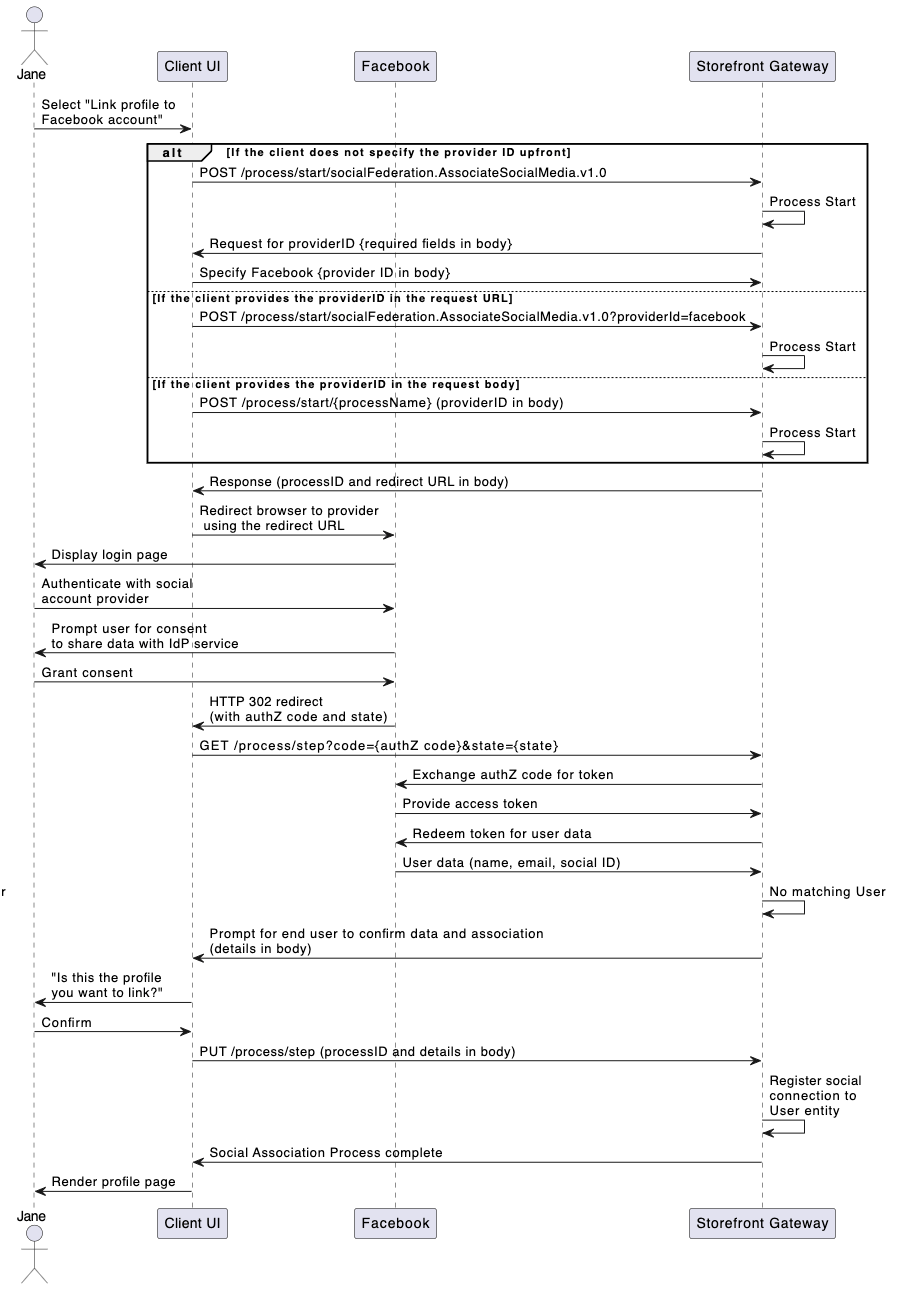
Initial Request
Your client calls the Process Start API to initialize the Process:Response
Storefront Gateway responds with a request to specify the provider from a list of available options:Next Request: Specify Provider
The client specifies the desired social provider, and passes that back to Storefront Gateway with the Process Step API:Response
Storefront Gateway responds with a redirect URL for the client to follow:Next Step: Redirect
The client expected to redirect to the URL provided in therequestUrl parameter. The user is then asked to authenticate to their social profile, and grant access for Storefront Gateway to read basic information (their name, email address, etc). The social provider then redirects back to Storefront Gateway with an authorization code, which Storefront Gateway independently verifies with the social provider back-end.
Response: Confirm Social Details
Storefront Gateway redirects back to the client, and passe along detail returned by the social provider. The Process requests for the user to confirm that this is the account that they want to associate:Final Request
The user confirms the association, and the client passes that choice to the Process with the Process Step API:Process Complete
The Process completes the association and returns a200 HTTP status:
Parent topic:Associate Social Account to User Process